Symptom
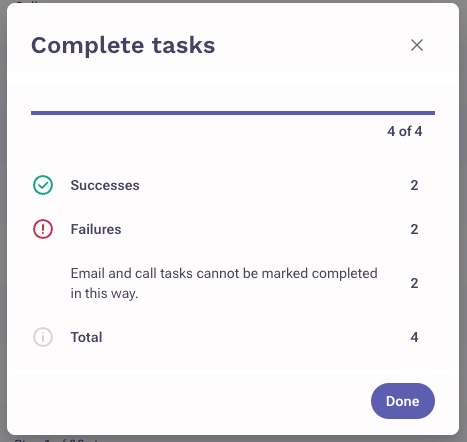
When trying to bulk/mass complete tasks, you're seeing a failure error: Email and call tasks cannot be marked completed in this way.
Applies To
-
Tasks
-
Completing multiple tasks at once
Resolution
Each tasks type/category has to be completed separately using the correct option. After filtering by the task type (action item, email, call, etc.), select the tasks that you want to bulk complete, click the ellipsis (3-dots), and choose the correct option below based on the task type:
Generic/Action and LinkedIn tasks: can be done in bulk using the Mark complete option.
Email tasks: can be done in bulk using the Send email option. Please note, we recommend only doing this if there is a ready draft already in place is ready to be sent.
Calls tasks: can be done in bulk using the Log call option.

Cause
A lot of times, users are accidentally trying to bulk complete their different tasks by choosing the Mark complete option for everything. This option is only applicable to the generic/action item tasks, and LinkedIn tasks. A different option is required for different task types.
The reason you have to bulk complete each task type separately is because they each are performed using a different execution path.
Ex. If you selected a call task and an email task to complete together (not to be confused with executing tasks to start a task workflow), you can't select both the 'log call' and 'send email' option from the ellipsis dropdown; you can only choose one option. Therefore, the system cannot 'log call' for an email task, since you have to choose the 'send email' option.
Was this article helpful?
That’s Great!
Thank you for your feedback
Sorry! We couldn't be helpful
Thank you for your feedback
Feedback sent
We appreciate your effort and will try to fix the article