Symptom
When executing LinkedIn tasks in Outreach, you're not seeing the LinkedIn UI element in the task panel. Instead, you have to click on the LinkedIn link and go directly to the LinkedIn site.
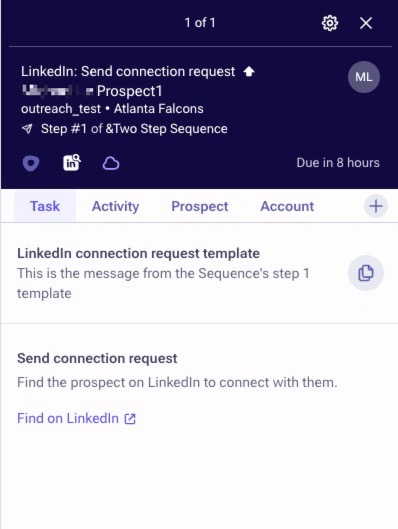
vs.
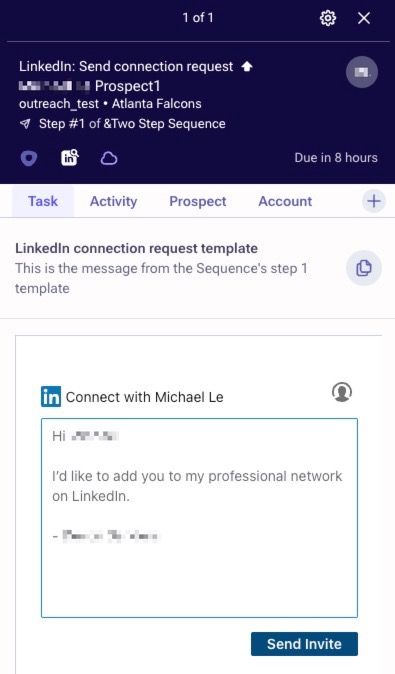
Applies To
-
Executing LinkedIn tasks in Outreach
-
LinkedIn Sales Navigator accounts
Resolution
While working on the task, click on the cogwheel in the top right of the task panel. Enable the LinkedIn Sales Navigator option, and click Save.

You can also enable this in your user's account settings page as well.
- Hover over your initials in the bottom left.
- Click Personal settings.
- Click Your account under the General section.
- Scroll down to the bottom and enable the LinkedIn Sales Navigator option.
Cause
If you do not have a LinkedIn Sales Navigator account, and/or this option is disabled, it will not show the LinkedIn UI element directly within your task panel. Instead, you will have to go directly to the prospect's LinkedIn page.
Was this article helpful?
That’s Great!
Thank you for your feedback
Sorry! We couldn't be helpful
Thank you for your feedback
Feedback sent
We appreciate your effort and will try to fix the article