Objective
The purpose of this guide is to provide guidance to Outreach users on deactivating a sequence.
Applies To
- Outreach Users
- Outreach Admins
Procedure
- Click Sequences from the left toolbar.
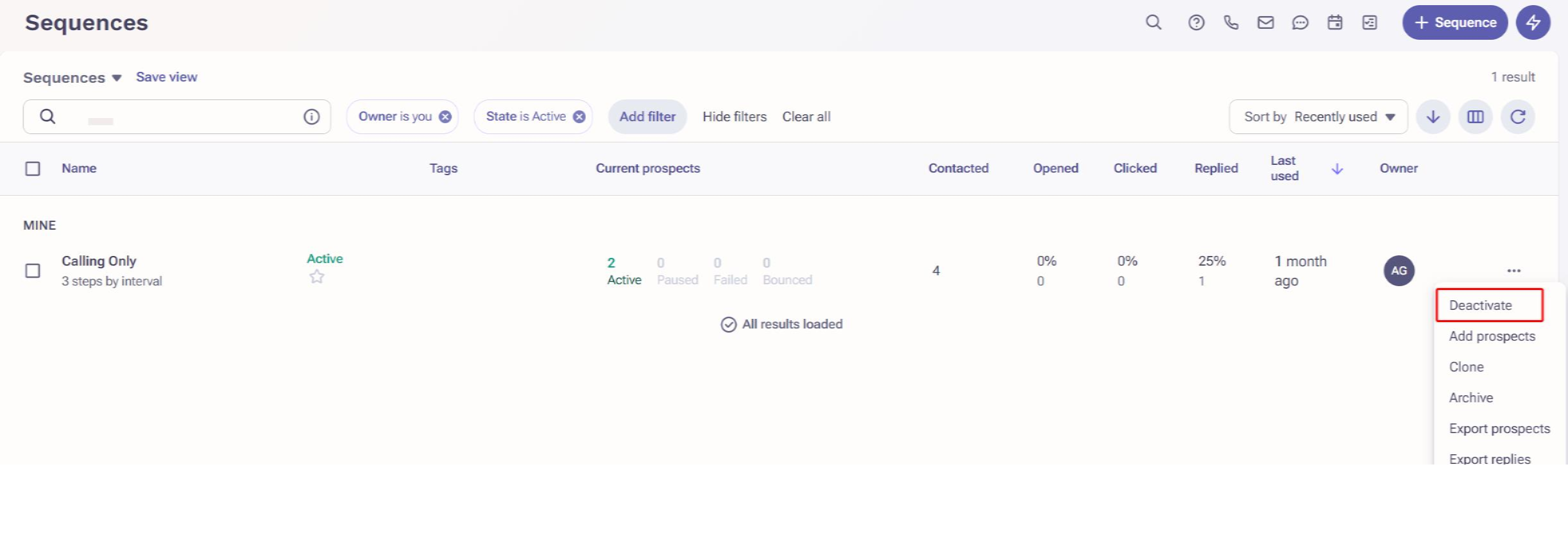
- Click the three-dots [ ... ] menu at the far right of the sequence you'd like to deactivate.
- Click Deactivate.
Additional Information
If you attempt to deactivate a sequence that has active prospects, you will see this notification: "There are active prospects in this sequence. Deactivating this sequence deletes all of its drafted and scheduled mailings, including ones you may have customized. Are you sure you want to deactivate this sequence?" This means that any scheduled mailings or tasks will be deleted and new tasks for the active prospects will be recreated when the sequence is reactivated.
Was this article helpful?
That’s Great!
Thank you for your feedback
Sorry! We couldn't be helpful
Thank you for your feedback
Feedback sent
We appreciate your effort and will try to fix the article