Objective
After setting up Okta SSO with Outreach, users or admins encounters the following error messages when attempting to log in or test the connection.
Applies To
- Outreach Admins
- Okta admins
Frequently Asked Questions
Error:Could not retrieve SSO connection name: cannot retrieve authorization URL for non-SSO login org after testing SSO.
Confirm all SSO settings are verified.
- Log in to Outreach.
- Click Administration > Organization > Sign-in & password options.
- Click Edit.
- Click SSO.
- Toggle Enable.
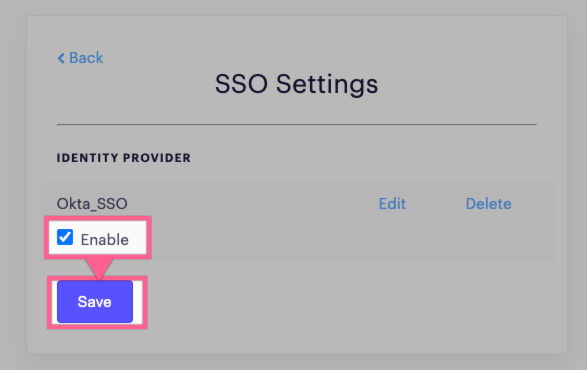
- Click Save.
Retest the SSO connection.
When a user attempts to sign in, they receive "User is not assigned to this application"
Once your Okta is configured, you must assign user and groups to the application that was created. If they are not assigned to the application, they will receive this error.
{"errors":["OAuth error"]} error message after testing SSO
This failure is usually caused by one or more of the following:
- The email that the user logs into Okta is not exactly identical to the login email within Outreach.
- The uploaded certificate is not the one that is generated and attached to the Outreach SSO application that was created.
- The Assertion Consumer Service (ACS) URL and the Service Provider Entity ID / Audience URI is not configured properly in Okta's configuration.
- The uploaded certificate has expired.
Okta SSO Settings is enabled, but when a user attempts to sign in, they receive: "Oops, something's not right. Please try again or contact support." OR "Your SSO provider returned an error - this can happen when your organization's SSO configuration isn't configured correctly. Reach out to your admins for help"
This failure is usually caused by one or more of the following:
- The email that the user logs into Okta is not exactly identical to the login email within Outreach.
- The uploaded certificate is not the one that is generated and attached to the Outreach SSO application that was created.
- The Assertion Consumer Service (ACS) URL and the Service Provider Entity ID / Audience URI is not configured properly on Okta's configuration
- The uploaded certificate has expired.
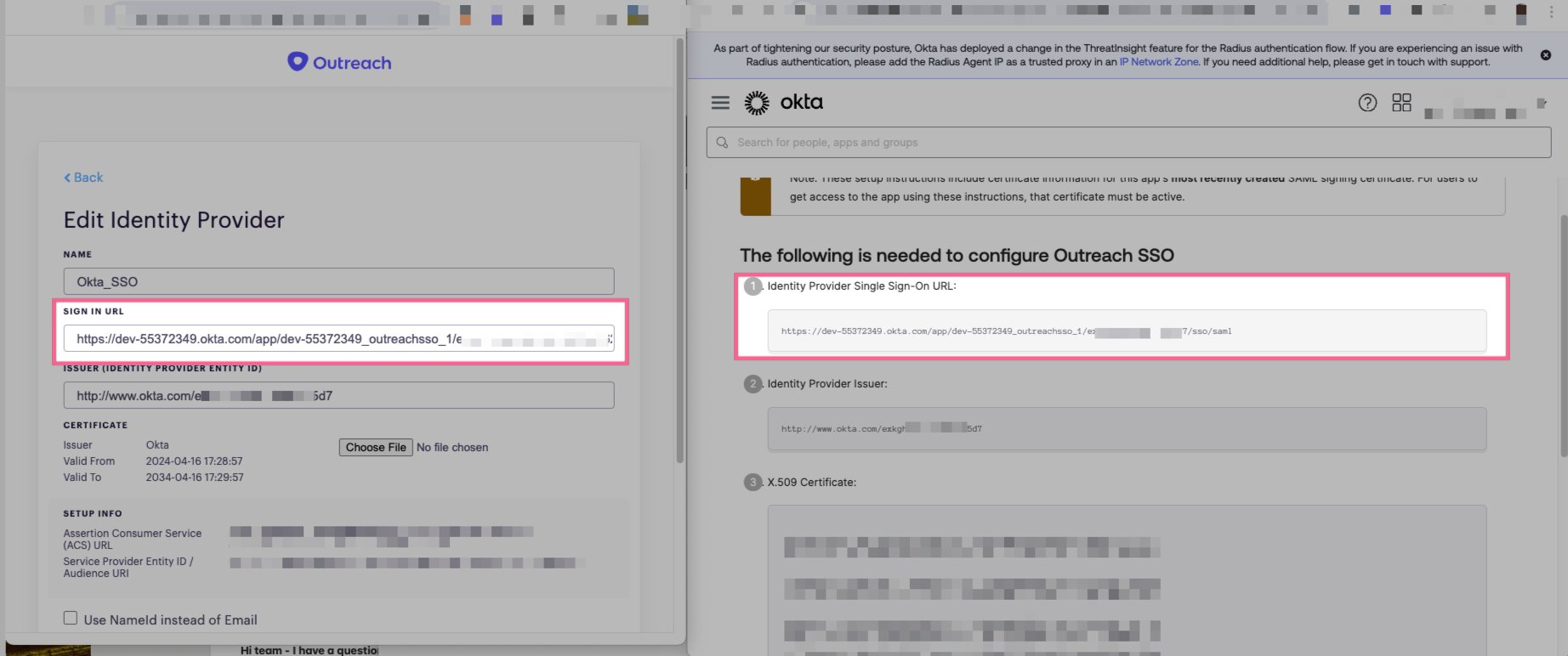
When a user attempts to sign in, they are immediately shown a Okta "404, Page Not Found" error.
Ensure that the Sign In URL matches the Single Sign-On URL provided by Okta.
Was this article helpful?
That’s Great!
Thank you for your feedback
Sorry! We couldn't be helpful
Thank you for your feedback
Feedback sent
We appreciate your effort and will try to fix the article