Objective
Use the Outreach Support Widget in your Outreach application to start a phone call and open help requests for urgent issues with our Support team. The Support call option is available to our Enterprise Support Plan customers.
Applies To
- Outreach Customers with the Enterprise Support offering
- Users for whose Profile the Live voice support option is enabled
Procedures
Calling Outreach Support During Global Coverage Hours
- Access the Outreach application.
- At the top right, click the Support (question mark) icon to open the Resource center.
- From the dropdown, click Get help. The phone number for your Support Plan is displayed along with Call for Outreach Support.
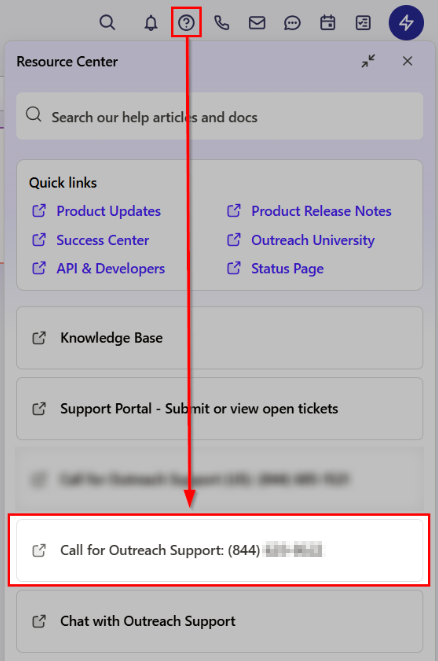
- Utilize the listed phone number to contact our Support team.
- During Business Hours, you will hear a message requesting you select your issue type. Please select the most appropriate option relevant to your issue to be connected to one of our support agents.
- Once connected with an agent, provide your name, company name, and email address.
- Validate your identity using an Outreach-generated Caller Verification Code.
- Select the question mark icon > Caller Verification.
- Select to receive your code by email, SMS, or phone call. (Emails may be sent to your Spam folder.)
- The technical support agent will validate your identity and then work with you to gather all relevant information and attempt to identify the issue live.
If a resolution is unable to be reached on the initial call, your support agent will continue troubleshooting offline and follow up with you through your preferred channel.
Issues launching the Resource Center?If the Resource Center panel does not load when clicking the Support (?) icon, please try the following:
|
Calling Outreach Support Outside of Global Coverage Hours
If calling outside of our Global Coverage hours or if support is unavailable, you’ll be prompted to leave a message with:
- your name
- company name
- phone number
- email address
- a detailed description of your urgent issue
When Global Coverage hours resume, an agent will reach out to work with you to gather all relevant information and attempt to identify the issue live.
Support Global Coverage Hours
Monday-Friday, excluding holidays.
Basic: Regional Support
Plus: Multi-Regional Support
Enterprise: Global Support
| Americas | Europe, Middle East & Africa (EMEA) | ANZ & Asia (APAC) |
|---|---|---|
Mon-Fri 6 am-6 pm PT | Mon-Fri 7 am-7 pm GMT | Mon-Fri 10 am-10 pm Aus ET |
Additional Information
Outreach Technical Support Offerings
Best Practices for Contacting Outreach Support
What to Check Before Contacting Outreach Support
Conversations in the Outreach Support Widget
How to Manage Technical Support Request Ticket
Configuring User Access to Outreach Support in Profile Settings
Was this article helpful?
That’s Great!
Thank you for your feedback
Sorry! We couldn't be helpful
Thank you for your feedback
Feedback sent
We appreciate your effort and will try to fix the article