Purpose:
The purpose of this article is to provide information to Outreach users regarding sequence exclusivity.
Intended Audience:
- Outreach Users
Sequence Exclusivity Settings
Sequence exclusivity settings let you determine whether or not a prospect can be added to multiple sequences, or if they should only be in one sequence at a time. You have three options available for sequence exclusivity:
- Yes - The prospect should only be active in one sequence. They cannot be added to any other sequence unless they finish the sequence they are active in or are removed from the sequence.
- No - The prospect can be active in more than one sequence.
- Yes, but only to other exclusive sequences - The prospect should not be added to other exclusive sequences, but can be added to a non-exclusive sequence.
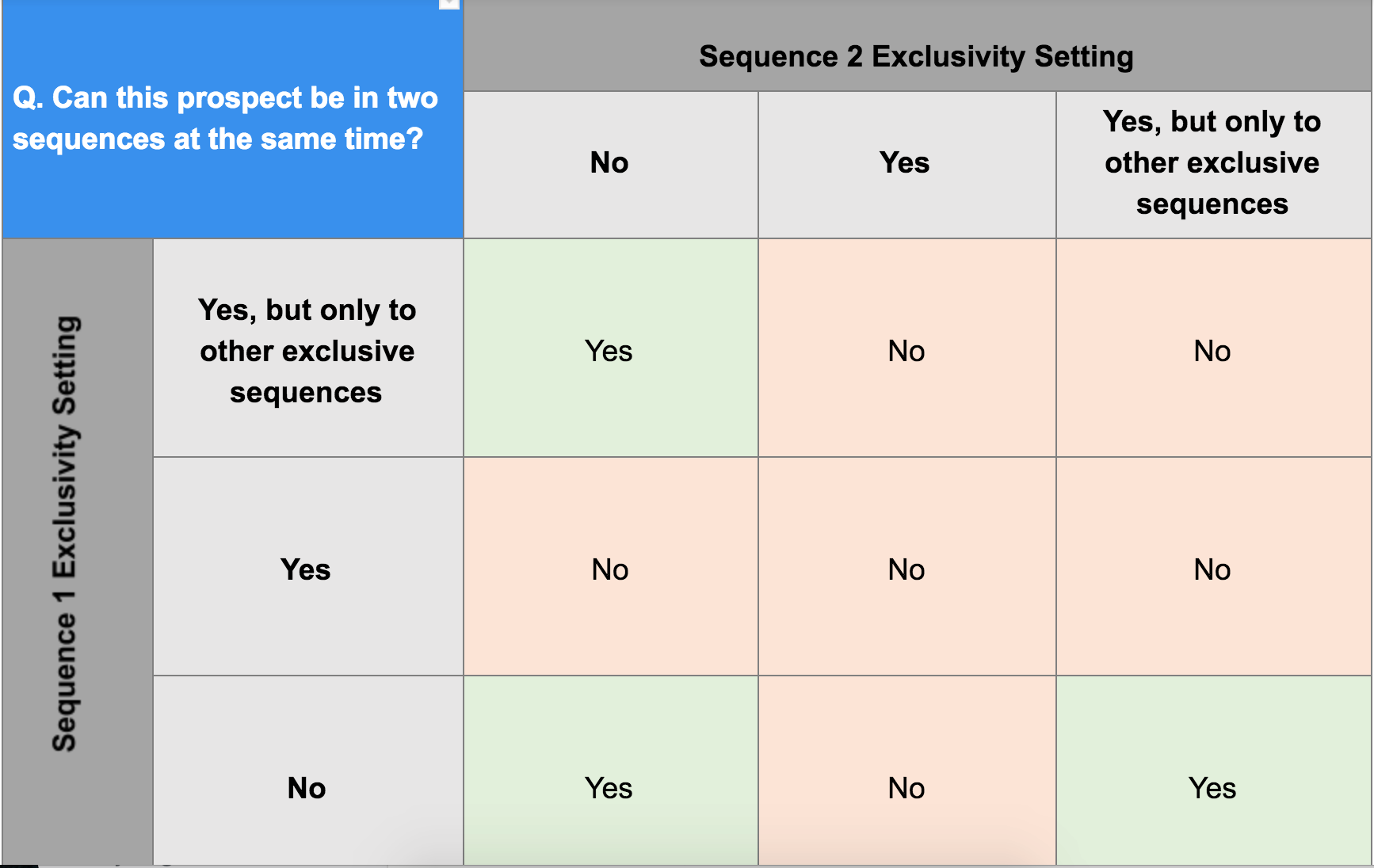
To better understand how to sequence settings in one sequence can affect your ability to add prospects to another sequence with different settings, you can refer to the chart below.
Support for Purposeful Dupes & Sequence Exclusivity
To better support organizations that have Purposeful Duplicates enabled, we’ve introduced a new ruleset safety setting that allows you to select if you would like the three safety settings (referenced above) to be based on Prospect ID or Prospect Email.
If you do not have Purposeful Duplicates enabled, Prospect ID is used to evaluate Sequence Exclusivity.
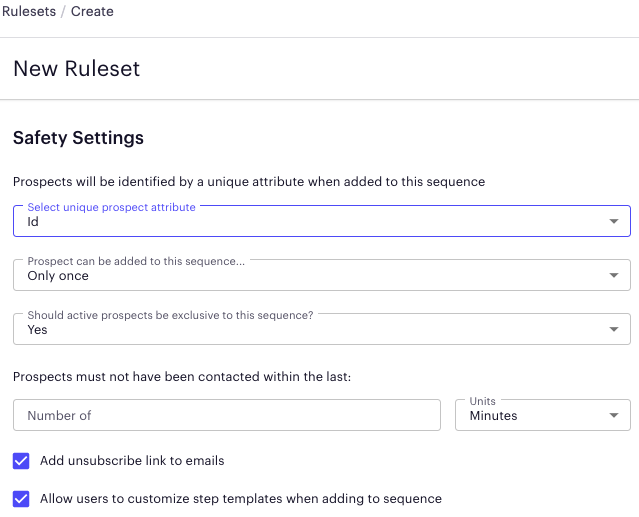
In the case where you have Purposeful Duplicates enabled AND would like to limit your prospects to being in one sequence at a time, you would use the following Ruleset setup.
Note: We respect the ruleset settings at the time the prospect was added for the remainder of the sequence.
- Safety Rule Specification: Would you like your Safety Settings to be based on Prospect ID or Email > Select Email
Note: This will apply to all 3 of these safety settings
- Prospect can be added to this sequence
- Should the prospect be exclusive?
- Prospect must not have been contacted in X time.
-
Safety Rule: Should active prospects be exclusive to this sequence? > Select Yes
You have three options available for sequence exclusivity:- Yes - The prospect should only be active in one sequence. They cannot be added to any other sequence unless they finish the sequence they are active in or are removed from the sequence.
- No - The prospect can be active in more than one sequence.
-
Yes, but only to other exclusive sequences - The prospect should not be added to other exclusive sequences, but can be added to a non-exclusive sequence.
Was this article helpful?
That’s Great!
Thank you for your feedback
Sorry! We couldn't be helpful
Thank you for your feedback
Feedback sent
We appreciate your effort and will try to fix the article