Objective
The Interested (count) is calculated as the number of prospects that have replied to the email with a positive or referral response, based on the Outreach Sequence Email Sentiment Classification.
The Interested metric provides a clear indication of how well sequences and individual email variants are performing in terms of generating positive engagement and interest from prospects.
Applies To
- Sequences
Procedure
The metric is calculated using the following formula:
- Interested (count) = Prospects count with positive replies + Prospects count with referral Replies
-
Interested (%)= [Interested (count)/Number of prospects with email delivered]*100
- Positive and referral replies are retrieved using the Outreach Sequence Email Sentiment Classification.
The new metric appears in two places:
- Sequence List View
- Added interested (% and count) metric alongside existing metrics (contacted, opened, clicked, replied).
- Displays the Interested (% and count) for each sequence in the list.
Allows users to sort on the Interested (% and count).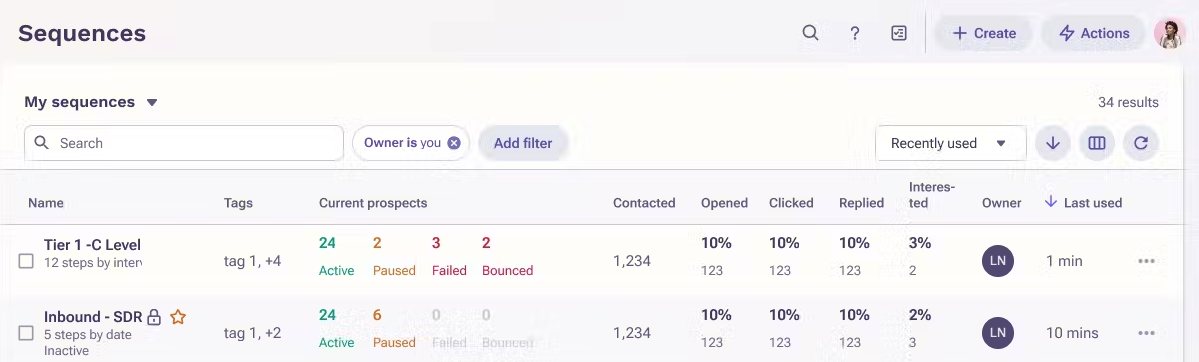
- Sequence Overview Page
- Added Interested (% and count) metric to each email variant alongside existing metrics (delivered, opened, replied, clicked).
- Displays the Interested (% and count) for each email variant within a sequence
Was this article helpful?
That’s Great!
Thank you for your feedback
Sorry! We couldn't be helpful
Thank you for your feedback
Feedback sent
We appreciate your effort and will try to fix the article