Applies To
-
Outreach Everywhere Chrome extension
-
Outreach banner appearing at the top of Google mail, Google calendar, Salesforce, LinkedIn, and ZoomInfo
Answer
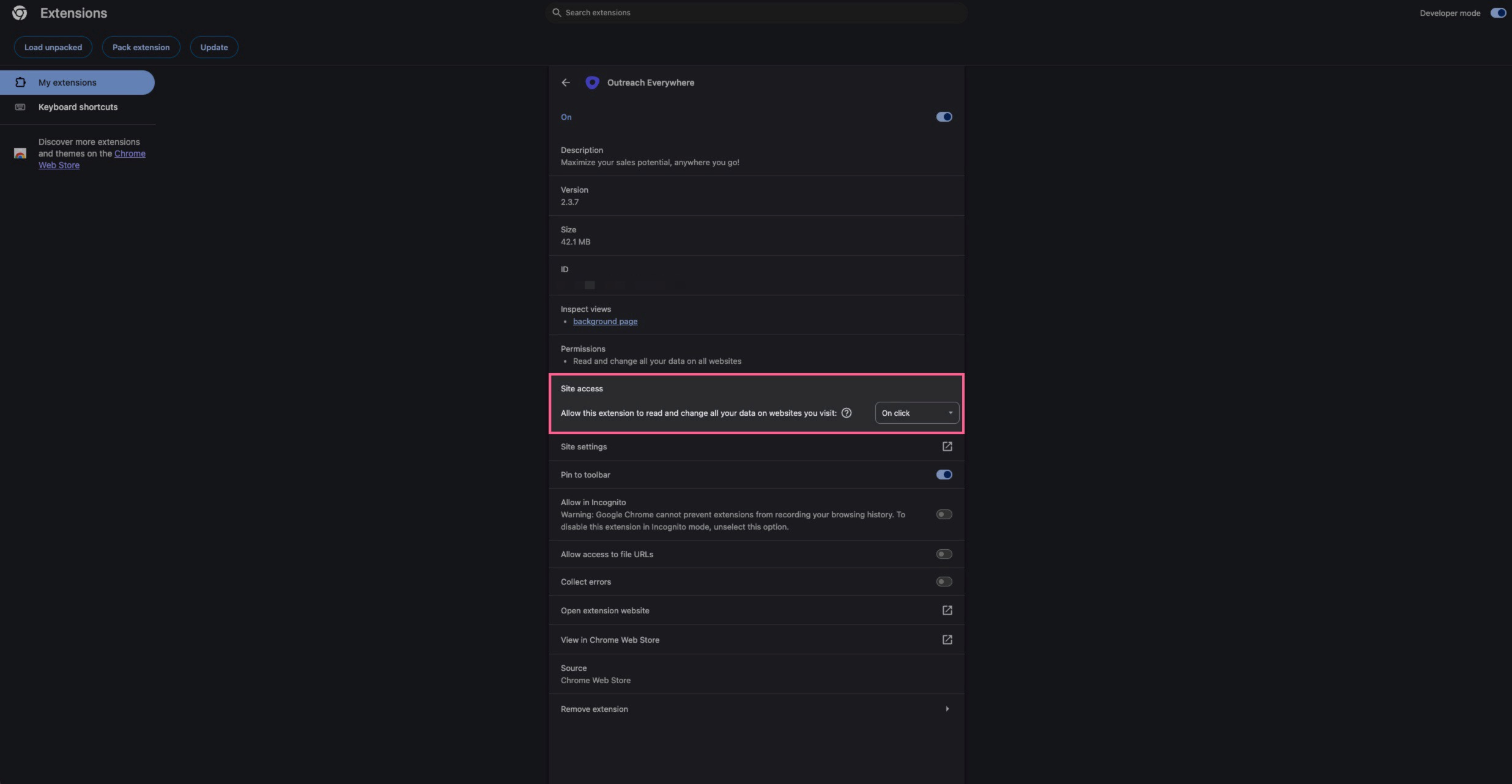
This is appearing due to having the Outreach Everywhere Chrome extension and the user not signed in to the Outreach website or tool. If you do not want to give Outreach access to your other websites, you can configure this under the extension's configuration settings page. Please note that if you prevent access to certain sites, it may affect that integration and tile in Outreach.
- In the Chrome browser, click on the puzzle icon (extensions) in the top right
- Click Manage Extensions at the bottom
- Click Details for the Outreach Everywhere extension
- For the Site access field, change this to either On click or On specific sites
- Go back to your webpage, refresh the browser, and the banner should go away
Was this article helpful?
That’s Great!
Thank you for your feedback
Sorry! We couldn't be helpful
Thank you for your feedback
Feedback sent
We appreciate your effort and will try to fix the article