Objective
To set up and configure password policy for Outreach users in non-SSO setups.
Applies To
- Outreach Admins
- Configuration
Before You Begin
- Password rule option are available for non-SSO configurations only. To set up access to Outreach via SSO, see our Single Sign On category.
- At this time, multifactor authentication (MFA) options are not available directly in the Outreach platform.
Procedure
- Log in to Outreach as an Admin.
- Click Administration > User management > Sign-in.
- Under Sign-in and password options > Password rules, click Edit.
- In the modal window, update rules as needed. Configurable options include:
- character requirements and restrictions
- minimum password length
- when the password will expire and require users to create a new one
- session duration (how often people will need to log in with their password)
Note: Session lifespan must be between 1 hour and 30 days.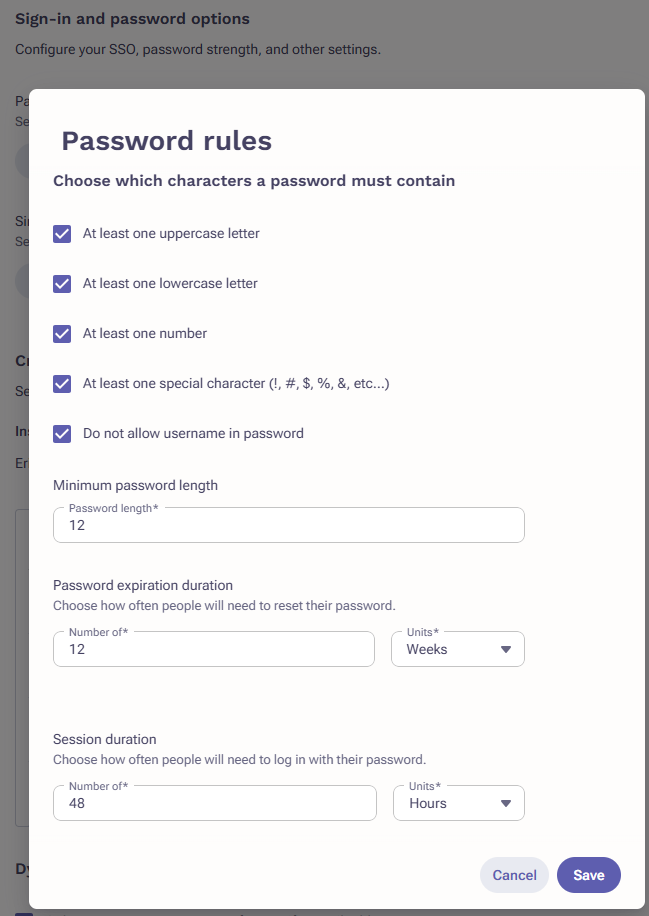
- When done, click Save.
Was this article helpful?
That’s Great!
Thank you for your feedback
Sorry! We couldn't be helpful
Thank you for your feedback
Feedback sent
We appreciate your effort and will try to fix the article