Objective
The purpose of this article is to provide direction to Outreach users and admins on automatically skipping call and SMS tasks when prospects do not have valid phone numbers. The Automatically Skip Call or SMS Tasks for Invalid Phone Numbers feature helps Outreach users maintain clean, actionable task queues by automatically bypassing non-actionable call and SMS steps and progressing the Sequence without manual intervention.
Applies To
- Outreach users executing tasks
- Outreach admins configuring Rulesets
- Sequences with Call or SMS steps
- Sequence Rulesets
Before you begin
- This functionality is disabled by default and must be explicitly enabled in a Ruleset
- The Ruleset must be applied to the Sequence for the behavior to take effect
- Only Call and SMS steps are evaluated by this feature
Overview
With this launch, Outreach will provide a new Ruleset setting that will enable users to automatically skip call and SMS tasks for prospects with missing or invalid phone numbers. This ensures reps only see actionable tasks, keeps task queues clean, and allows sequences to progress seamlessly without manual intervention.
What is new?
Outreach now provides the ability to automatically skip call or SMS tasks for prospects whose phone numbers are missing or invalid.
This is enabled through a new configuration option in Rulesets:
Automatically skip call steps for invalid or missing numbers
When enabled:
- Outreach evaluates phone data for each prospect at task creation time.
- If no valid phone numbers exist, the call/SMS task is automatically skipped.
- The next sequence step is triggered without creating a call/SMS task.
- Reps no longer see non-actionable call tasks in their queue.
High-Level Value:
- Reduces manual skipping during power hours
- Ensures cleaner task queues
- Prevents sequence stalls caused by non-actionable call tasks
Procedure
Enable the Skip Setting in the Ruleset
To start, the user selects the Ruleset they want to operate with and turns on the new checkbox setting:
[✓] Automatically skip call steps for invalid or missing numbers
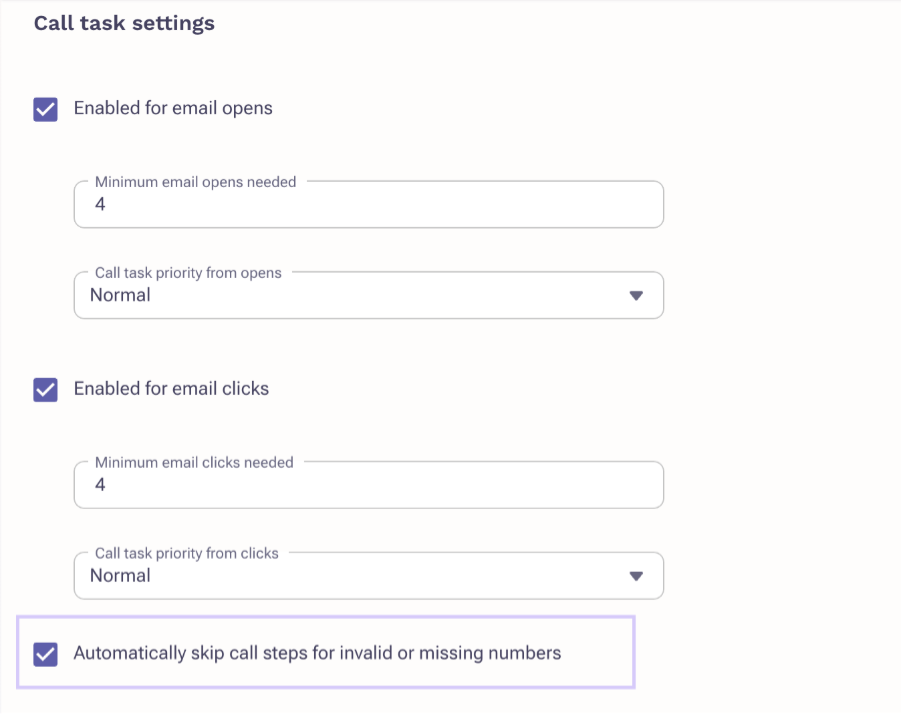
This configuration enables validation logic for call and SMS steps at task creation time. This setting is disabled by default to preserve existing behavior.
Apply the Ruleset to the Desired Sequence
To apply the behavior to a specific Sequence:
- Open the Sequence
- Navigate to the Settings tab
- Under Sequence Ruleset, search and select the Ruleset where this setting is enabled
Once saved, Outreach will now evaluate call and SMS tasks for phone number validity during execution for prospects enrolled in that Sequence.
When a Sequence reaches a call or SMS step for a given prospect:
- Outreach checks for phone data in the prospect’s Phone and Mobile Phone fields
- Outreach also verifies that any numbers present are not flagged as invalid
If both fields are empty OR all associated numbers are invalid:
- Outreach does not create the call/SMS task
- Instead, Outreach automatically creates the task for the next step in the Sequence
If at least one valid number exists:
- The call or SMS task is created normally for execution by the rep
Frequently Asked Questions
What qualifies as an invalid number?
If the phone number associated with the prospect is marked as Status Inactive, or if there is no contact information available for the prospect.
Is this setting on by default?
No. It must be turned on in order to be able to automatically skip call task. It is disabled by default to preserve current behavior for all existing customers.
Does this apply globally or per Sequence?
This setting is at the Ruleset level. The ruleset then needs to be applied to all the Sequences where we wish to automatically skip call or sms task in case of invalid or missing numbers.
Does this affect email or other step types?
No. This only applies to call and SMS steps.
Was this article helpful?
That’s Great!
Thank you for your feedback
Sorry! We couldn't be helpful
Thank you for your feedback
Feedback sent
We appreciate your effort and will try to fix the article