Symptom
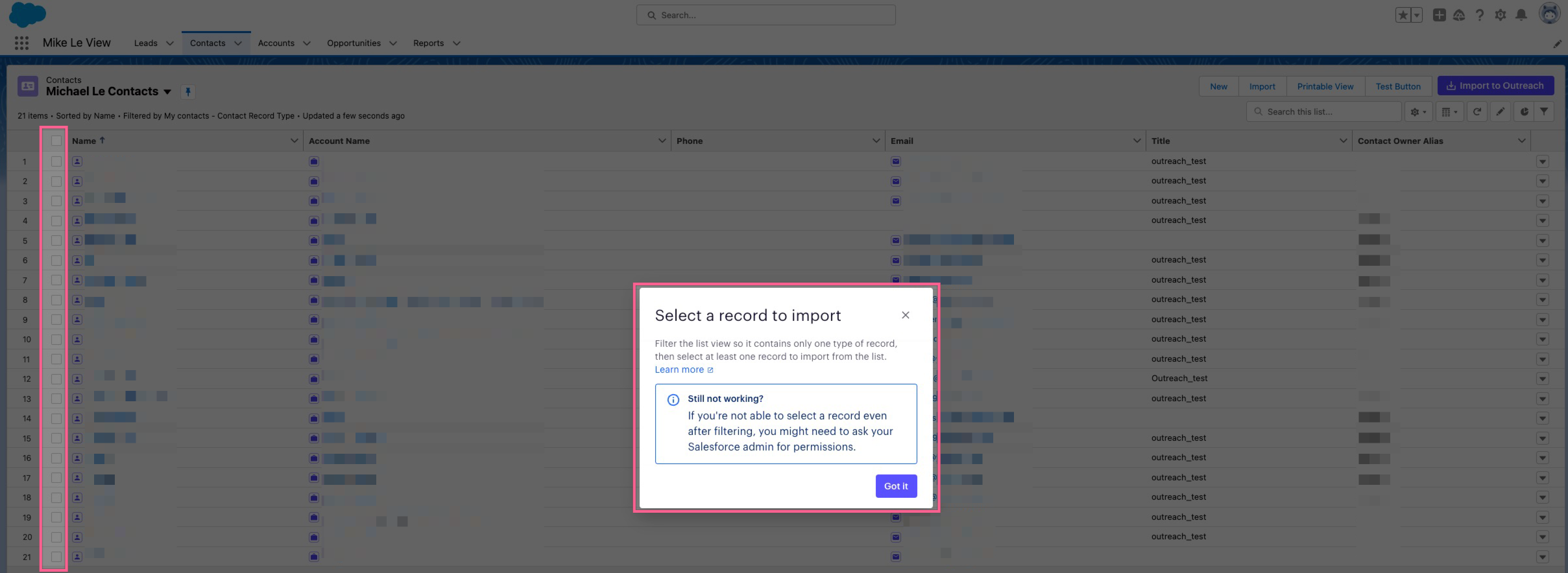
User is trying to import records from SFDC to Outreach. In Salesforce, they visit their Leads or Contacts list view. After clicking on the Import to Outreach button, a dialog box appears that says to "Select a record to import".
Applies To
-
Salesforce users
-
Importing to Outreach from SFDC using the Outreach Everywhere Chrome extension
Resolution
Make sure you are selecting records from the list view. You can select multiple records from Salesforce by clicking on the checkboxes on the left side.
Cause
If you are simply going to the list view page and clicking Import to Outreach, that dialog box will appear. The extension doesn't know which records you want to import, since you haven't selected any using the Salesforce checkboxes on the left side.
If you do not see those checkboxes, you may need to edit your layout and filter by the specific Record Type. If you're filtering by multiple, it may be hiding those checkboxes by Salesforce design. You can also reach out to your SF admin about those SF multi-select checkboxes if they are not appearing.
Was this article helpful?
That’s Great!
Thank you for your feedback
Sorry! We couldn't be helpful
Thank you for your feedback
Feedback sent
We appreciate your effort and will try to fix the article