Purpose:
The purpose of this article is to provide direction to Outreach Admins in configuring the Appointments Task in the Outreach platform for Microsoft Dynamics.
Advanced Task Mapping for Appointments Tasks creates a Calendar Event task on the Lead or Contact record in Microsoft Dynamics. Based on the plugin settings, when the task is marked complete in Outreach the corresponding task is marked complete in MS Dynamics.
Dynamics Plugin Settings
Enable the following options in mapping the MS Dynamics Appointment Task <> Outreach Meetings object, including those conditions under Outbound Create:
- Pushing
- Outbound Create
- Outbound Update
Enabling the applicable options in the MS Dynamics plugin provides users with the ability to map the following fields:
| Outreach Calendar Event Field | Dynamics Appointments Field | Description |
|---|---|---|
| Booked Date | Created On | The date and time the appointment was created. |
| Booker | createdby_appointment | The user who created the appointment. |
| Title | Subject | The subject of the appointment. |
| Description | Description | The description of the appointment. |
| Location | Location | The location of the appointment. |
| Is All Day? | All Day Event | Whether the appointment is an all day event. |
| Start Time | Start Time | The date and time the appointment is scheduled to begin. |
| End Time | End Time | The date and time the appointment is scheduled to end. |
| Prospect | Activity Parties | The attendees of the appointment. |
| Owner | Owner (systemuser) | Record owner. |
| Opportunity | Regarding (opportunity) | If the appointment is associated with an opportunity, the opportunity will populate in the regarding field. |
Note: Outreach adds the necessary advanced field options during setup, removing the necessity of altering advanced field options for any particular field. Contact Outreach Support prior to adjusting advanced field options to confirm planned changes do not negatively affect the Dynamics synchronization.
Configuration
- In the Outreach platform, click Administration.
- Click Integrations > CRM.
- In the Set object mapping table, click the line with Appointments object.
- Under Set object syncing, on the CRM side of the sync, click the boxes for both Create and Update.
- Scroll down to the Set sync frequency section and under Pushing, check the box next to Automatically push changes to [your CRM].
- Double check that all fields that are mapped are set to update and sync into the CRM (not the other way around).
Note: Field settings come out-of-box and can be adjusted as applicable. - Scroll down to Set sync conditions.
- Under the section Create a event in [your CRM] whenever a calendar event is created in Outreach, add the following conditions:
- If Prospect | is not empty — This ensures meetings are not pushed to the CRM if they are not associated with a Lead/Contact.
- And Canceled | is | False — This condition prevents meetings that were previously removed from the calendar from syncing and use less API calls when users connect their calendar to Outreach for the first time (which retroactively syncs in meetings from the last 12 months).
- And Is organizer? | is | True — This prevents duplicate records from syncing to the CRM because it will only sync the record for the user that is the organizer of the meeting.
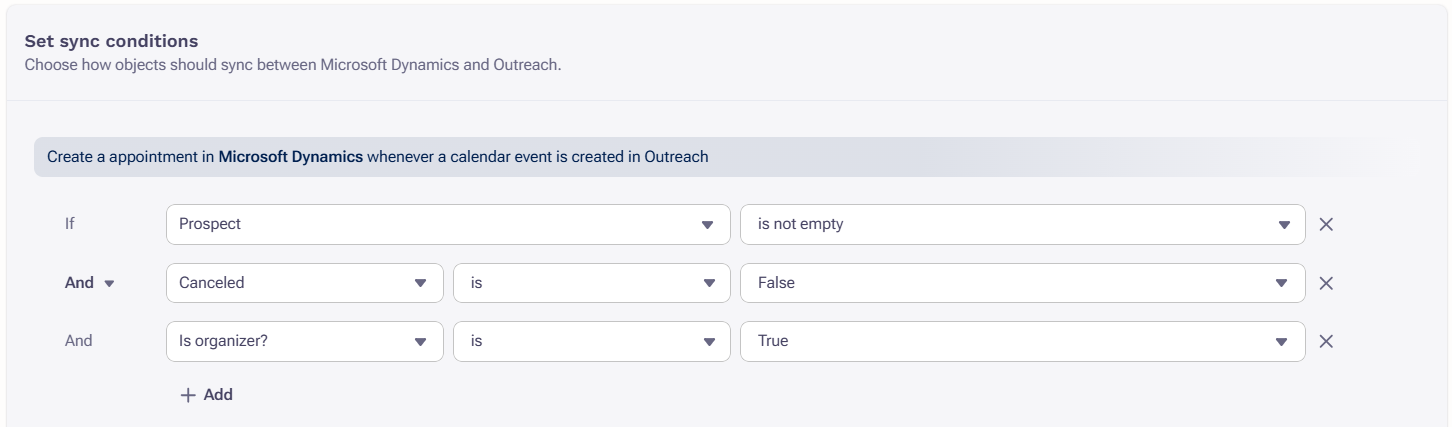
- Click Save to complete setup.
Rescheduled and Canceled Meetings
If a Prospect uses the reschedule link to find a new time to meet, the change will sync to Outreach and subsequently update the event in Dynamics; however, if a Prospect declines or cancels a meeting, that change is only reflected in Outreach.
Was this article helpful?
That’s Great!
Thank you for your feedback
Sorry! We couldn't be helpful
Thank you for your feedback
Feedback sent
We appreciate your effort and will try to fix the article