Purpose:
The purpose of this article is to provide direction to Outreach users in adding Microsoft Dynamics Opportunity Stages in Outreach.
Notes:
- Opportunity Stages must be added to the stage options in Outreach prior to configuring Opportunity Stages in the CRM Plugin.
- Opportunity Stages must be mapped exactly as they appear in the CRM plugin, including spelling, capitalization, etc.
- The CRM Sync experience listed here includes both the Classic Plugin experience and the new Enhanced CRM Sync Experience.
Procedure
- Access the Outreach Platform.
- Access the Dynamics Integration.
- On the Dynamics integration landing page, click the Opportunities object.
- On the object's page, scroll down to Set field mapping under the Configuration tab.
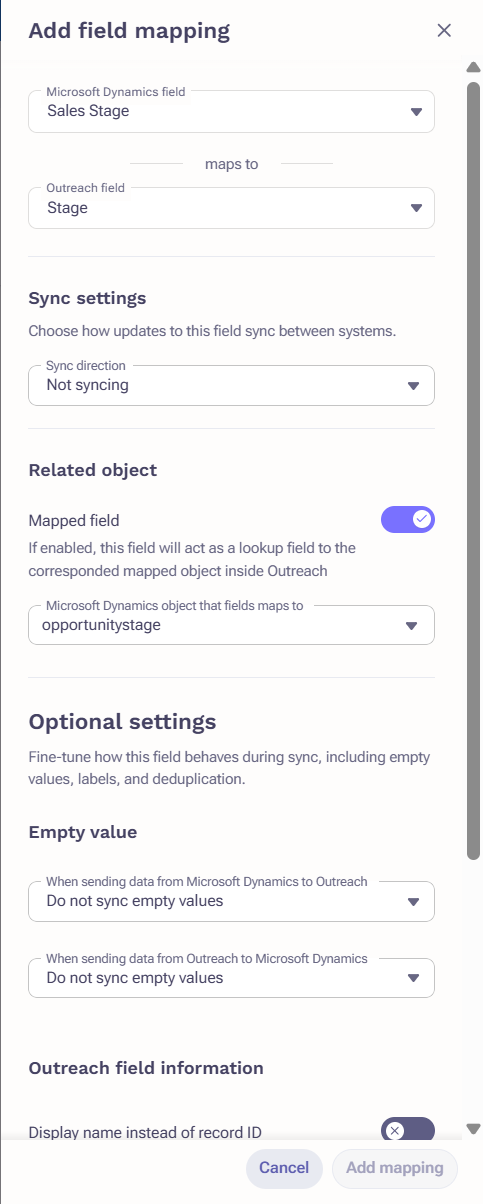
- Click on Add Mapping
- Select Stage from the Outreach Opportunity Field dropdown menu.
- Select Sales Stage from the Dynamics Opportunities Field dropdown menu.
- Navigate to Sync Settings and set sync settings as any of following options:
- Not Syncing
- Sync both ways
- Into Outreach
- Into Dynamics
- Navigate to Related Object settings and enable the Mapped Field toggle.
- Select Opportunity Stage under the External Mapped Type dropdown menu.
- Click Add Mapping and click Save.
Additional Information
Was this article helpful?
That’s Great!
Thank you for your feedback
Sorry! We couldn't be helpful
Thank you for your feedback
Feedback sent
We appreciate your effort and will try to fix the article