Purpose:
The purpose of this article is to provide information to Outreach Users regarding email failure notifications.
It's important to know that your emails are landing in your prospects inboxes. Outreach proactively notifies you if your emails are failing so you can quickly fix the problem and deliver your email.
Intended Audience:
- Outreach Users
Email Failure Notifications:
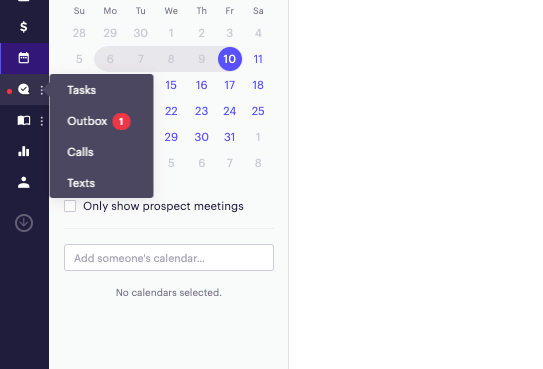
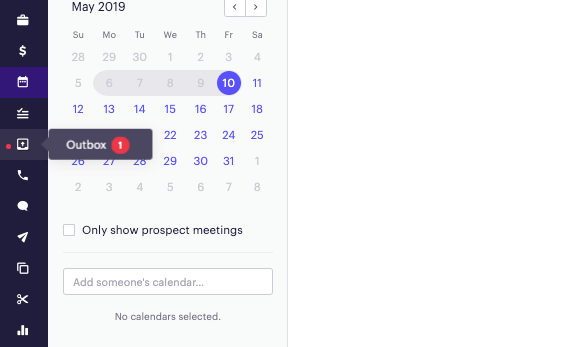
Email failure notifications appear as a red badge next to the outbox on the left hand navigation panel. When you click into your outbox, you'll automatically be redirected to view the emails that are failing.
The notification badge will appear in the navigation panel regardless of whether you used a collapsed or expanded panel.
-
If you use a collapsed panel - The notification badge appears next to the chat bubble symbol. Hovering over the chat bubble pulls up a menu, where the outbox is nested. Next to the outbox is a red circle with the number of failed emails. This number resets once you click into the outbox.
-
If you used an expanded panel - The notification badge appears next to the outbox symbol. When you hover over the outbox symbol, a menu appears that contains a red circle with the number of failed emails. This number resets once you click into the outbox.
Clicking on the outbox when there is an active notification brings you directly to the failed emails. Once there, you can hover over the red "Failed" box to get more information on why your email could not be delivered by Outreach.
Note: There is 10 minute delay before the badge appears to allow adequate time for retries. However, a hard refresh will surface the errors immediately.
Additional Information
BE ADVISED: This document provides information about new bulk sending requirements from Google and Yahoo. It should not be construed as legal advice, and we recommend that you work with your legal advisors and/or compliance team to ensure you are sending emails in compliance with all applicable laws.
We also recommend that you review the Google and Yahoo requirements directly to ensure you completely understand how they apply to your specific situation.
Was this article helpful?
That’s Great!
Thank you for your feedback
Sorry! We couldn't be helpful
Thank you for your feedback
Feedback sent
We appreciate your effort and will try to fix the article