Symptom
A user cannot view submitted Kaia coach cards in Outreach. Outreach admins in the same org can view them without any issue.
Applies To
- Outreach Admins
- Kaia
- Governance Profiles
Resolution
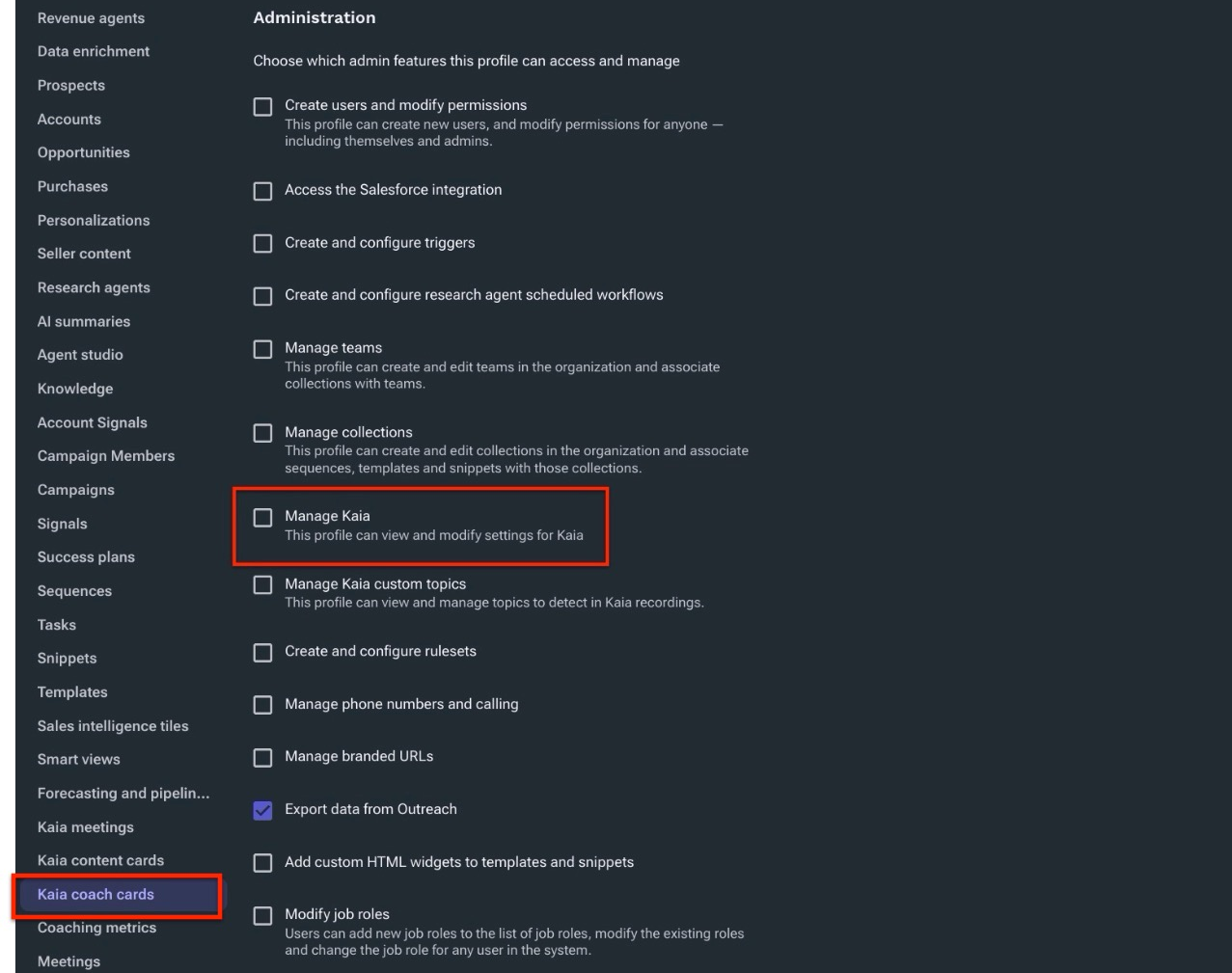
Enable the Manage Kaia permission on the profile assigned to the affected user.
- Log in to Outreach as an Admin.
- Click Administration > User management > Access Control.
- Select the profile assigned to the affected user.
- In the profile menu, click Administration.
- Select the Manage Kaia checkbox.
The profile can now view and modify settings for Kaia, including submitted coach cards.
Please Note
When the Manage Kaia permission is enabled on a profile, every user assigned to that profile can view submitted coach cards.
Cause
The Manage Kaia permission is not enabled on the user's profile. The Admin profile has this permission enabled by default, which is why admins can view submitted coach cards and users on other profiles cannot.
Additional Information
Was this article helpful?
That’s Great!
Thank you for your feedback
Sorry! We couldn't be helpful
Thank you for your feedback
Feedback sent
We appreciate your effort and will try to fix the article