Objective
The purpose of this article is to provide guidance to Outreach users on the Personalization Agent's Web Search capability. This feature enables sales reps to enrich their outreach with real-time, web-powered insights using Google Gemini, helping craft hyper-personalized emails that resonate with prospects and accounts even when limited data is available.
Applies To
- Outreach Amplify package customers
- AI Personalization in sequences, templates (email & LinkedIn: Send Message), one-off emails, emails and LinkedIn: Send Message tasks via Triggers
Before You Begin
- This feature is currently in Beta
- Ensure the Amplify package is enabled for your organization.
- Web Search results are powered by Google Gemini with grounding and rely on publicly available information.
- Data availability may vary based on the company/prospect’s online presence.
- Citations are displayed so users can verify the authenticity of the information.
Overview
AI Personalization supports real-time web search to fetch fresh, relevant, and contextual data. Reps can:
- Enable Web Search in personalization blocks.
- Generate personalized content using both internal data (prospect, account, opportunity, seller content or Buyer data) and external data (publicly available updates).
- View the source and citations of the information used, directly in the personalization preview.
Procedure
- Log in to Outreach.
- Click Agents & AI > Personalization agents.
- Click New personalization or an existing personalization.
- In the Personalization inputs, toggle Web Search on.
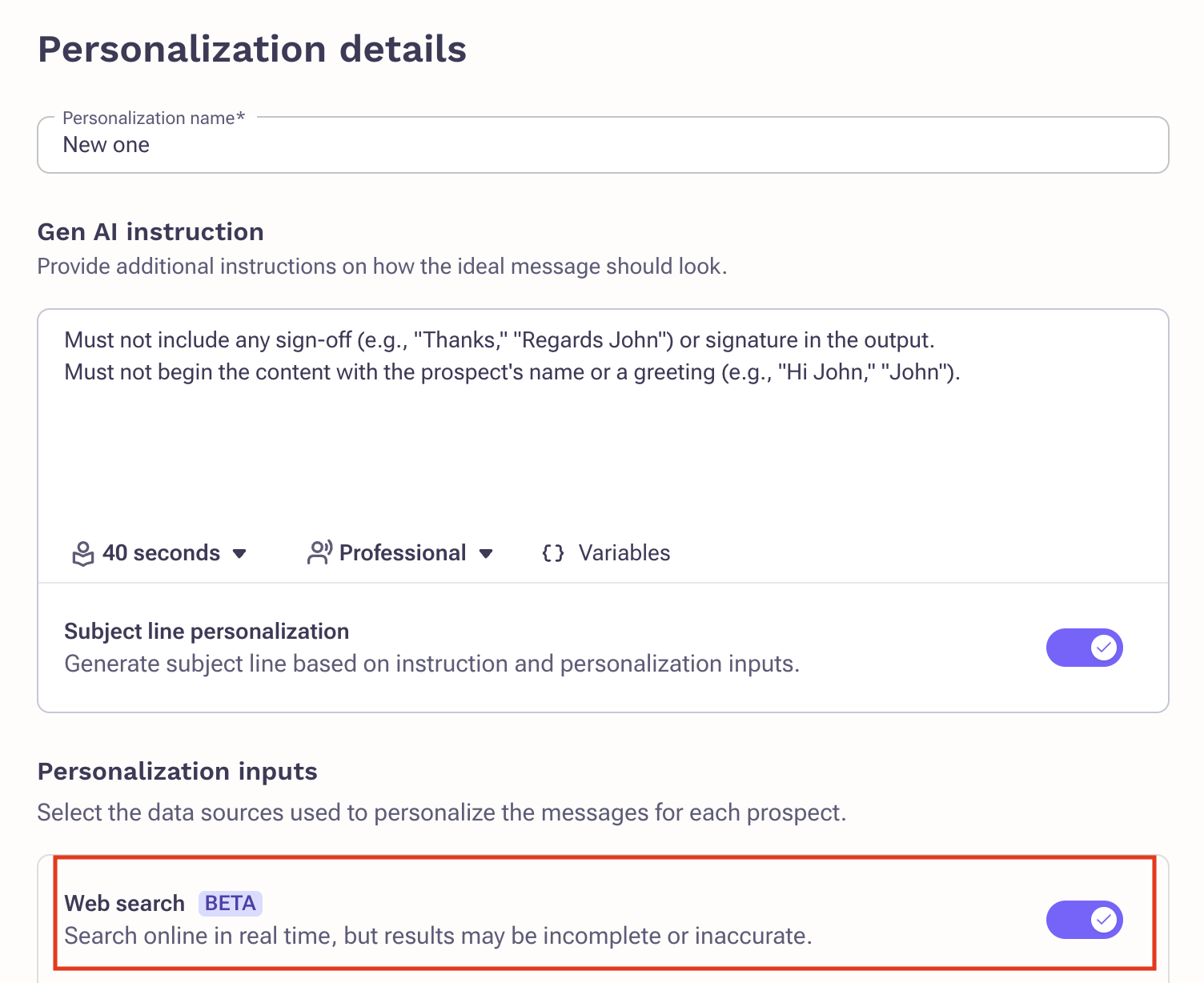
- Click Generate preview.
- Prompt-Driven Search: The GenAI instruction guides the search context (e.g., if asking for “recent funding,” the system prioritizes financial news).
- Hover over Personalized to review what web search data was used, including citations.
- Click Save.
Example Use Case – Inbound Lead
Problem: CRM leads enriched by ZoomInfo/D&B only provide stale or generic data (e.g., company name, website, industry).
Solution: With Web Search enabled, reps can:
- Pull in fresh updates like recent funding rounds, leadership changes, or product launches.
- Create context-rich, trust-building emails tailored to current company initiatives.
Example: “Congrats on raising your $150M Series D! Many growth-stage companies face pressure to scale quickly—here’s how Outreach helps sales teams keep pipeline predictable.”
Additional Information
- Works across email task workflows and one-off email compositions.
- Web Search is optional; if disabled, personalization uses only internal data.
- Admins can define default prompts and configure variables for consistency.
Limitations of Web Search
Prospect Identification Limitations
- There are scenarios where the web search may not correctly identify the prospect. This can happen when:
- The prospect has a common name, leading to confusion between multiple people with similar identities.
- There is limited or no public information about the prospect on the web.
- The prospect recently changed roles or companies, but search results have not been updated to reflect that change.
- When this happens, the generated insights may contain inaccurate or irrelevant context about the wrong individual.
Account Identification Limitations
- Similarly, the web search may sometimes fail to correctly identify the prospect’s account or company. This can occur due to:
- Ambiguity in company names (e.g., acronyms or generic names like “Prosper” or “Summit”).
- Lack of a clear association between the prospect and the company in indexed search data.
- Limited or outdated search information for newer or smaller companies.
- In such cases, the resulting information may reference the wrong organization, leading to misleading personalization inputs.
LinkedIn Data Search Limitations
- LinkedIn data used by the web search is limited to search indexing. This means that Gemini cannot directly access live LinkedIn profile data or private content. It can only retrieve information available through public search indexing. As a result, recent job updates, activity posts, or private details from profiles may not be surfaced accurately or at all.
Other Website Data Search Limitations
- Information sourced from other websites (such as G2, Crunchbase, or news publications) is also constrained by Google’s search indexing. If these sites are not frequently crawled or indexed, the web search might surface outdated data or miss relevant recent updates entirely. This limitation also affects niche domains or gated content that is not accessible via standard web crawlers.
Gemini Model Limitations: Missing Citations
- The Gemini API occasionally fails to return citations for the information it retrieves. When citations are missing, users have no visibility into the source of the content, which can impact the perceived credibility of the generated insights. This is a known limitation of the Gemini API and may vary across queries.
Search Term Generation by Gemini
- The search queries used to fetch results are generated by Gemini based on the context provided in the prompt. If the prompt does not contain sufficient or precise context, the model may create overly generic or inaccurate search terms. This can lead to irrelevant or low-quality results, particularly when multiple interpretations of a search term exist.
Search Recency and Source Credibility
- In cases where recent or high-quality sources are unavailable, Google’s search may return older or less credible links. The model will still generate an output based on the best available data, even if the content is outdated. This can result in insights that reference old events, obsolete company details, or unreliable third-party blogs.
Best Practices to Navigate These Limitations
To improve accuracy and reliability when using the web search feature, follow these guidelines:
- Verify Prospect Identity: Before relying on the generated output, confirm that the information aligns with the correct individual (e.g., job title, company, or location).
- Validate Company Information: Cross-check the surfaced company data with official sources like the company’s website or verified LinkedIn page.
- Use Precise Context in Prompts: When available, include unique identifiers such as the prospect’s company domain or job title to help the model generate more accurate search terms.
- Manually Review Citations: If citations are present, review them to ensure credibility. If they are missing, treat the insights as directional rather than factual.
- Avoid Over-reliance on Outdated Data: When the generated insights refer to older events, consider refreshing the search after a few days or using alternative information sources.
FAQ
When should I use Web Search in personalization?
Use it when you need fresh context for inbound leads, prospects with limited CRM data, or to tailor messaging to recent events.
Can I see where the information came from?
Yes. Citations are displayed when you hover over the Personalized badge, including the source and link.
Does Web Search guarantee accuracy?
Outreach uses Google Gemini to fetch real-time, public web data. While accuracy is high, reps should review citations before sending.
Is Web Search data stored in Outreach?
No. The data is fetched on demand for personalization and isn't permanently stored in Outreach.
Is Web Search available to all customers?
It's available to customers with the Amplify package.
Was this article helpful?
That’s Great!
Thank you for your feedback
Sorry! We couldn't be helpful
Thank you for your feedback
Feedback sent
We appreciate your effort and will try to fix the article