June 2026 Release Overview
IMPORTANT UPDATE:
From June 15 through September 30, 2026, we will migrate all remaining users to the personalized homepage and deprecate the legacy 360 homepage experience. The improved homepage experience is built to cater to different roles such as sellers, customer success, and account reps, providing expanded capabilities not available on the legacy 360 homepage. To learn more, view the support article. Otherwise contact your account rep or support for more information.
AI Agents, Personalization, and Data Enrichment
Outreach MCP Client
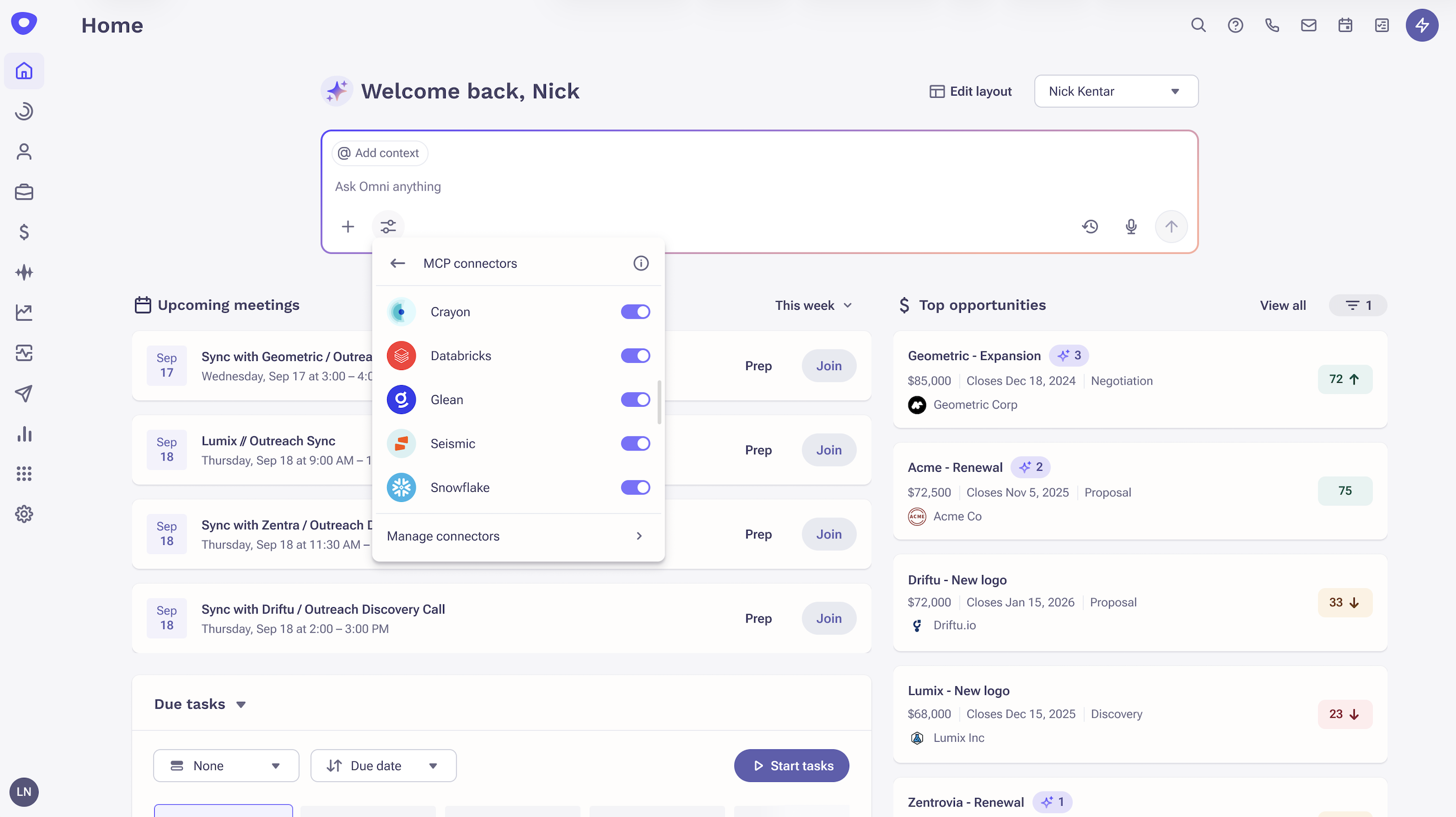
Connect your sales tech stack to Outreach AI for richer, context-aware responses in Omni.
Summary
Pull knowledge and actions from third-party MCP connectors directly into Outreach Omni. With Omni, reps can use natural language to access information and take action across connected systems without switching tools - such as competitive intelligence tools, content platforms, or product analytics.
Release Date
June 11, 2026 – June 25, 2026
Updates
- Browse and install Connectors from the marketplace for tools your team already uses.
- Enable Connectors in Omni using the filter icon to get responses grounded in both external context and Outreach account, deal, and prospect data.
- Admins install Connectors org-wide and configure access by user or group. Users can enable or disable individual Connectors from personal settings or toggle them per query.
- Organizations can publish private MCP Connectors to the marketplace, restricted to their instance only.
To learn more, view the support article.
Knowledge Enhancements: Now Surfaced in Omni
Ground Omni responses in your approved sales content for answers tailored to your business.
Summary
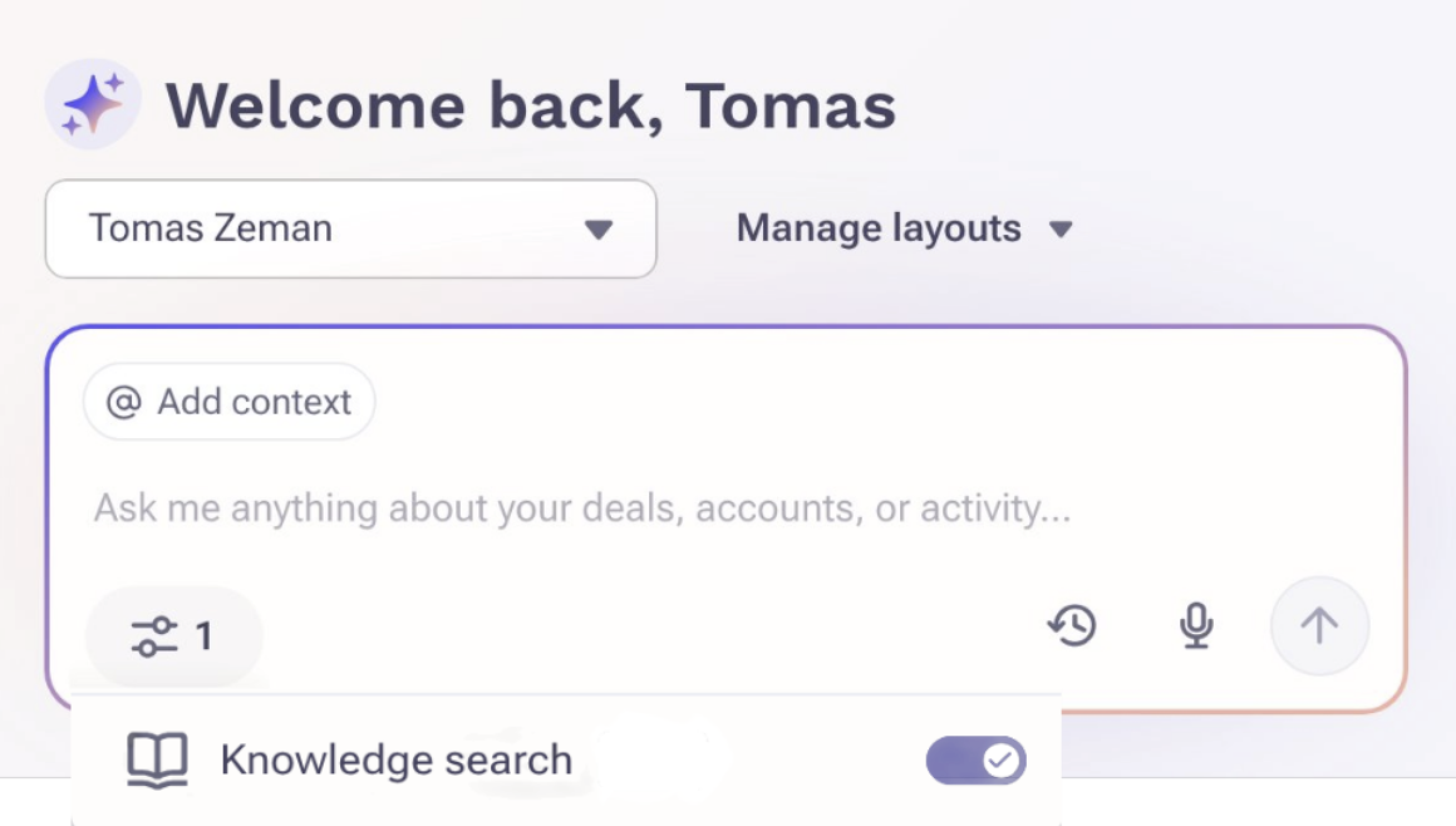
Knowledge allows RevOps leaders and admins to upload approved sales collateral into Outreach. With this release, Omni can reference it. Uploaded documents are processed and indexed by Outreach. When a user asks a question in Omni, the system checks for relevant documents and uses them to ground its response. Users can see which documents were referenced in the Sources section of any Omni response.
Release Date
June 11, 2026 – June 25, 2026
Updates
- Admins can upload PDF, Word, and text files to Outreach and organize them into folders. Documents are processed and indexed automatically, which can take up to 24 hours.
- Documents are assigned to channels that control where they can be used, including Omni, Account Assist, Personalization, and Playground. Documents not assigned to a channel are uploaded but not referenced anywhere.
- Admins can validate documents in Playground before promoting them to live channels, allowing content to be tested before it influences Omni responses.
- Users can toggle Knowledge on or off within the Omni chat interface. When enabled, any documents used in a response appear in the Sources section and can be downloaded directly from there.
To learn more, view the support article.
Omni on Account, Prospect, and Opportunity
Unify AI insights into a single, consistent experience across accounts and deals.
Summary
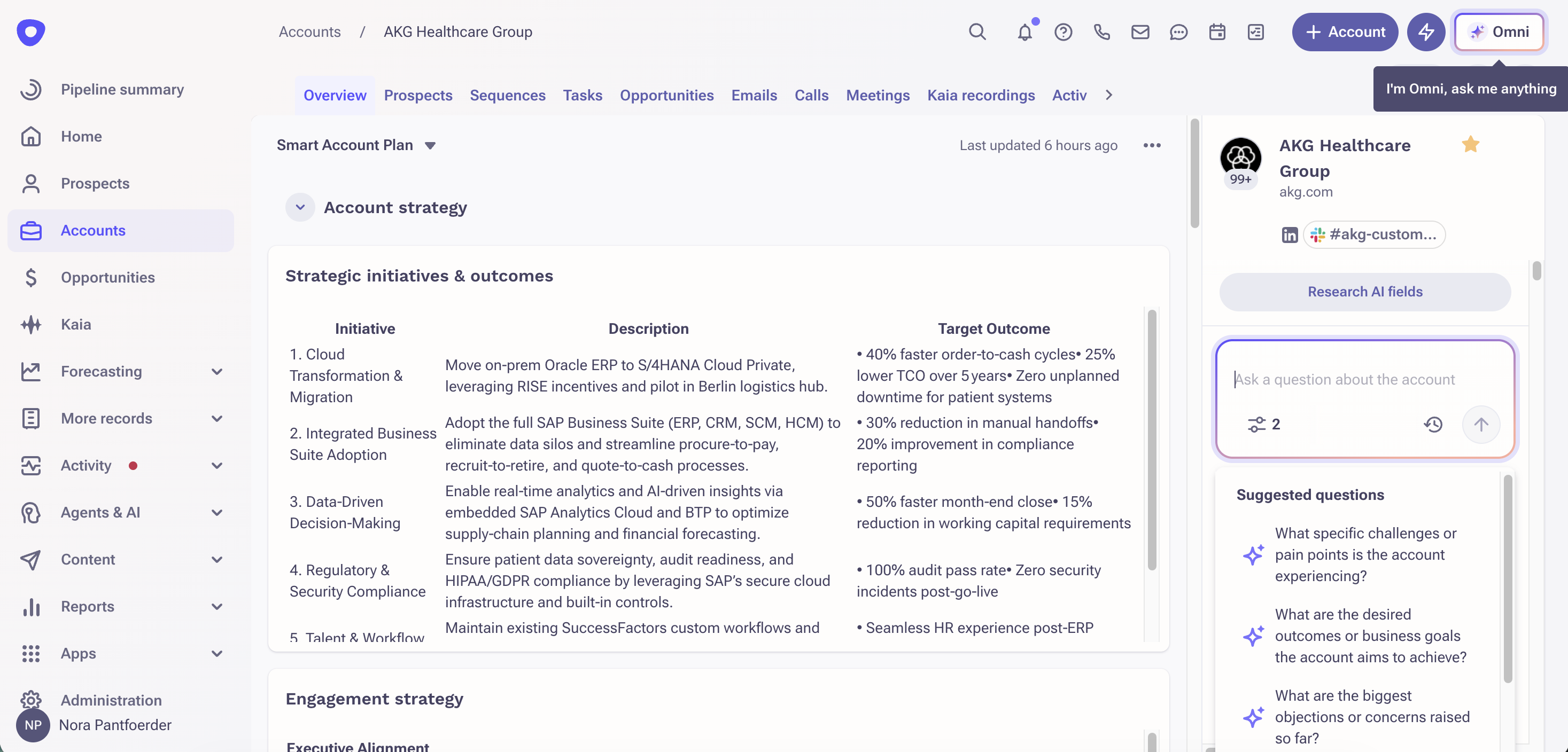
Get a more streamlined and cohesive AI experience with Smart Account and Deal Assist consolidated with Outreach Omni. Instead of switching between separate tools, sellers can rely on one consistent source for account and deal insights.
Release Date
June 11, 2026 – June 25, 2026
Updates
- When Omni is enabled and Account and Deal Assist is disabled, Omni is accessible across multiple entry points where Account and Deal assist were previously, including account, prospect, and opportunity views and related side panels.
- All account and deal related queries route through Omni.
- Provide admins with visibility and control over the Account & Deal Assist setting through org and profile-level configuration.
Note: If Account/Deal Assist and Omni are enabled, both experiences are available.
To learn more, view the support article.
Individual Revenue Agent Reporting
Access Sequence Performance Reports filtered per Revenue Agent directly from the Agent List View and Overview Page.
Summary
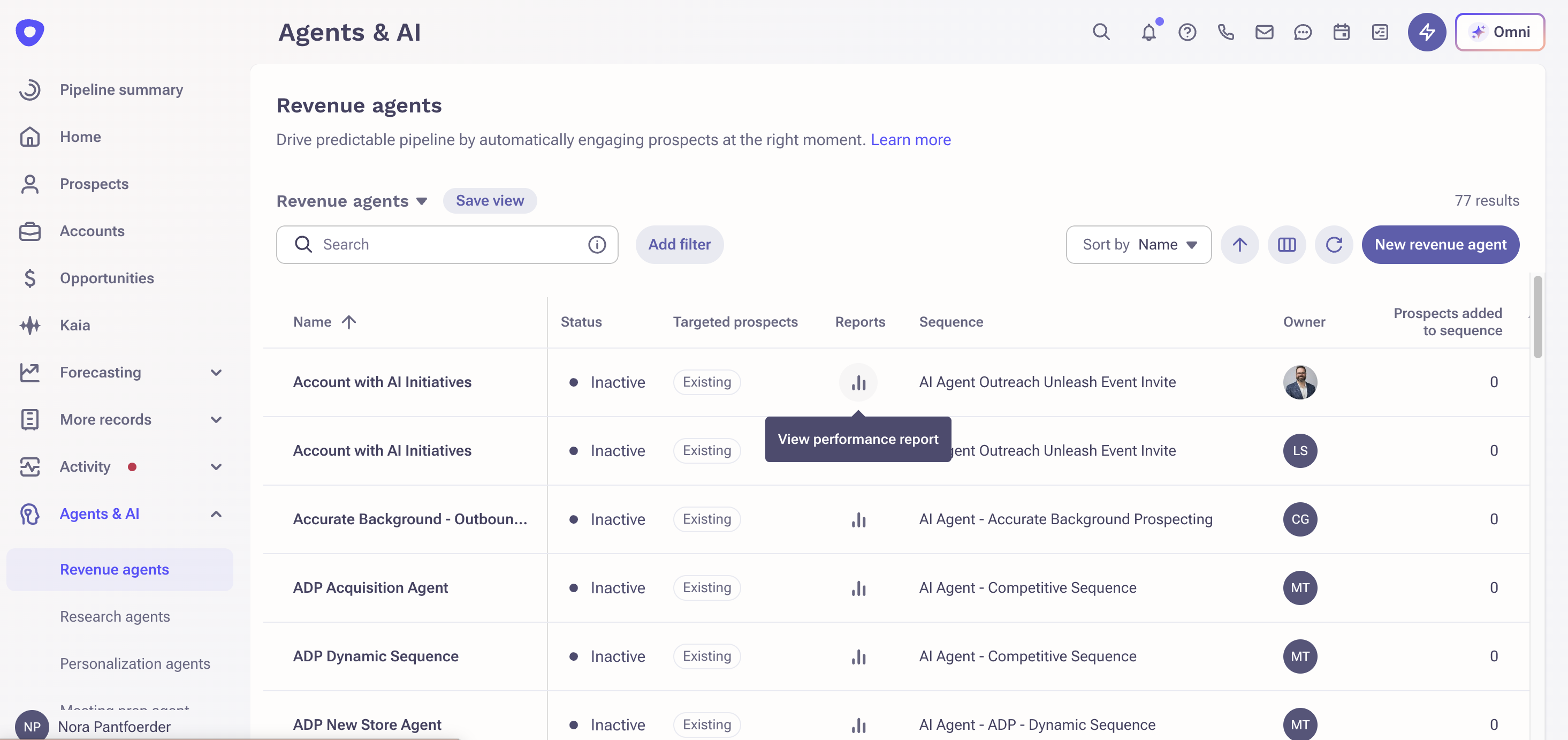
Revenue Agents now surface direct links to Sequence Performance Reports scoped to that agent and its associated sequence(s). Users can evaluate pipeline impact, opportunities created, and closed won revenue for a specific agent without manually configuring report filters.
Release Date
June 11, 2026 – June 25, 2026
Updates
- A Reports column has been added to the Agent List View. Clicking the link opens the Sequence Performance Report with filters automatically applied for that Revenue Agent.
- A View Performance button has been added to the Revenue Agent Overview Page, providing the same filtered reporting experience from within the agent.
To learn more, view the support article.
Sales Engagement
Sequence Enhancements: Export Additional Sequence States and Added by Source in Detail View
Get full visibility into sequence performance and attribution for reporting, analytics, and downstream workflows.
Summary
Users can now export additional columns of Sequence state fields including the prospect's current step, step type, sequence status, pause information, lock status, and latest contact date, providing a more complete view of sequence execution and prospect engagement.
You also get more detailed visibility on how prospects are added into Sequence in the detail view.
Release Date
June 11, 2026 – June 25, 2026
Updates
- All Sequence State columns are available in exports. Existing exports and currently supported fields remain backward compatible.
- The Added By Source field now displays the user name for manual enrollments, the Trigger name for Trigger-driven enrollments, and the Revenue Agent name for Revenue Agent-driven enrollments.
To learn more, view the support article.
Custom Text Field with Configurable Max Length
Standardize data entry across prospect and account records with defined character limits on custom text fields.
Summary
A new custom text field type allows admins to set a maximum character length at the point of field creation. Users are prevented from saving values that exceed the configured limit, helping teams maintain consistent, predictable data across records, list views, reporting, and CRM sync workflows.
Release Date
June 11, 2026 – June 25, 2026
Updates
- Admins can create a new text field type and define the maximum number of characters allowed.
- Users receive a validation message on save if their input exceeds the configured limit. The value cannot be saved until it is within the allowed length.
To learn more, view the support article.
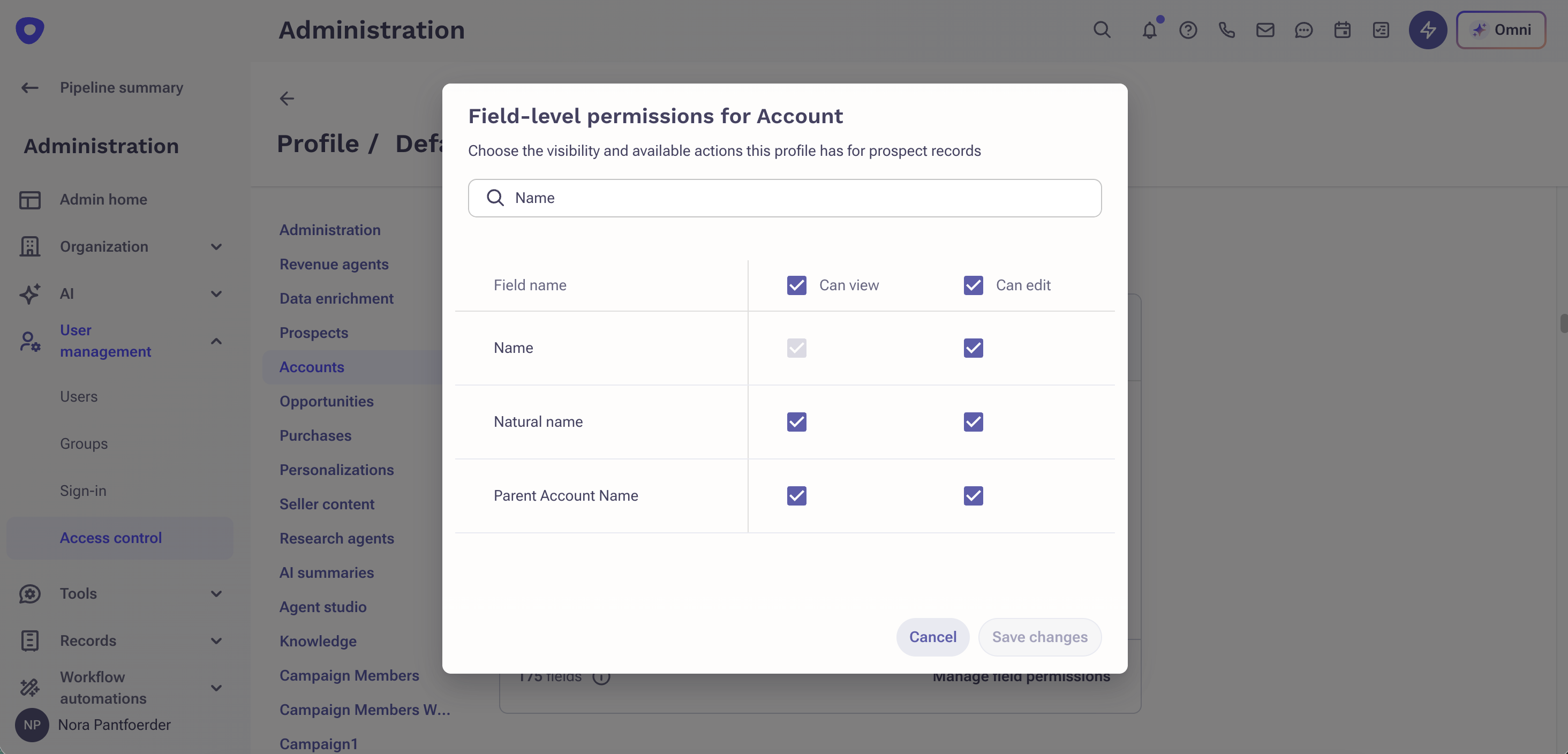
Field-Level Governance Expansion: Account and Prospect Fields
Have full flexibility and precision on governance for all sets of Account and Prospect fields.
Summary
Field-Level Governance (FLG) now covers a broader set of Account and Prospect fields that were previously excluded including ownership, compliance, identity, tags, and account linkage. This release also introduces Always Viewable fields — fields required for core platform functionality that cannot be hidden, but whose edit permissions remain configurable.
Release Date
June 11, 2026 – June 25, 2026
Updates
- Expanded FLG coverage for Prospect fields now includes opt-out and compliance fields, persona and stage fields, tags, ownership and assignment fields, identity and contact information, and account linkage fields.
- Expanded FLG coverage for Account fields now includes ownership and assignment fields, the Name field, and tags.
To learn more, view the support article.
Conversation Intelligence and Rep Coaching
Kaia Consent Page: Webex Support and Outlook Add-In Improvement
Stay compliant with recording consent across video platforms and scheduling tools your team uses.
Summary
Reps can now add consent-wrapped links for Webex meetings directly from the Outreach Outlook add-in. Webex consent links are also automatically applied when scheduling through the Outreach web app or when prospects book via the public calendar — no additional action required from the rep.
Release Date
June 11, 2026 – June 25, 2026
Updates
- Webex consent link support in the Outreach Outlook add-in — works for both dynamic Webex links (added via the Cisco Webex add-in) and static Webex room links (via meeting type).
- When the Kaia consent page is enabled, Webex consent links are now automatically applied when scheduling through the Outreach web app or when prospects book via the public calendar using an Outreach meeting type. No action required.
- Add Kaia meeting is now available directly in the Outreach Outlook add-in ribbon — making it accessible without opening the add-in side panel first. The existing side panel button remains.
Note: A new "Add Kaia meeting" button will appear in the Outreach ribbon menu for all users of the Outreach Outlook add-in (version 3.1 and higher). If your org does not have the Kaia Consent Page enabled, you do not need to use this button. Clicking it will show an informational message explaining it is not configured for your org. Your existing scheduling workflow is completely unchanged.
To learn more, view the support articles for admins and users.
Deal Management and Forecasting
Closed Opportunity Activity Association
Connect activities to closed deals for complete opportunity context.
Summary
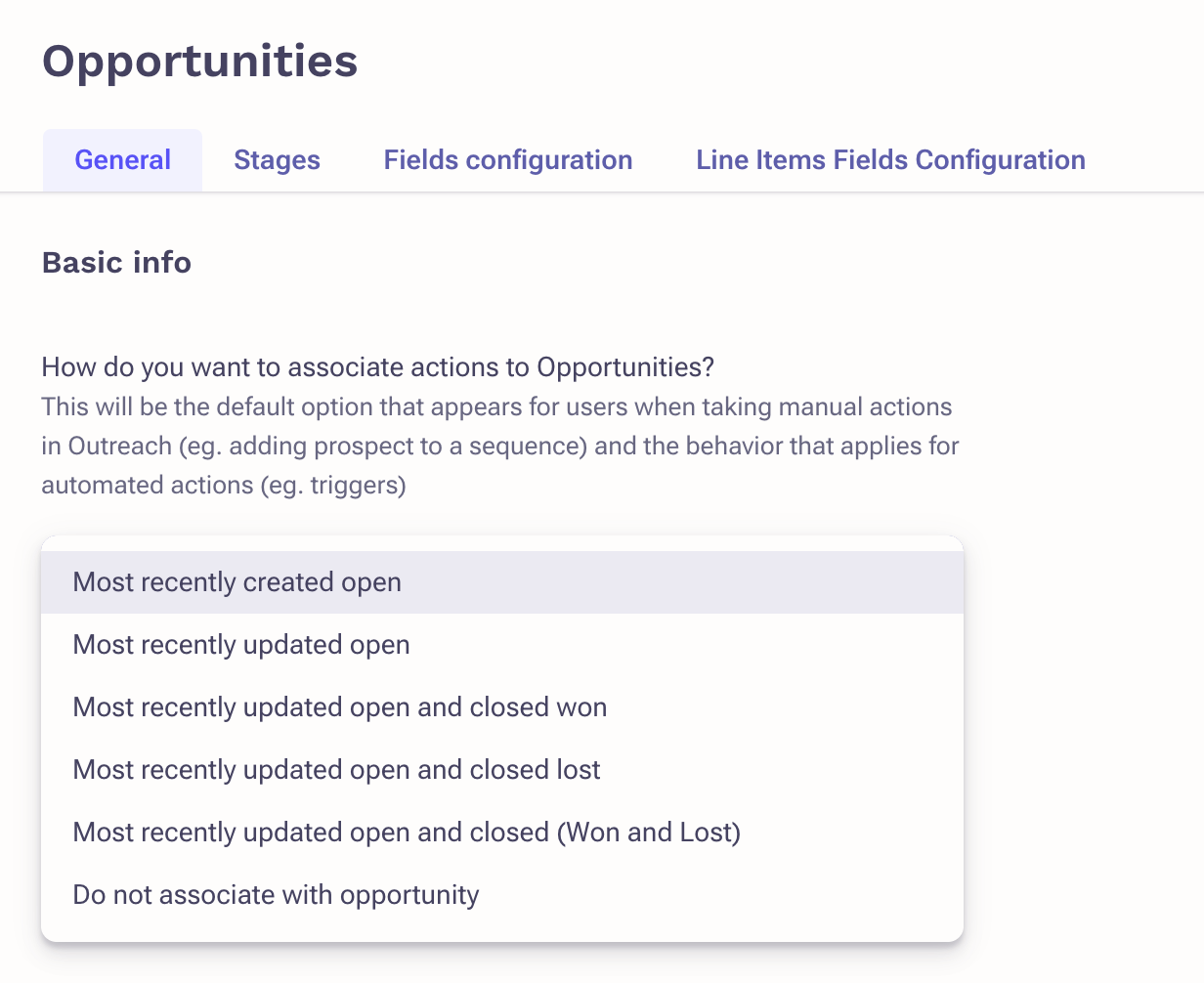
You can now associate Outreach activities with both open and closed opportunities, giving sellers a more complete view of account history. Closed Won and Closed Lost deals are available across workflows, making it easier to reference past context when re-engaging prospects or managing renewals. Once enabled by an admin, this update applies automatically, allowing sellers and managers to capture more accurate activity-to-opportunity relationships without changing their workflows.
Release Date
June 11, 2026 – June 25, 2026
Updates
- Admins can configure opportunity association settings to include Closed Won, Closed Lost, or both alongside open opportunities.
- Closed opportunities now appear in the opportunity picker across workflows, including email composition, call logging, task creation, meeting logging, and sequence enrollment.
- Sellers can associate activities directly with closed opportunities when logging calls, emails, tasks, meetings, and in-person interactions.
- Personalization Agent templates can reference a specific closed opportunity, allowing variables such as opportunity name and stage to reflect the correct deal context.
- Configuration is applied at the org level and takes effect immediately once enabled, with no changes required from sellers.
To learn more, view the support article.
Was this article helpful?
That’s Great!
Thank you for your feedback
Sorry! We couldn't be helpful
Thank you for your feedback
Feedback sent
We appreciate your effort and will try to fix the article