May 2026 Release Overview
IMPORTANT UPDATE:
From June 15 through September 30, 2026, we will begin migrating all remaining users to the personalized homepage and deprecate the legacy 360 homepage experience. The improved homepage experience is built to cater to different roles such as sellers, customer success, and account reps, providing expanded capabilities not available on the legacy 360 homepage. To learn more, view the support article. Otherwise contact your account rep or support for more information.
AI Agents, Personalization, and Data Enrichment
Custom Object Variables for Personalization Agent
Trigger highly relevant outreach using your custom objects data.
Summary
Drive more relevant, timely outreach in Outreach through automatic trigger sequences or personalize messages based on custom object data such as events, product interest submissions, webinar registration or renewal milestones.
Release Date
May 14, 2026 – June 18, 2026
Updates
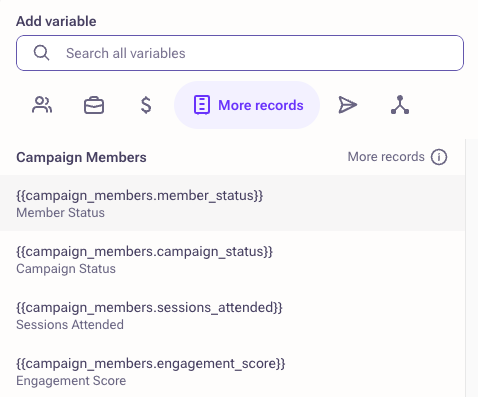
- Use custom object data in templates, snippets, one-off emails, and sequence emails through the variable picker, enabling dynamic personalization with fields from your custom objects.
- Access custom objects linked to prospects, accounts, or opportunities directly in the variable picker.
- Automatically trigger sequences based on custom object events (for example, when a record is created or updated), using the exact associated record for personalization.
- Personalize outreach using the most recently updated related custom object record on manually launched sequences.
- Support multiple custom object variables within a single template to combine different data sources for richer messaging.
To learn more, view the support article.
Smart Data Enrichment Enhancement: New ZoomInfo Signals
Identify high-intent accounts and prospects with key market signals for smarter targeting and outreach.
Summary
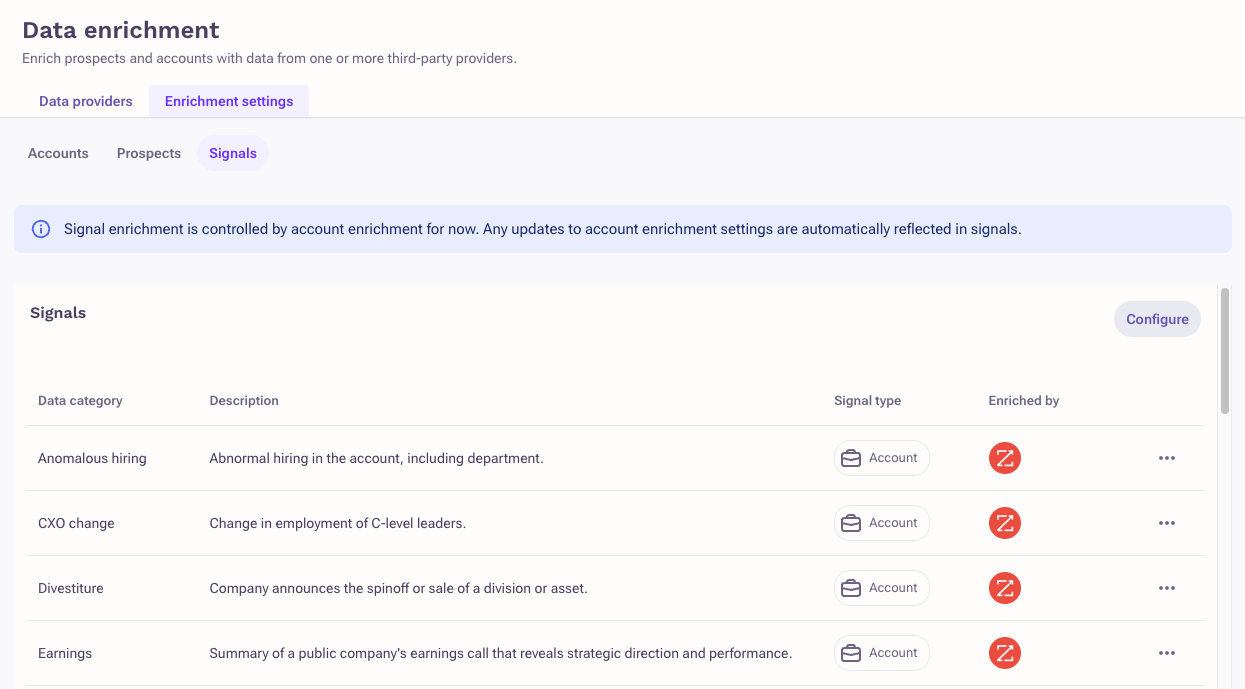
New ZoomInfo Signals expand Smart Data Enrichment by providing actionable insights into companies and prospects based on market events and intent signals. Sellers and RevOps teams can use these signals as context to better identify which accounts to prioritize and tailor the outreach. The new signals surface directly within existing agents and workflows, enabling more precise targeting and personalization without additional manual effort.
Release Date
May 14, 2026 – June 18, 2026
Updates
- 20 new ZoomInfo signals that capture company and prospect activity, including hiring trends, leadership changes, funding events, and intent signals.
- Utilize these new signals to filter and target accounts in the Revenue Agent.
- Utilize these new signals to personalize outreach in the Personalization Agent.
- Track the details of the signals from companies including strength (when applicable) in the Account Activity pages.
To learn more, view the support article.
MCP Server Actions
Enable AI agents to take action across your sales workflows, not just retrieve data.
Summary
Outreach MCP Server now allows AI agents to take direct actions across core sales workflows in addition to retrieving information. Agents can create and manage records such as accounts, opportunities, and prospects, helping automate tasks that previously required manual input. Enhanced search capabilities also allow agents to query data using filters like stage, owner, and custom fields, improving precision and efficiency. This enables sellers, RevOps teams, and technical users to streamline workflows and execute tasks more effectively within Outreach.
Release Date
May 14, 2026 – June 18, 2026
Updates
- Agents can now create and delete accounts, opportunities, and prospects, as well as add or remove prospects from sequences.
- Introduced enhanced search capabilities that support filtering by attributes such as date, owner, stage, and custom fields.
- Added tools that allow agents to discover available fields, required inputs, and lifecycle stages dynamically when performing actions.
- Replaced legacy name-based search with more flexible general-purpose search across accounts, prospects, opportunities, sequences, and users.
To learn more, view the support article.
Sales Engagement
Custom Meeting Fields Enhancements
Capture structured meeting data with expanded field types and improved booking experience.
Summary
Custom Meeting Fields enhancements expand how you capture and manage internal meeting data in Outreach. Admins can now define a wider range of field types, allowing sellers to record more accurate and structured details—such as deal size or close probability—directly during meeting booking. The update also improves the experience across booking surfaces, including the Outreach web app, Google Calendar Extension, and Outlook Add-in. These changes help sales teams and admins maintain cleaner data, reduce errors, and ensure consistency across systems.
Release Date
May 14, 2026 – June 18, 2026
Updates
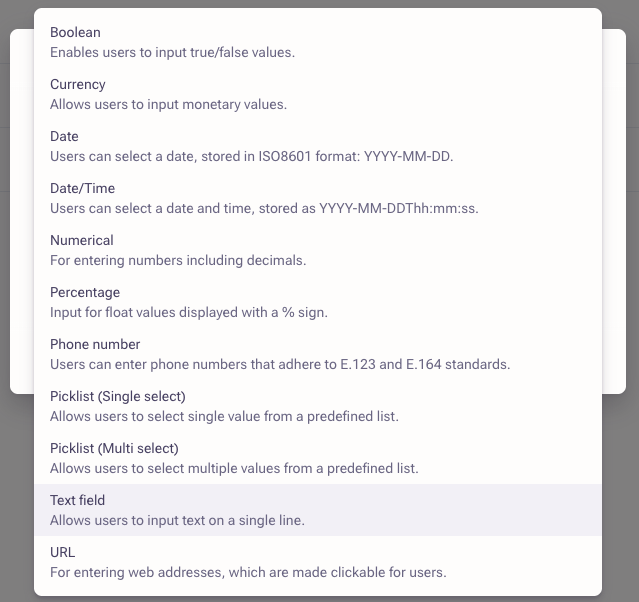
- Expanded support for all available field types, including currency, percentage, date/time, picklists, and more, enabling more precise data capture during meeting booking.
- Improved data entry experience in the Google Calendar Extension with a warning message for invalid inputs, allowing users to fix or remove incorrect values before sending invites.
- Added clear messaging to indicate that required custom meeting fields are enforced only in the Outreach web app, helping set expectations across booking surfaces.
- Enabled admins to define and manage field types for custom meeting fields, with updates applying across all future meetings.
- Ensured custom meeting fields are available across supported booking surfaces, including the Outreach web app, Google Calendar Extension, and Outlook Add-in.
To learn more, view the support article.
SMS on Mobile
Send and manage SMS conversations directly from the Outreach mobile app.
Summary
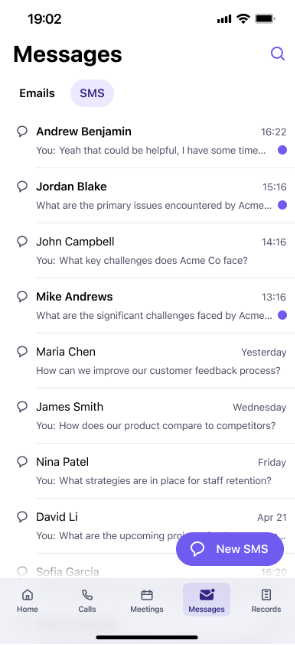
SMS on Mobile enables sellers to communicate with prospects via text message directly from the Outreach mobile app. You can send, receive, and manage SMS conversations while on the go, without needing to switch to a desktop experience. This helps sellers stay responsive and maintain continuity in conversations, even when away from their desk. The feature supports efficient follow-ups and real-time engagement with prospects from anywhere. SMS support is only for US/CA phone numbers at this time.
Release Date
May 14, 2026 – June 18, 2026
Updates
- Access SMS conversations directly within the Outreach mobile app to manage outreach alongside other activities.
- Send and receive text messages with prospects from your mobile device.
- Start new SMS conversations by selecting a prospect or manually entering a phone number.
- View full message history to continue existing SMS conversations without losing context.
- Manage SMS interactions as part of your regular mobile workflow, keeping conversations centralized.
To learn more, view the support article.
Reporting on Revenue Agents
Measure Revenue Agent impact with sequence-level performance insights.
Summary
The Sequence Performance report now includes enhanced filtering to help you understand how Revenue Agents contribute to your outbound results. Sales leaders, managers, and RevOps teams can analyze key outcomes—such as meetings booked, pipeline creation, and revenue generation—attributed to agent-driven activity within sequences. This update helps teams evaluate the effectiveness of automated prospecting and make more informed, data-driven decisions to optimize workflows.
Release Date
May 14, 2026 – June 18, 2026
Updates
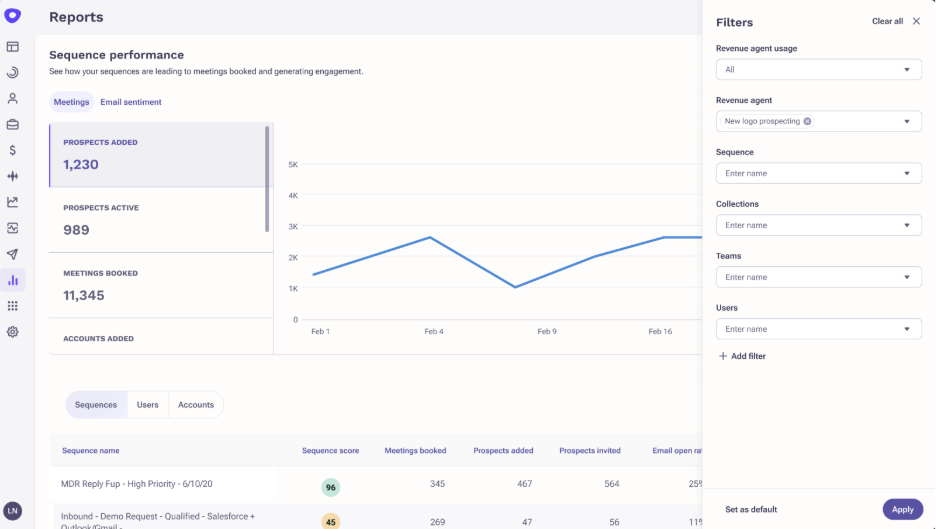
- Added a ‘Revenue Agent’ filter to the Sequence Performance report, enabling you to view sequences where prospects were added by a specific Revenue Agent along with associated metrics.
- Introduced a ‘Revenue agent usage’ filter to segment results by Revenue Agent activity, non-agent activity, or all sequences.
- Expanded reporting to include key performance outcomes such as meetings booked, opportunities created, pipeline influenced, and revenue generated tied to agent-driven activity.
- Reporting can now be filtered to analyze performance across both Meetings and Email Sentiment data for Revenue Agent-driven sequences.
To learn more, view the support article.
Reporting for AI Content
Analyze the impact of AI-personalized content on sequence performance.
Summary
Outreach now includes an AI content usage filter in the Sequence Performance report, enabling users to evaluate how AI-generated personalization influences engagement and outcomes. Sales leaders and teams can compare performance across sequences that use AI-generated content versus those that do not. This added visibility helps you better understand the impact of AI-driven personalization on key metrics like meetings booked, open rates, and replies. By segmenting performance data, teams can make more informed decisions about adopting and optimizing AI content strategies.
Release Date
May 14, 2026 – June 18, 2026
Updates
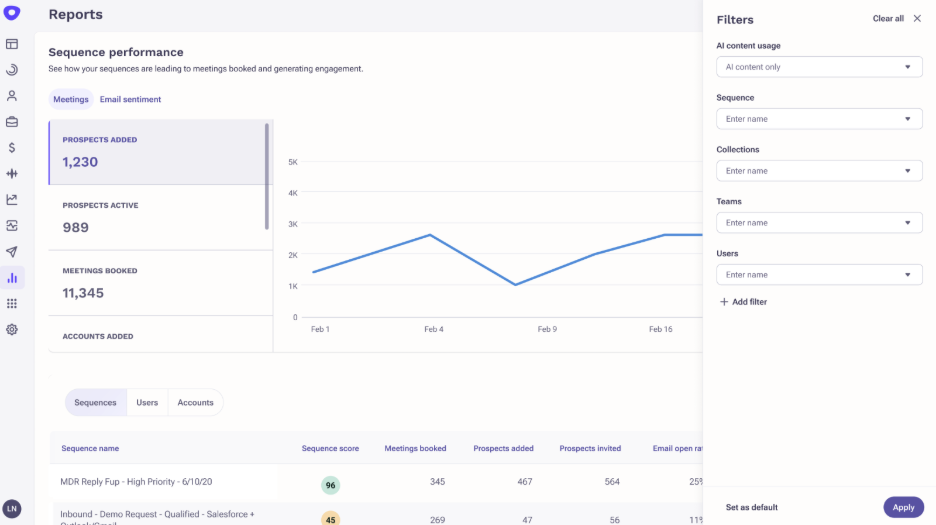
- Added a new ‘AI content usage’ filter to the Sequence Performance report, accessible from the Filters panel.
- Filter options include ‘AI Content,’ ‘Non-AI Content,’ and ‘All Content,’ allowing users to segment sequence performance based on AI usage.
- Selecting ‘AI Content’ displays metrics only for sequences that include AI-generated content in emails or LinkedIn messages.
- Selecting ‘Non-AI Content’ isolates sequences without AI-generated content for comparison.
- The filter applies across the full report, including both Meetings and Email Sentiment tabs.
To learn more, view the support article.
Outreach Voice
Voicemail Drop - Sequential Dialing and Org Settings
Enable voicemail drops with clear consent guidance and streamlined setup.
Summary
Admins can now enable Voicemail Drop directly through an organization-level setting, removing the need for manual support requests. When enabled, users are informed about consent requirements for using recorded or AI-generated voice messages, helping teams stay compliant while executing outbound calls. This update simplifies feature access while ensuring users understand key regulatory considerations. It benefits admins managing configuration and sellers leveraging voicemail drops in their outreach workflows.
Release Date
May 14, 2026 – June 18, 2026
Updates
- Added an organization-level setting that allows admins to enable Voicemail Drop without submitting a support request.
To learn more, view the support article.
Conversation Intelligence and Rep Coaching
Comments in KaiaTM Live Experience
Collaborate live with in-meeting comments and real-time mentions.
Summary
Kaia Live now supports comments directly during meetings, enabling real-time collaboration without interrupting the conversation. Instead of using notes, users can add comments and @mention teammates to highlight key moments or follow-ups as discussions happen. Mentioned users receive notifications with a link to the meeting, making it easier to stay aligned and take action. This update helps sellers, managers, and collaborators capture insights and coordinate next steps more effectively during live interactions.
Release Date
May 14, 2026 – June 18, 2026
Updates
- Replaced “notes” with “comments” in the Kaia Live experience for in-meeting collaboration.
- Users can now @mention specific team members directly within Kaia Live during meetings.
- Mentioned users receive a notification with a link to the meeting for quick access and follow-up.
To learn more, view the support article.
Custom KaiaTM Summaries - Org Defaults
Set a default AI summary to standardize meeting insights across your organization.
Summary
Admins can now define which AI Summary template is applied by default across recordings. This ensures consistency in how meeting insights are captured and shared across teams without requiring manual selection for each recording. The default summary applies across multiple surfaces, helping sellers and managers quickly access the information that matters most. This update is particularly useful for organizations that want to standardize how meeting outcomes and key insights are documented and distributed.
Release Date
May 14, 2026 – June 18, 2026
Updates
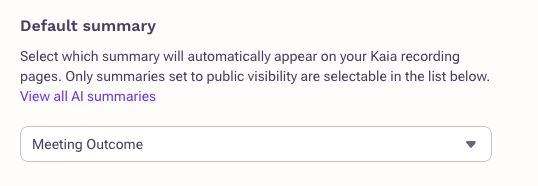
- Admins can select a default AI Summary template that is automatically applied to recordings.
- The selected default summary appears on the recording page and in the recording list view.
- The default summary is used in post-meeting emails sent after recordings.
- Summaries synced to systems now follow the configured default template.
- Shared recording links include the selected default summary for consistent external viewing.
To learn more, view the support article.
Self-Serve KaiaTM Recording Upload
Upload recordings anytime and generate insights even if Kaia was not present.
Summary
You can now manually upload recorded meetings and access the same insights typically generated during live sessions. This allows sellers and managers to recover value from meetings where Kaia was not invited or unable to join. Once uploaded, recordings can be used to generate summaries, share content, and leverage AI-driven insights. This helps ensure consistent visibility into meeting outcomes regardless of how the recording was captured.
Release Date
May 14, 2026 – June 18, 2026
Updates
- Users can upload video or audio recordings directly from the Recording page to generate insights.
- Uploaded recordings are processed after submission, with confirmation in-app and via email once ready.
- Users can assign speakers to uploaded recordings for more accurate context and analysis.
- A new recording source filter allows users to identify and view recordings based on their origin, including uploaded files.
To learn more, view the support article.
Deal Management and Forecasting
Forecast Movement: Column Customization
Customize Forecast Movement views to surface the most relevant deal data.
Summary
Admins can now customize the columns displayed in Forecast Movement charts to better align with team needs. Instead of relying on a fixed set of fields, you can configure which data points appear for each forecast, making it easier to focus on the most relevant information. This helps sales leaders quickly assess movement and performance without navigating into individual records. The feature supports more tailored reporting across different teams and sales motions.
Release Date
May 14, 2026 – June 18, 2026
Updates
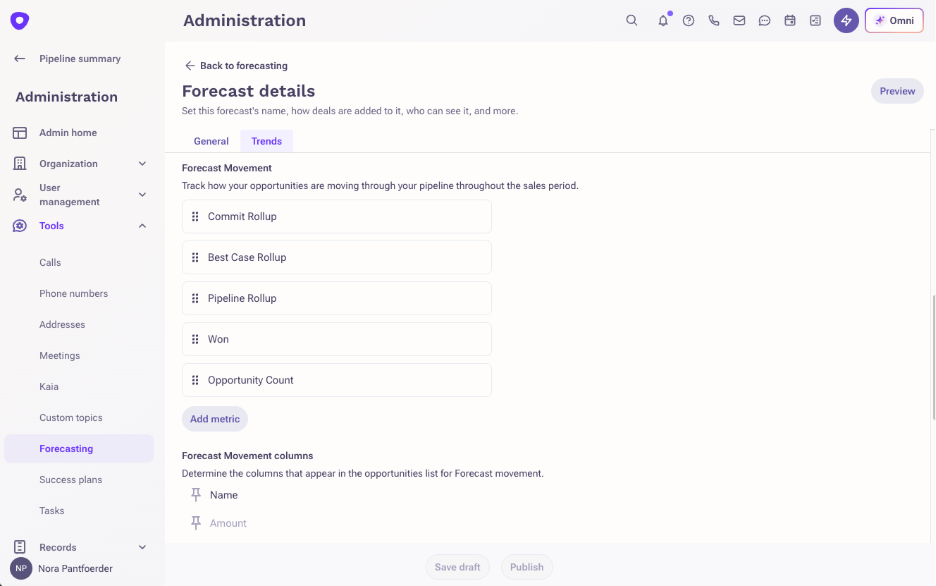
- Admins can select and display specific fields, including custom fields, in the Forecast Movement chart table.
- Column configurations can be set per forecast, allowing different layouts for distinct forecasts such as monthly or quarterly views.
- Default columns remain available, with the option to modify, remove, or add new fields as needed.
- Columns can be reordered using drag-and-drop to prioritize the most important data in the table view.
To learn more, view the support article.
Deal Overview Page: New Tile
Focus on the deal insights that matter most.
Summary
A new Blank Tile is available on the Deal Overview Page. Unlike other tiles with fixed content, this tile lets users select any Opportunity field to display, giving users full control over which deal data surfaces in the layout.
Release Date
May 14, 2026 – June 18, 2026
Updates
- Add the tile to any custom layout, pick an Opportunity field from the selector, and the tile renders that field's label and value. Users can add it multiple times to show multiple fields side by side.
To learn more, view the support article.
Platform Services
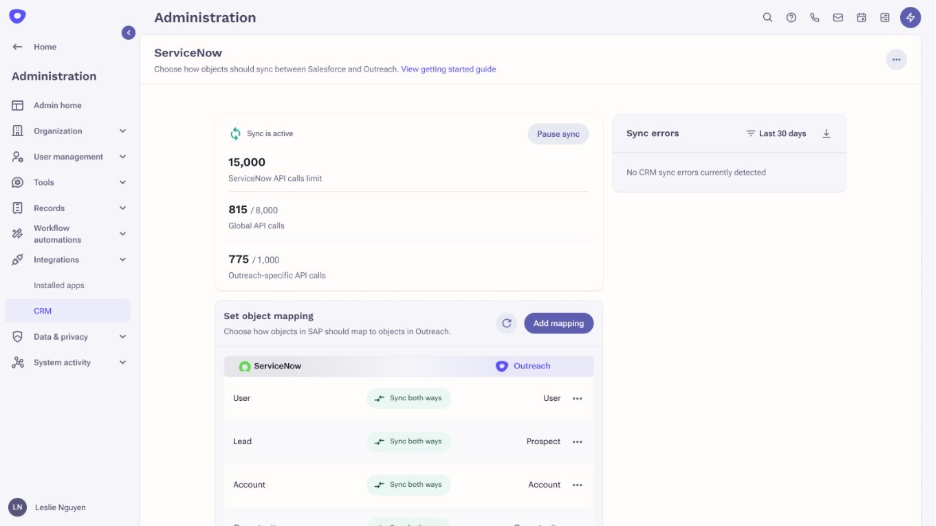
ServiceNow Sales CRM Integration
Connect Outreach with ServiceNow Sales CRM to unify workflows and keep data in sync.
Summary
Outreach now integrates natively with ServiceNow Sales CRM, allowing teams to manage outreach and CRM data within a unified workflow. Sellers can run sequences, manage opportunities, and track pipeline activity while keeping CRM data automatically synchronized. This integration supports the full lead-to-cash process, helping sales teams operate more efficiently across prospecting, deal management, and customer engagement. Sellers, managers, and admins who rely on ServiceNow as their system of record can also leverage Outreach capabilities.
Release Date
May 6, 2026
Updates
- Native integration with ServiceNow Sales CRM, enabling Outreach functionality within ServiceNow-based workflows.
- Bi-directional data sync to keep records aligned between Outreach and ServiceNow.
- Object and field mapping controls, allowing admins to define how data flows between systems.
- Conditional syncing and dependency handling to manage how and when records are updated.
- Extended Outreach capabilities—including sequences, task management, and opportunity tracking—to teams using ServiceNow Sales CRM.
To learn more, view the marketplace listing.
Account and Prospect Notes to Data Sharing Tables
Access account and prospect notes directly through your data sharing workflows.
Summary
Account and prospect notes are now available through Outreach Data Sharing, allowing teams to access note data alongside existing shared records. This enables admins and data teams to retrieve and analyze notes connected to accounts and prospects without relying on manual extraction. By including notes in data sharing, organizations can gain deeper insights into customer interactions and maintain a more complete data set across systems. This update benefits admins and data teams looking to centralize and utilize Outreach data for reporting and analysis.
Release Date
May 14, 2026
Updates
- Added account and prospect notes to Data Sharing, making note data accessible alongside other shared records.
- Notes can now be retrieved with associated metadata, including linked account or prospect, timestamps, and content.
- Note records include fields such as message content, creation and update timestamps, and associated entities for deeper analysis.
- No additional setup is required to access notes beyond having Data Sharing enabled and appropriate permissions.
To learn more, view the support article.
New Fields in Data Share Sequence States Tables
Access new sequence states fields directly through your data sharing workflows.
Summary
New sequence states fields are now available through Outreach Data Sharing, allowing teams to access additional data alongside existing shared records. This enables admins and data teams to retrieve and analyze additional engagement metrics connected directly through Data Sharing, without requiring any additional setup or manual extraction. By including these fields in data sharing, organizations can gain deeper insights into customer interactions and maintain a more complete data set across systems.
Release Date
May 14, 2026
Updates
- Added new fields to Sequence States in Data Sharing, making more data accessible alongside other shared records.
- The fields are
deliver_count,open_count,click_count, andreply_count. - No additional setup is required to access these fields beyond having Data Sharing enabled and appropriate permissions.
To learn more, view our developer documentation.
CRM Sync Improvements: Daily Polling on Picklist Value
Improve CRM sync reliability with active polling of picklist values.
Release Date
May 14, 2026 – June 18, 2026
Summary
Outreach now automatically syncs active picklist values from Salesforce daily for any Picklist-to-Picklist field mappings. New picklist values added in Salesforce will be available in Outreach within 24 hours without any manual intervention.
Details
- The poller runs once every 24 hours with no configuration required, and no option to set a custom schedule.
- Automatic add of any newly detected active picklist values into Outreach.
- One API call is made per mapped object per day.
- This feature is always on. There is no opt-out or per-org toggle.
Note: The feature applies to Salesforce CRM integration only.
Microsoft Teams Notifications
Never miss a revenue critical update with notifications via Microsoft Teams.
Summary
Connect Outreach to Microsoft Teams to receive notifications, helping revenue teams stay informed and aligned in real time.
Release Date
May 14, 2026
Updates
- Admins must enable the Microsoft Teams integration at the organization level.
- Users control which Outreach notifications they receive through their personal notification settings.
To learn more, view the support article.
Was this article helpful?
That’s Great!
Thank you for your feedback
Sorry! We couldn't be helpful
Thank you for your feedback
Feedback sent
We appreciate your effort and will try to fix the article