Symptom
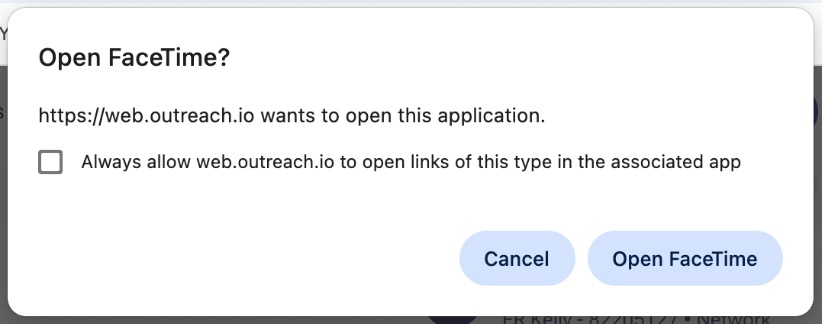
When trying to place a call to a prospect in Outreach, a popup asking to open FaceTime (Mac OS) or the Phone app (Windows) pops up instead of the Outreach Dialer.
Applies To
Outreach Users with Voice access
Outreach Admins
Resolution
Go to your user's voice settings page following these steps below:
- Hover over your name/initials in the bottom left
- Click on Personal settings
- Click on Phone numbers under the Voice section
- Confirm that you have at least one of these options selected as your default for calling/texting:
- A purchase phone number
- An imported personal phone number
- Local dial / local presence (A number with the prospect’s area code)
If you do not see any phone numbers available then your admin needs to assign you a purchased phone number, or permit you the ability to use local dial, or you'll need to add your own personal phone number by importing it into the system.
Cause
Without the Voice option available or a phone number assigned as your default to use for dialing in Outreach, your default operating system app will be prompted instead by Outreach.
Please find below the different reasons FaceTime will popup instead of the Outreach dialer:
- the 'Voice Feature' is disabled in your Governance Profile (or for the whole Org).
- the 'Local Presence' option is disabled in your Governance Profile.
- you don't have any assigned number configured within your Personal Settings and the 'Local Presence' is also disabled.
Additional Information
Outreach User Admin Settings: Org Voice Overview
How To Configure Custom Caller ID (Import a Phone Number into Outreach) How To Enable Local Presence for Outreach Voice, and How It Works
Was this article helpful?
That’s Great!
Thank you for your feedback
Sorry! We couldn't be helpful
Thank you for your feedback
Feedback sent
We appreciate your effort and will try to fix the article