Symptom
You are not receiving any Chrome and Desktop notifications for certain Outreach activity.
Applies To
-
Chrome Browser
-
Mac OS & Windows OS
Resolution
Outreach notifications need to be enabled at the Outreach level, browser level and operating system level.
Outreach
- Log in to Outreach.
- Click on your profile (name in bottom left) > Personal settings.
- Click on Notifications under the General section.
- Toggle Enable desktop notifications to on/checked. Go ahead and enable any other notifications features you want as well.
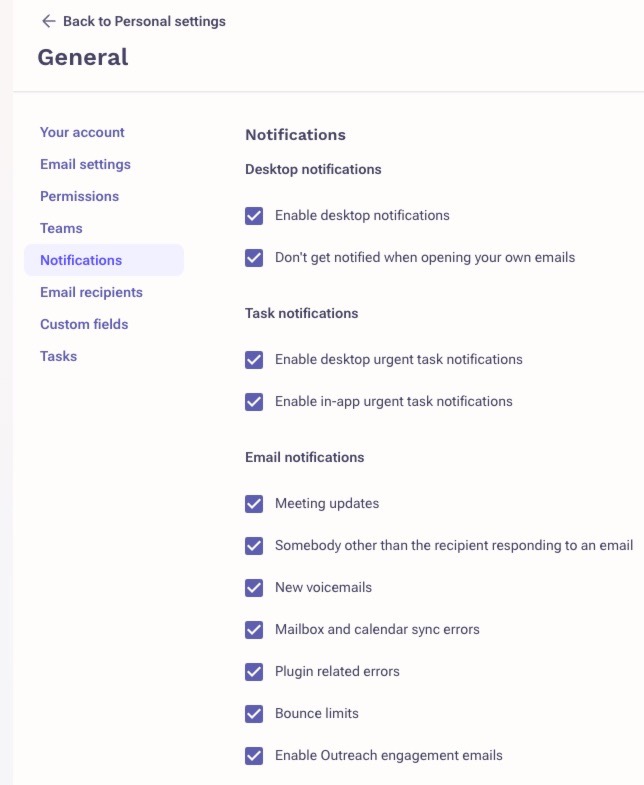
- Click Save.
Chrome
- Click on Site information (padlock icon) in the Chrome URL bar on the left side while in Outreach site.
- Click Site Settings.
- Set Notifications to Allow.
Operating System Settings
Notifications may be blocked on an OS level. Ensure that notifications are allowed in Windows or MacOS. Enable notification and ensure Google Chrome is allowed.
Note: MacOS users who use Focus should ensure that both Google Chrome and Google Chrome Helper (Alerts) have their permissions set to Allowed.
Cause
Some users don't realize that there are multiple locations they need to configure to make sure they are correctly receiving Outreach notifications. Ensuring that all of the above options are configured correctly will allow you to receive your Outreach activity notifications to your Chrome browser and desktop.
Was this article helpful?
That’s Great!
Thank you for your feedback
Sorry! We couldn't be helpful
Thank you for your feedback
Feedback sent
We appreciate your effort and will try to fix the article