Objective
Learn how to search for, install, and manage integrated apps in your Outreach instance as an Admin.
Applies To
- Outreach Admins
- Integrations
Procedures
Access the Integrations List
- Access the Outreach Platform as an Admin.
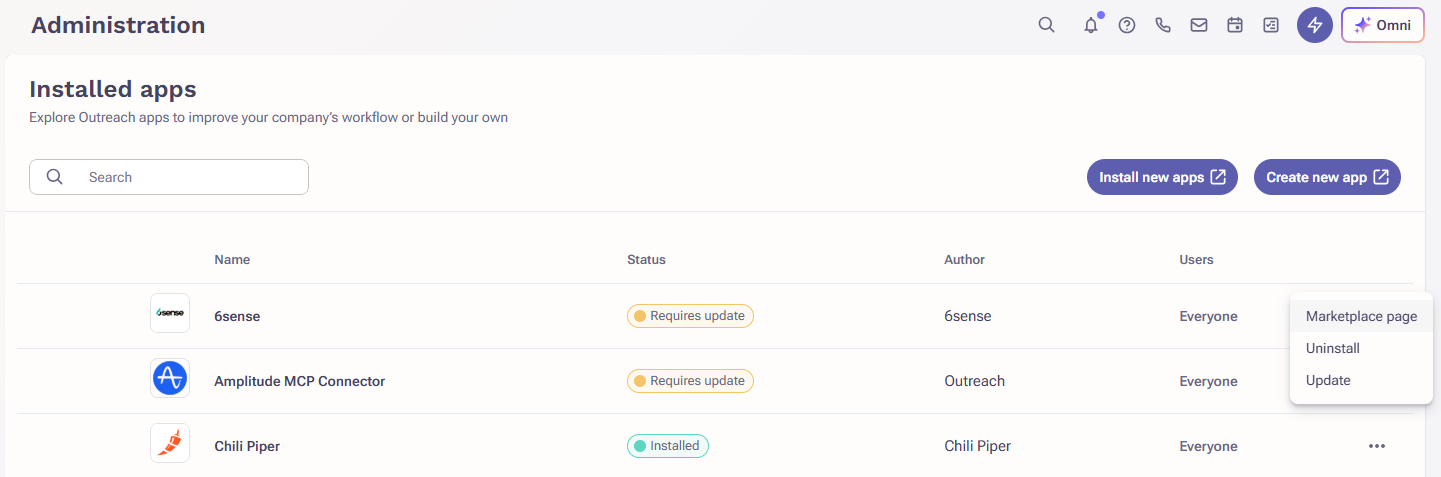
- Navigate to Administration > Integrations > Installed apps.
Install New Integration
- On the Installed apps page, click the Install new apps button. The Outreach marketplace site will open in a new browser tab.
- Search for and select the desired integration.
- On the integration's details page, click Install app.
Note: Some apps require installing and managing the integration with Outreach externally (that is, within their application rather than within Outreach). - Click through the installation steps until complete.

Manage an Integration
- On the Installed apps page, find and click the name of the integration you want to manage.
- Click through the available tabs and controls, and configure as needed.
Note: Different apps provide different configuration options. - When done, click Save.
From the Installed apps page, to the far right of a list item, you can also click the ⋯ menu to:
- visit the app's Marketplace page
- Uninstall the app
- Update the app
Was this article helpful?
That’s Great!
Thank you for your feedback
Sorry! We couldn't be helpful
Thank you for your feedback
Feedback sent
We appreciate your effort and will try to fix the article