Purpose:
The purpose of this article is to provide direction to Outreach Admins in syncing users from Microsoft Dynamics to the Outreach platform via the Polling option.
Intended Audience:
- Outreach Admins
Notes:
- Outreach does not sync users from Dynamics into Outreach. This option must be enabled after enabling the plugin.
- When enabled, Dynamics users will be automatically created in Outreach.
- Dynamics users must exist in Outreach in order for Outreach to sync CRM records and activities correctly. Outreach recommends enabling user sync after enabling the plugin.
- Outreach users created via user sync are locked by default and cannot be used to log in until activated.
- Users created via sync will not count against the license limit until assigning a license to users. For more information regarding activating users, refer to the Outreach Seat Management Process.
How to Sync Dynamics Users to Outreach via Polling
- Access the Outreach Platform.
- Access the Dynamics Plugin.
- On the Dynamics settings page, click the Systemusers object in the Types list.
- On the Configuration settings page, scroll down past the field mappings section until you reach the Polling section.
- Set Polling settings to Automatically.
- Click the + add conditions option to add specific sync criteria as applicable.
- Click Save.
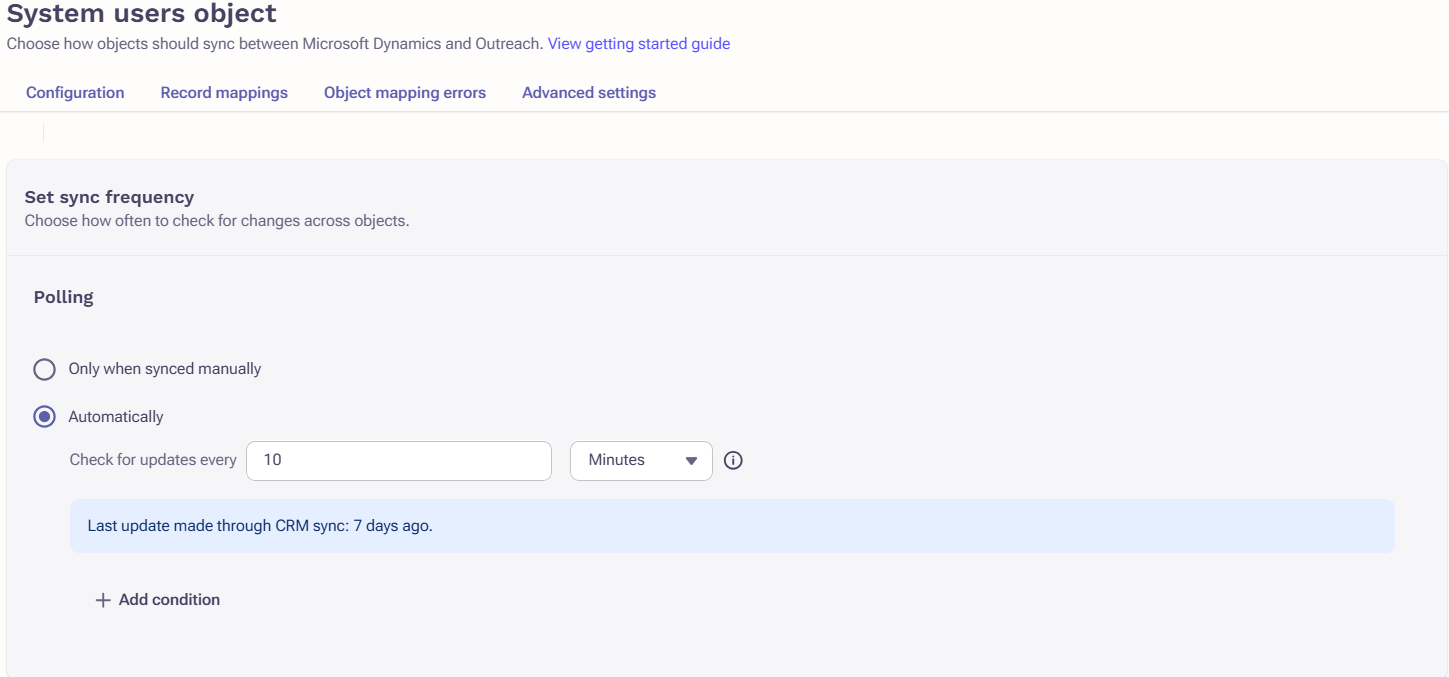
Users will now sync from Dynamics to Outreach based on the parameters defined above.
Was this article helpful?
That’s Great!
Thank you for your feedback
Sorry! We couldn't be helpful
Thank you for your feedback
Feedback sent
We appreciate your effort and will try to fix the article