Objective
Learn Agent Studio, including available templates, how workflows are structured, and how access is determined by package.
Applies To
- Outreach Admins
- Outreach Users
- Amplify package
Before You Begin
- Access to Agent Studio templates is gated by package. See Package based access below for details.
- Customers on Engage only (no Deal Management, no Amplify) do not have access to Agent Studio.
Overview
Agent Studio introduces pre-curated, high-impact sales workflows visualized in a modular canvas interface. Built on the existing Triggers engine, this release adds net-new capabilities: scheduled execution, inline Research Agent actions, and Deal Alert automation — all designed to activate in minutes with no custom build required.
Agent Studio workflows live in a dedicated tab under Agents & AI, visually and functionally separate from existing Trigger templates.
Every Agent Studio workflow is made up of four fixed blocks. Settings within each block are configurable, but blocks cannot be added, removed, or reordered. This structure is intentional — it reduces setup complexity and drives faster activation.
- Source & Event — Select the object and when to trigger (for example, new prospect created, opportunity updated, or a scheduled time).
- Target & Frequency — Set which records are acted on and how often. Most templates run once per target to prevent duplicate processing.
- Conditions — Optional filters to narrow when the workflow proceeds (for example, research score above 7, opportunity stage, or account attributes).
- Actions — Defines what happens. Available actions include Run Research Agent, Create Deal Alert, and Add to Sequence.
Procedure
Admin Configuration
- Log in to Outreach as an Admin.
- Click Administration > User management > Access control.
- Select a profile.
- Navigate to Agent Studio.
- Toggle on Create and configure agents.
- Click Save.
That profile will now be able to access Agent Studio.
User Access
- Log in to Outreach as a user.
- Click Agents & AI > Agent Studio.
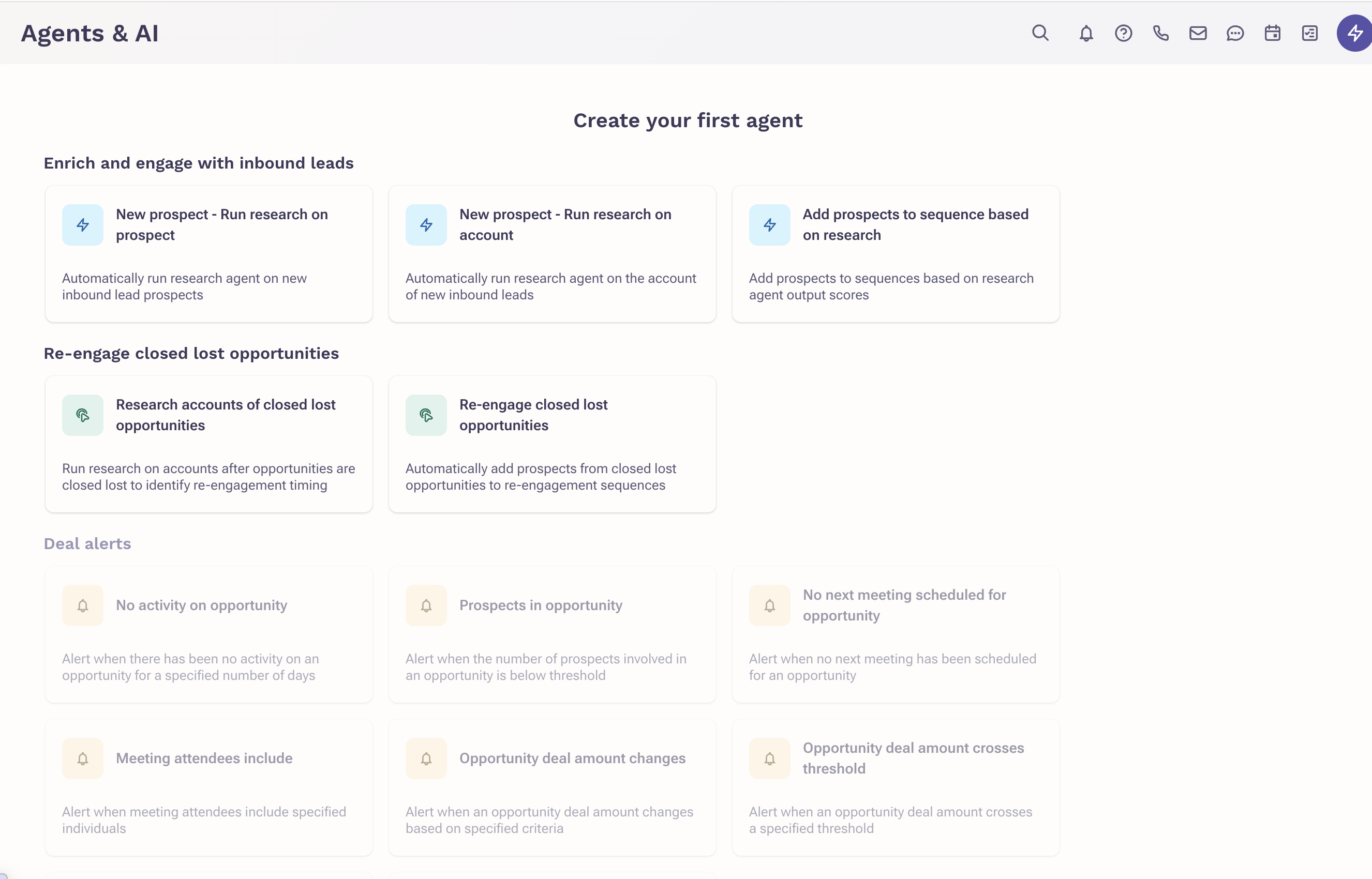
- Select an agent to create.
- Enter a name for the agent.
- Click into each card and complete the agent prompts
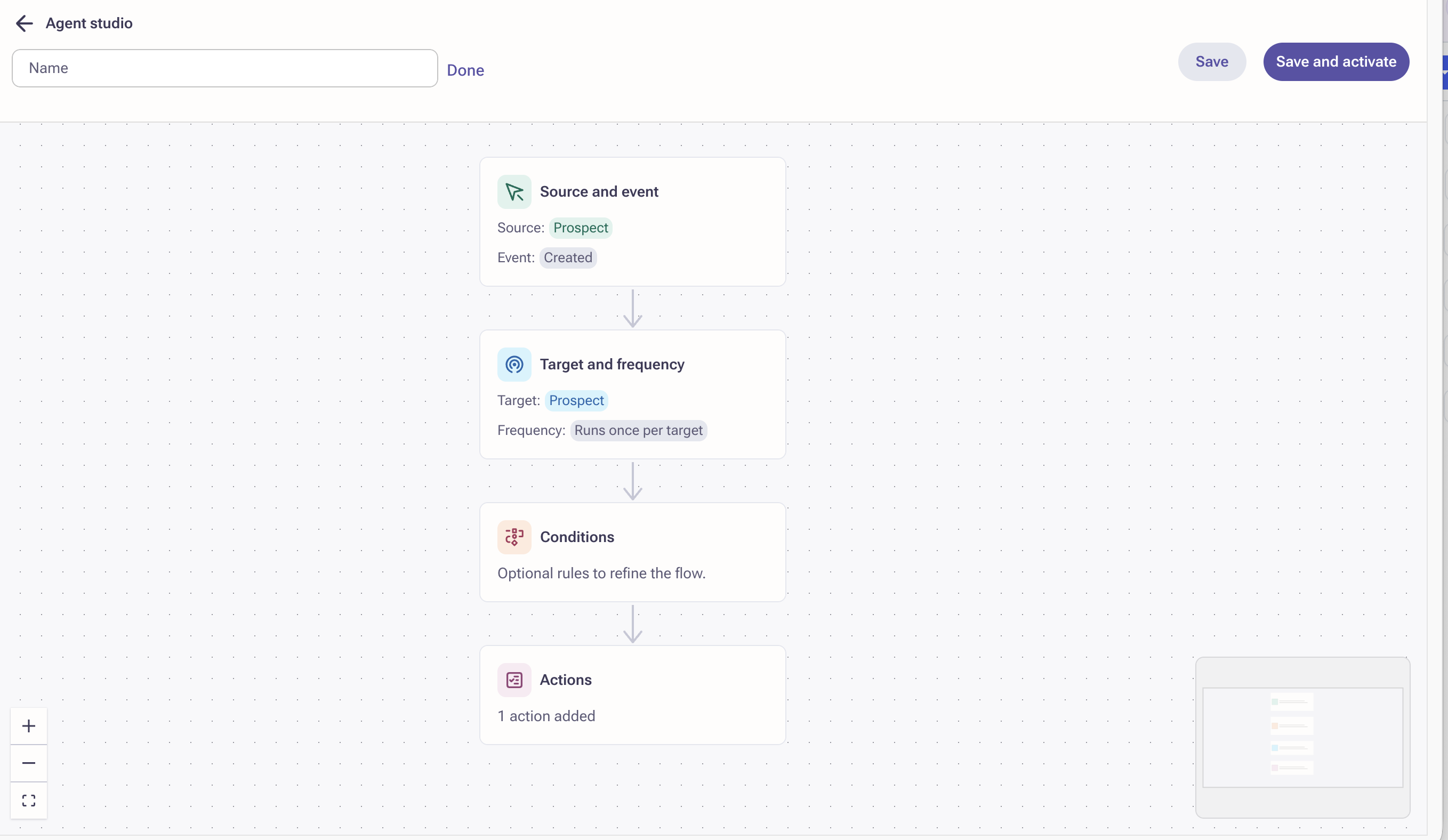
- Click Save and activate.
Templates
Agent Studio launches with 11 pre-curated templates across three categories. All templates are visible to users, with access gated by package.
Enrich & Engage Inbound Leads
Run AI-powered research and smart routing the moment a new lead arrives. Eliminates manual triage and ensures no inbound prospect goes unworked.
- New Prospect — Run Research on Prospect — Automatically triggers a Research Agent on each new inbound prospect the moment they are created in Outreach.
- New Prospect — Run Research on Account — Automatically triggers a Research Agent on the account associated with each new inbound prospect.
- Add Prospects to Sequence Based on Research — Uses Research Agent output scores to route prospects into the right sequence automatically: high-touch for strong fits, low-touch for others.
Re-Engage Closed Lost Opportunities
Re-research accounts and restart outreach automatically at the right signal, typically 6 to 8 months after an opportunity closes lost. No rep intervention required.
- Research Accounts of Closed Lost Opportunities — Runs research on accounts tied to closed-lost opportunities to identify whether conditions have changed and re-engagement timing is right.
- Re-Engage Closed Lost Opportunities — Automatically adds prospects from closed-lost accounts to re-engagement sequences when the scheduled signal fires.
Deal Alerts
Monitor every active deal every day across eight risk conditions. Runs on a fixed 24-hour schedule. Each alert is surfaced in-app with context so AEs and managers know exactly where to focus.
- No Activity on Opportunity — Alert when there has been no activity on an opportunity for a configurable number of days.
- Prospects in Opportunity — Alert when the number of prospects involved in an opportunity falls below a defined threshold.
- No Next Meeting Scheduled — Alert when no next meeting has been scheduled for an opportunity within a configurable window.
- Meeting Attendees Include — Alert when meeting attendees include specified individuals, such as key stakeholders or executive sponsors.
- Opportunity Deal Amount Changes — Alert when a deal amount changes based on configurable operators: increased by, decreased by (value or percentage), above, or below.
- Opportunity Deal Amount Crosses Threshold — Alert when a deal amount crosses a specified upper or lower threshold value.
- Opportunity Close Date Moved — Alert when an opportunity close date shifts by more than a configurable amount, forward or backward.
- Opportunity Close Date Overdue — Alert when an opportunity close date has passed without the deal being closed.
Package Based Access
Agent Studio templates are visible to all users. Access is gated based on the active package combination. Templates that require an unavailable package appear greyed out with a tooltip explaining the upgrade path.
| Customer Package | Access Level |
|---|---|
| Engage only (no Deal Management, no Amplify) | No access to Agent Studio (hidden) |
| Engage + Amplify | Access to Enrich & Engage and Re-Engage templates. Deal Alert templates greyed out with tooltip. |
| Engage + Deal Management (no Amplify) | Access to Deal Alert templates only. Other workflows greyed out with tooltip. |
| Engage + Deal Management + Amplify | Full access to all 11 templates. |
Agent Studio vs. Triggers
Agent Studio uses the same backend engine as Triggers but introduces new capabilities, a new UI surface, and a different usage model. Existing Trigger templates and their UI are fully unchanged by this release. The new field operators introduced in Agent Studio are the only shared enhancement between both surfaces.
| Capability | Agent Studio | Triggers |
|---|---|---|
| Workflow creation | Pre-curated templates with editable blocks | Fully customizable from scratch |
| Branching logic | Not available | Available |
| Scheduling support | Yes | No |
| Run Research Agent action | Yes | No |
| Create Deal Alert action | Yes | No |
| Visual canvas UI | Yes | No |
| New operators for field changes | Yes | Yes (shared from Agent Studio) |
| Access controlled by package | Yes (gated with tooltips) | No |
| Custom block add / remove / reorder | Not available | Available |
Frequently Asked Questions
Can users create workflows from scratch?
Not currently. All workflows are pre-curated templates with configurable block settings.
Can blocks be added, deleted, or reordered?
No. The block structure is fixed per template to reduce complexity and accelerate adoption. This constraint will be lifted in a future Agent Studio release.
Can I personalize actions within a template?
Yes. Within each block you can select which Research Agent to run, choose target sequences, set score thresholds, adjust alert time windows, and add notes to alerts.
Can I use branching logic like in Triggers?
No. Branching logic is not currently available in Agent Studio and is expected in a future release.
Will this affect existing Triggers?
No. Existing Trigger templates and their UI remain fully unchanged. The only shared change is the new field operators, which become available in both surfaces.
Why do some templates appear greyed out?
Your org may not have the required package (Amplify or Deal Management). A tooltip on each greyed-out template explains what is needed and the upgrade path.
Was this article helpful?
That’s Great!
Thank you for your feedback
Sorry! We couldn't be helpful
Thank you for your feedback
Feedback sent
We appreciate your effort and will try to fix the article