Objective
Learn about Outreach MCP Server and how it allows other AI Agents to utilize Outreach knowledge directly inside their workflows. In a server capacity, Outreach acts as a producer (server) of knowledge and a facilitator of actions for MCP Clients. To learn more about Outreach as an MCP Client, refer to the MCP Client documentation.
Outreach MCP Server is built to support Anthropic's Model Context Protocol (MCP) standard and can be utilized by any MCP Client that follows the MCP specifications. Any user who wants to utilize Outreach MCP Server must be an active, licensed seat in an Outreach instance and have the Amplify add-on package enabled in their plan.
Applies To
- Outreach Admins who want to set up Outreach via MCP for their organization
- Outreach Users who want to use Outreach via MCP in their daily workflow tools like Claude, ChatGPT, Microsoft Copilot, Google Gemini, and so on
Before You Begin
Outreach MCP Server requires the following for users trying to access Outreach via MCP:
- The organization must have Amplify enabled with active credits. If you do not have the Amplify add-on, or you are unsure, please reach out to your AE to inquire about it.
- The user must be active and have access to at least one Outreach instance.
- MCP Clients like Claude, ChatGPT, etc. might require additional licenses and environmental setups.
- If you are interested in learning more about how Outreach can behave as a MCP Client to bring in knowledge and actions from other systems, please check our MCP Connectors documentation.
- If you are a developer, partner or a customer planning to please check our developer documentation.
Overview
What is MCP?
AI applications are only as useful as the knowledge they can generate from the data they have access to. The real world is a landscape of disconnected data islands, hosted in their own servers and controlled by the hosting product. For useful and usable experiences, AI applications need to connect to these data sources. This is where MCP, or Model Context Protocol (MCP), comes in.
MCP is an open-source standard from Anthropic for connecting AI applications to external systems for tools, knowledge, insights, and actions that the local system doesn't have. MCP standardizes how LLMs communicate with each other. Think of MCP as context in motion, your Outreach AI can share or draw to and from the broader ecosystem of tools your company already uses, and those systems can talk back to Outreach.
You can learn more about MCP from Anthropic's official documentation. You can install Outreach's Official MCP Server directly in Claude.
Outreach MCP Server
In a server capacity, Outreach is a producer of knowledge and facilitator of actions for MCP Clients. Other AI Agents, or end users, can now utilize Outreach's data and draw best-in-class insights and next best actions directly inside their revenue workflows.
Outreach MCP Server is available to all Outreach customers to connect to. It is expected to be most useful for MCP Clients that integrate Outreach value into their workflows and end-user experiences.
Outreach envisions that customers can use Outreach-exposed MCP Tools in all sorts of applications, including LOB Agents, as well as MCP Clients like Claude, OpenAI, Copilot, Gemini, Agentforce etc.

Setup
Enabling Outreach MCP Server
| Note: If you do not see the options below available to you, you may not have the Amplify add-on. Reach out to your AE to inquire about the Amplify add-on product. |
Before MCP Clients can connect to it, Outreach MCP Server must be enabled. This setting is per organization and only exposes the data of that specific instance. This action is only available to the organization's admins.
To enable the MCP Server:
- Log in to Outreach as an Admin.
- Click Administration (settings) > Organization > Org Info.
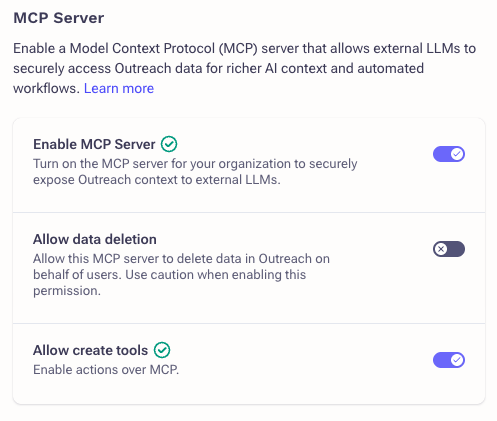
- Navigate to MCP Server and toggle it ON
- There are two optional settings which allow you to control whether you want to allow create (ON by default) and delete (OFF by default) actions over MCP.
Authentication
Outreach enforces that only authenticated, authorized, and licensed users can connect to the server. We also require that the instance, and the user, has Amplify enabled. For supported features, Outreach follows MCP's Authorization standards as published on November 11, 2025. Learn more about Outreach's MCP security principals.
To access Outreach tools, the user must sign in with their Outreach credentials and provide any additional factors required by their organization. The MCP Client will be set up using the credentials you provide, so make sure you are providing the credentials of the instance you want to use.
| Note: Before you begin, make sure you're signed in with the appropriate Outreach account, the one you want to connect to, on your default browser. Most clients launch your default browser to authenticate and pick up whichever account you are signed in with. If you don't see your correct account getting connected, sign out and sign back in your browser and try again. If you are seeing authentication issues, please check FAQ 20 below. |
MCP Client Availability
Any AI application that supports the MCP protocol, user-level auth, and Dynamic Client Registration should be able to connect to Outreach MCP Server. Here are the instructions to connect the most popular clients:
- Claude – Available for both Claude Desktop and Web apps
- ChatGPT – Available for both ChatGPT and Codex
- Salesforce Agentforce – Available through Apex invocable actions
- Microsoft Copilot – Available. You can use it with Microsoft Copilot and Microsoft 365 Apps
- Gemini – Available. Install through CLI.
- AWS Bedrock and Amazon Quick – Available. You must be signed in to view.
- Development tooling for major IDEs (like Visual Studio Code) – Available. Install through CLI or Config.
Our up-to-date listing can be found in Outreach Marketplace > MCP Connectors.
Usage and User Experience
MCP is a standalone protocol and can be utilized by any end-user GenAI application that supports the protocol. This opens a whole world of possibility for how best to utilize Outreach's knowledge inside your daily workflows.
With GenAI, the most common experiences are either a chat-based (user-initiated) interaction or Agent-to-Agent autonomous collaboration. Let's look at those closely.
Chat Experience
Outreach MCP Server can be connected directly with GenAI (LLM) chat experiences within Claude, Copilot, OpenAI ChatGPT and Codex, Agentforce Agents etc. or your LOB applications, once you have set up the MCP clients. You can run queries as you would normally do as part of your daily revenue workflows, and the chat should connect automatically to Outreach MCP Server and display insights and knowledge from Outreach.
Examples
Here are some sample queries you can run:
- Prepare for meetings: "Help me prepare for my next call with Acme"
- Create content referencing conversations: "Generate a best practice guide for each feature discussed in the last meeting with Acme"
- Analyze what's working and why: "What sequences from our customer conference have the best reactions, and what are they?"
- Plan smarter objection-handling: "Tell me Contoso's concerns around our solution and how I should combat that?"
Note: The quality of the response will be determined by the richness of data available to Outreach.
Agent-to-Agent Autonomous Collaboration
If you are running Agentic AI that is fully autonomous (for example, task completions, automatic workflow execution, etc.), these agents can also utilize insights and knowledge from Outreach MCP Server as part of their flow.
From an MCP point of view, these are fundamentally the same client-server communication as a chat-based interaction. The key difference is that, in this case, the agent runs fully autonomously.
Note: Outreach does not support Client Auth-only clients. For security reasons, Outreach enforces that an active user credential, SSO or non-SSO, must be provided over MCP, and the Profile assigned to that user account will be applied. If you plan to use an Agentic Identity, that identity must be an active, licensed user in Outreach.
Outreach MCP Tools
Pro Tip: If you want a detailed rundown on the latest tools, descriptions, or sample queries with request-response, you can always ask Claude, ChatGPT, or another LLM you've connected to Outreach MCP Server. You can even ask it to create shareable materials to send around to your teams.
Outreach exposes the following tools:
Conversational Intelligence Tools
- Search Kaia calls and meetings by keyword, transcript text, topic, account, opportunity, participant, host, date range, title, or duration; returns matching recordings with transcripts, topics, and summaries –
kaia_meeting_search - Fetch full call/meeting recording detail, including summaries and/or transcripts, for specific meetings by instance ID (up to 50 per call, always batched into a single request); complements
kaia_meeting_search, which returns match records only –kaia_meeting_fetch - Retrieve email content –
emails_search
Workflow Tools
- Lookup existing sequences –
sequence_search - Create a new sequence; settable fields are name, description, sales motion, owner, sequence type, share type, schedule, throttle max adds per day, and ruleset; owner defaults to the current user and throttle defaults to 50 per day –
sequence_create - Delete a sequence; requires explicit user confirmation –
sequence_delete - Track prospect progress through a sequence (active, bounced, replied, paused, finished); distinct from prospect lifecycle stages, and requires
filter_schema_fetchwith entity_type="sequence_state" before constructing filters –sequence_state_search - Add prospects to a sequence; creates a batch operation and returns a batch ID to poll for progress –
sequence_add_prospects - Remove prospects from a sequence in bulk; requires explicit user confirmation and returns a batch to poll –
sequence_states_destroy - Retrieve scheduled calendar events and meetings by date range, account, opportunity, prospect, attributed sequence, user, or cancellation status; timezone conversion is handled automatically –
calendar_events_fetch
Task Management Tools
- Create a new task with required fields (priority, theme, subject prospect, owner, due date); chains through
task_priority_fetchandtask_theme_searchfor ID resolution –task_create - Search tasks by state, owner, due date, type (call, email, action item, in-person, LinkedIn, SMS), origin, priority, theme, teams, and related account/opportunity/prospect; uses
filter_schema_fetchto discover valid filter attributes –task_search - Return configured task priority lookup values (typically Urgent/High/Normal/Low) –
task_priority_fetch - Return task themes, the categorization tags users assign when creating tasks –
task_theme_search
Account Tools
- Lookup account by account ID –
account_get_by_id - Search accounts by name, owner, or team –
account_search - Lookup account by external IDs like CRM IDs –
account_search_by_external_id - Ask general QnA and ask for Account insights, analyzing the account record, meeting transcripts, and related data, with optional date range scoping –
account_answer_question - Create a new account –
account_create - Delete an account; requires explicit user confirmation –
account_delete
Prospecting Tools
- Lookup prospect by ID –
prospect_get_by_id - Search prospects by name, account, opportunity, or owner –
prospect_search - Lookup prospect by external IDs like CRM IDs –
prospect_search_by_external_id - Create a new prospect –
prospect_create - Delete a prospect; requires explicit user confirmation –
prospect_delete
Deal Management Tools
- Lookup opportunity by ID; returns core deal fields plus optional MEDDPICC sales methodology field values when requested, and supports additional field IDs resolved through
filter_schema_fetch–opportunity_get_by_id - Search opportunities by name, account, owner, or date range –
opportunity_search - Lookup opportunity by external IDs like CRM IDs –
opportunity_search_by_external_id - Ask general QnA and ask for Opportunity insights –
opportunity_answer_question - Create a new opportunity –
opportunity_create - Retrieve opportunity stages (e.g. Discovery, Negotiation, Closed Won) –
opportunity_stage_fetch - Delete an opportunity; requires explicit user confirmation –
opportunity_delete
User Tools
- Lookup user by ID –
user_get_by_id - Search users by name or email –
user_search - Get the current authenticated user –
current_user - Return the authenticated user's organization, including the default opportunity-association strategy that create tools inherit –
current_org - Return the org's configured job roles (e.g. SDR, AE, CSM, Sales Manager), used for filtering users, task assignment, and role-based queries –
job_role_fetch - Search teams in Outreach –
team_search - Fetch a single team's full record –
team_get_by_id
Configuration Tools
- Return the complete filter schema for an entity type, including standard fields, custom fields with their validation types and allowed values, and the valid operators for each; supported entity types are prospect, account, opportunity, task, sequence_state, schedule, and ruleset; required before constructing filters or requesting additional output fields on search and get tools –
filter_schema_fetch - Fetch available input fields before creating a record –
input_fields_fetch - Retrieve prospect lifecycle stages configured for your org –
stage_fetch - Search schedules, the sending windows that can be attached to a sequence –
schedule_search - Search rulesets, the governance rules that can be attached to a sequence; org ruleset counts are usually small, so retrieving unfiltered is preferred –
ruleset_search
Exact configuration of the tools and sample responses can be found in our developer documentation for MCP Server. At this moment, Outreach has not exposed any resources or prompts.
| Note: We are always refreshing the list of available tools, so please keep an eye on this documentation for future enhancements. |
Data Security
Read about Outreach MCP Server and Client data and information security.
Additional Information
Frequently Asked Questions
What is MCP in simple terms?
MCP (Model Context Protocol) is a universal language that lets AI agents and tools talk to each other across different platforms. It removes silos so systems can share context and take actions seamlessly.
How is MCP different from an API?
APIs are point-to-point connections between two systems. MCP is a shared protocol that enables many AI agents and platforms to collaborate dynamically without custom integrations. Think of MCP as interoperability of AI agents at scale.
Is MCP a product or a standard?
MCP is a protocol (a standard), not a standalone product. Outreach uses MCP to make its AI agents interoperable with other tools your customers already use.
Where can I find MCP clients I can use?
MCP allows you to use any compliant client to connect to servers, and you are welcome to use any well-known MCP Clients. To try out Outreach MCP Server, the fastest way would be to use Claude or ChatGPT. For more technically minded people, or if you don't want to pay for a client yet, you can use Visual Studio Copilot.
Outreach MCP Server really shines when the knowledge and insights show up in daily revenue flows. If your organization has access to Salesforce Agentforce, Microsoft Copilot, or Google Gemini, they all support connecting to MCP Servers and provide an integrated experience. You can also use tools like Slack or Microsoft Teams if you want to use Outreach directly in your team-selling communication workflows.
Some organizations might restrict usage of public MCP Clients. Your organization admin would be the best group to reach out to. At minimum, your organization will need to enable MCP Server for your Outreach instance before you can use it.
Will MCP work with my existing tools?
Yes, as long as your tool can connect over MCP. MCP is designed for interoperability across platforms. Outreach will support major systems like Salesforce, Microsoft Copilot, and others at launch, with more partners added over time. If a customer's tools support MCP or have an MCP server/client, they can participate in this ecosystem without custom development.
How does Outreach pick the instance to get me knowledge and insights from?
Outreach uses the credentials you provide to connect to the appropriate Outreach instance, so make sure you're entering the credentials based on which instance you want to connect to.
Note: Most clients open your default browser to authenticate you, so make sure you're signed in with an appropriate Outreach account on your default browser before you sign in to a client.
Can an MCP client connect to multiple Outreach instances?
One client can only connect to one server per the MCP protocol. However, you can create an MCP host to connect to multiple Outreach MCP servers if the host is able to maintain credentials from multiple accounts. This is not something Outreach controls, and you'll need to refer to the documentation of your host AI application.
One thing to note however is concurrent connections: it is generally not advisable when working with LLMs. When you connect to 1+ Outreach instances to the same LLM session, this could be confusing to the underlying LLM since the LLM can solicit valid response for the same query from multiple Outreach instances. Talk to your LLM vendor on the best way to approach this. Outreach recommends that you connect to one instance at a time. If needed, you are welcome to create multiple browser profiles and connect to one Outreach instance for each profile.
Which version of the MCP spec does Outreach support?
For supported features, Outreach follows MCP's Authorization standards as published on November 11, 2025.
What is the pricing for MCP?
MCP Server is available to customers with Amplify. Please refer to your pricing guidance or Outreach partner for details on pricing. Once enabled by an admin, it is available to any licensed and active user. API throttle limits apply. If you're not sure whether you have this, or want to inquire about it, please reach out to your AE.
Why is the Enable MCP Server toggle greyed/grayed out in Org settings?
Make sure you have Amplify enabled for your organization. If you do not have the Amplify add-on package, please inquire about this with your AE if you're interested in adding it to your plan.
Does MCP support both manual and agentic workflows? Does it support technical or non-user identity?
Yes. MCP connectors work in both scenarios. They support manual workflows, like sellers requesting actions via Omni, and agentic workflows, where AI agents use external insights, such as ZoomInfo or Crayon, to generate outputs like personalized emails.
MCP supports authentication using non-user identities, as long as a valid authentication token is provided. Outreach does not differentiate between human and non-human identities at the protocol level. However, the identity must still be associated with a licensed user in Outreach. Client credential-based authentication is not currently supported.
Are there any limits to high usage?
Yes, API throttle limits apply. Please check in with your Outreach partner if you are hitting API calling limits and options available to you for increasing the limits.
With MCP, are existing integrations like APIs, SDES, and Snowflake Enrichment still relevant?
MCP is not designed to move large datasets or store third-party insights inside Outreach. Customers still need traditional integrations like SDES and Snowflake Enrichment when they want their reps to see enriched data directly inside Outreach, when they want enrichment to run automatically at scale, and when they want permanent fields populated for reporting or workflows. Customers can continue to use APIs to pull data into their existing workflows.
MCP connections are ideal for letting agents fetch just-in-time context from another system, generate guidance, and take action across platforms. These agent-to-agent interactions do not replace the value of persistent, visible, governed data inside Outreach.
Should I use MCP or API?
It depends. MCP is an AI-native construct built for Agent to Agent or LLM to Connector type conversation. The vendor, in this case Outreach, owns maintaining and refreshing tools, governance and security. For a user facing, AI-native scenario, where an MCP tool exists, using MCP is a no-brainer and is the future of AI-nativity. Importantly, you don't need human resource spend.
APIs continue to remain supported for now and are good for tight, continuous integrations. You'll need to create, manage and maintain these API clients, at your cost, including managing security and governance and keeping the clients up to date. APIs are not AI-native and require continuous human resourcing.
How can MCP access be controlled using roles or profiles?
MCP access follows existing role and profile permissions in Outreach. Data accessed through MCP is governed by the same permissions assigned to each user, making it straightforward to limit access for specific users or groups using standard profile configuration.
If you want exactly the same access control on Server and Client, make sure you have the same permissions applied on both Server and Client.
Can a specific user's MCP access be revoked?
Yes, but not through Outreach if you are using a 3rd party Identity Provider (IDP). Access can be revoked by an admin through the organization's Identity Provider (IDP). Once revoked, the user or system will no longer be able to authenticate or access Outreach via MCP. Please consult your IDP documentation for secure or conditional access.
How many MCP calls are used with one query?
MCP server calls depend on the LLM or agent used and how it reasons. Most LLMs have a Plan mode; we recommend that you use it to calculate your usage.
To help, here's how this works, using Claude as an example:
- User enters a query like "Help me prepare for my next call with Acme" into Claude.
- Claude reasons to understand if it has enough context to respond.
- Claude reasons that it'll need help from Outreach.
- Claude asks Outreach via MCP:
- API call 1: provide details on Acme Account.
- API call 2: provide details on Acme Opportunity.
- API call 3: provide details on champion John Doe Prospect.
- API call 4: provide a list of calls that happened between days X-Y.
- API call 5: provide details on any emails sent to the Acme Account, Opportunity, and Prospect.
- And so on...
The number of API calls made is highly dependent on how Claude reasons, which depends on Claude itself and how the customer has configured Claude or their agent.
Each API call that Claude or an agent makes is counted as one API call to the Outreach MCP endpoint. The actual number of calls is non-deterministic, and Outreach can't predict or provide firm guidance on it.
When searching Kaia meetings via MCP, is access limited to meetings the user is involved in?
Yes. Access is governed by the user's profile permissions. Users can only search and retrieve meetings they are authorized to view based on their assigned permissions.
Can I edit/update records with Outreach's MCP Tools?
No. MCP is a highly advanced but nascent technology and based on our internal testing, LLMs can have unpredictable behavior while updating existing records, leading to detrimental business impact for our customers. While we're actively looking at providing additional tools, we have made a conscious product choice to start our MCP journey with read-only, create and delete tools.
I'm seeing authentication or credentials failure when I run queries inside Claude or ChatGPT or another LLM or Agent, what can I do?
We have received sporadic reports of authentication (can't sign in) or permissions (credentials rejected) errors from our customers using Outreach connectors. This is more prominent if you are switching between multiple Outreach instances. While Outreach has no insights of these failures, since these errors are happening inside other vendors and Outreach can't see the logs, here are some steps that might potentially help.
Based on our analysis, most of these errors are happening because the apps are not managing their credentials cache properly. If this happens to you, follow these steps (Claude is used here as an example, please follow equivalent steps for the LLM or Agent you are using):Open your default browser and sign out of all Outreach instances
Open Claude and disconnect the Outreach connector or any Outreach custom connector you have enabled
Restart Claude (make sure Claude processes are entirely gone)
Reconnect the Outreach connector or Outreach custom connectors. At this point Claude will redirect you to Outreach and Outreach will prompt you to sign in. Please complete sign in and any other permission prompts that Outreach requires
If this doesn't solve your issue, please raise a support ticket with the vendor.
Was this article helpful?
That’s Great!
Thank you for your feedback
Sorry! We couldn't be helpful
Thank you for your feedback
Feedback sent
We appreciate your effort and will try to fix the article