Objective
Learn to use Smart Account Assist, a feature tailored to assist in identifying account risks and opportunities, determining next steps, and gaining insights into recent activities.
Applies To
- Outreach User
- Outreach Admin
Before You Begin
- Smart Account Assist currently utilizes the transcripts of the last 80 meetings/calls and the latest 500 emails for analysis. Please note that access to meeting data depends on appropriate licensing that enables Kaia meeting capabilities for customers.
- Smart Account Assist (similarly to Smart Deal Assist) uses artificial intelligence to review and summarize account activities. Chats remain private to each user and results can be verified using the thumbs-down feedback button to provide data when a response misses the mark.
- Only admins have the authority to enable or disable this feature.
Overview
Smart Account Assist offers an AI-generated summary of recent account activities, along with answers to critical questions such as "What are the potential risks?" or "What are the next steps?" The tool empowers sales representatives and managers to proactively pinpoint account risks and opportunities, determine the appropriate next steps, and gain insights into recent development, Like Smart Deal Assist, Smart Account Assist operates at the account level.
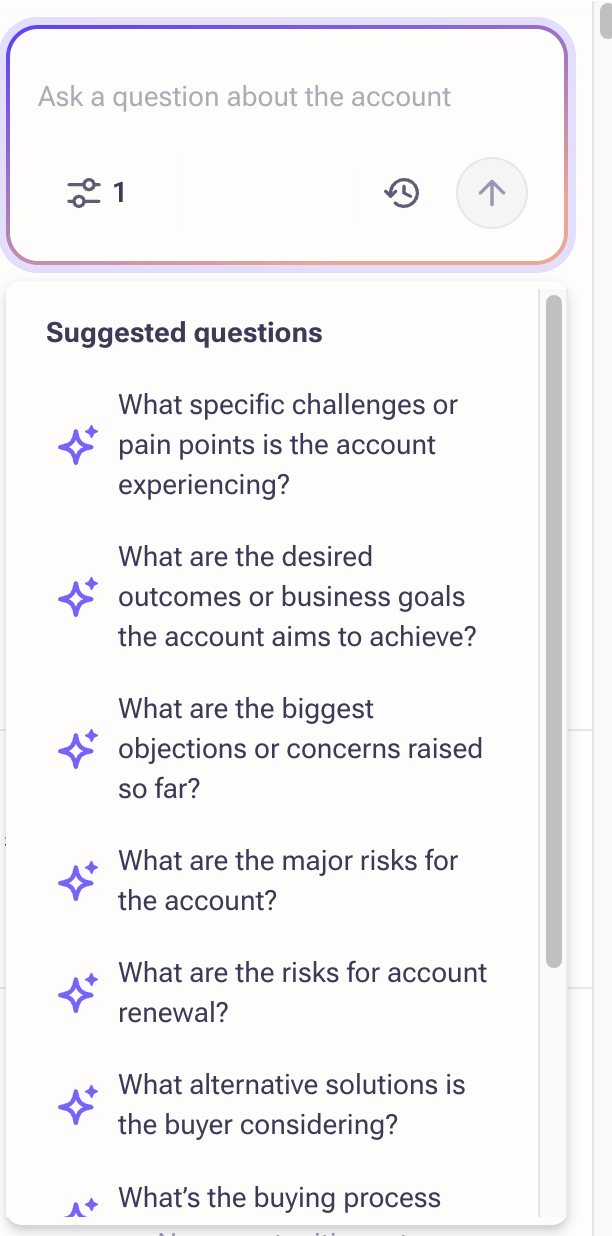
Users have options to thumbs up or thumbs down the response to indicate its helpfulness.
Procedure
Feature Enablement
Smart Account Assist needs to be enabled at both the organization level and user profile level.
Organization
- Log in to Outreach as an Admin.
- Click Administration > Organization > Org info.
- Navigate to the GenAI tab.
- Toggle on Smart Account Assist.
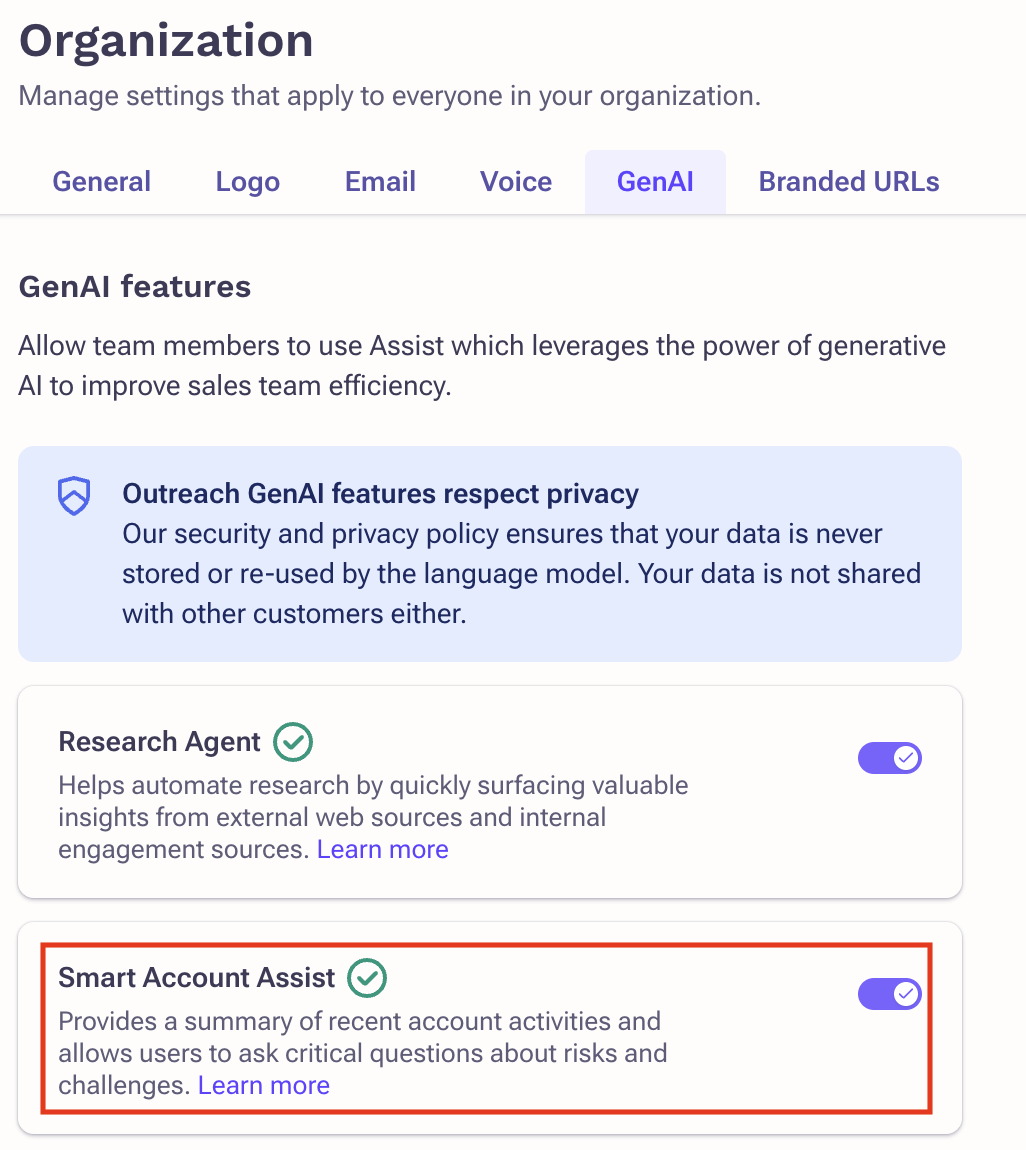
- Click Save.
User profile
- Navigate to Administration.
- Click User Management > Access control.
- Click the appropriate profile.
- Navigate to GenAI.
- Toggle on Can access Smart Account Assist.
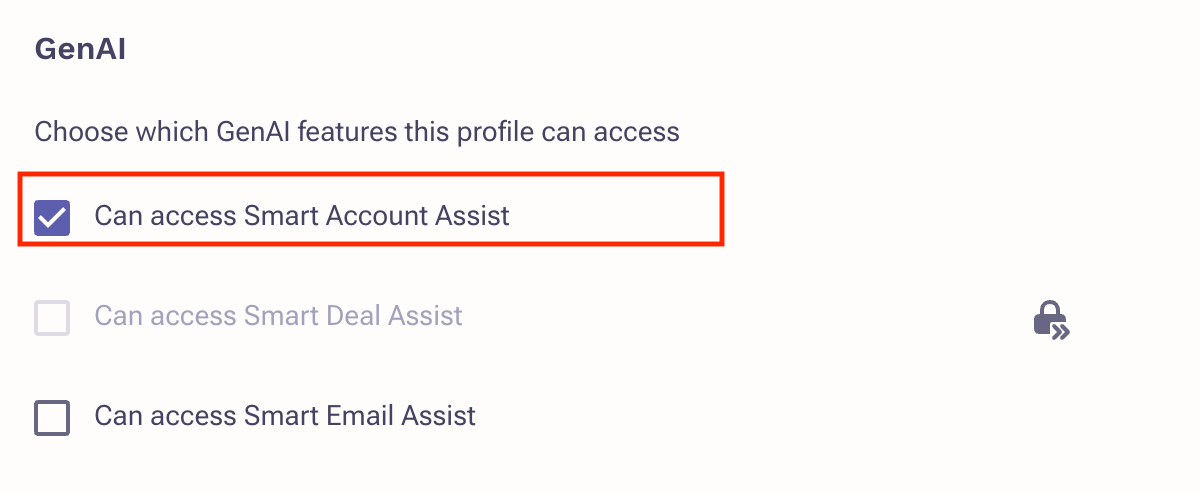
- Click Save.
User Workflow
- Log in to Outreach as a User.
- Click Accounts.
- Navigate to the appropriate Account.
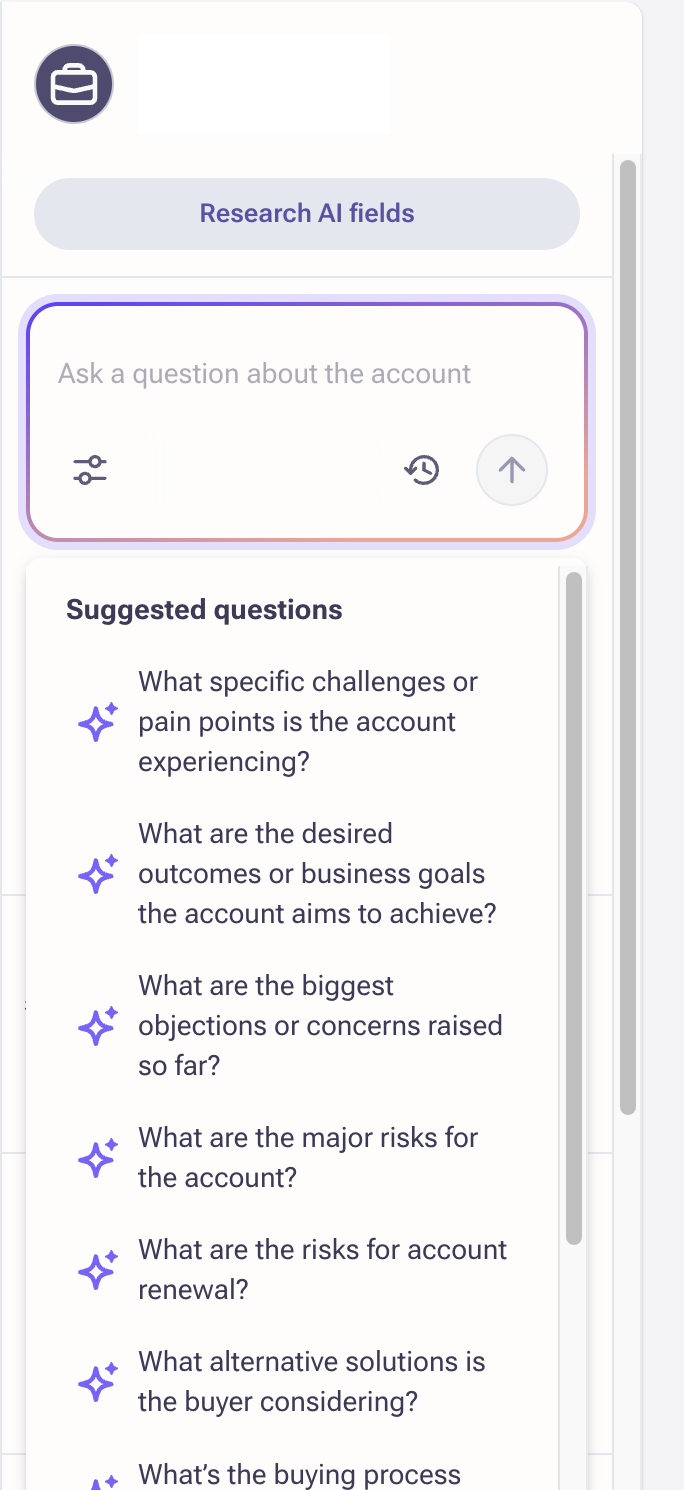
The right-side panel showcases Smart Account Assist and suggested questions. Responses posted to questions and summary generation rely on data derived from the transcript of the 80 most recent meetings/call and the analysis of the latest 500 emails.
AI-generated Summary
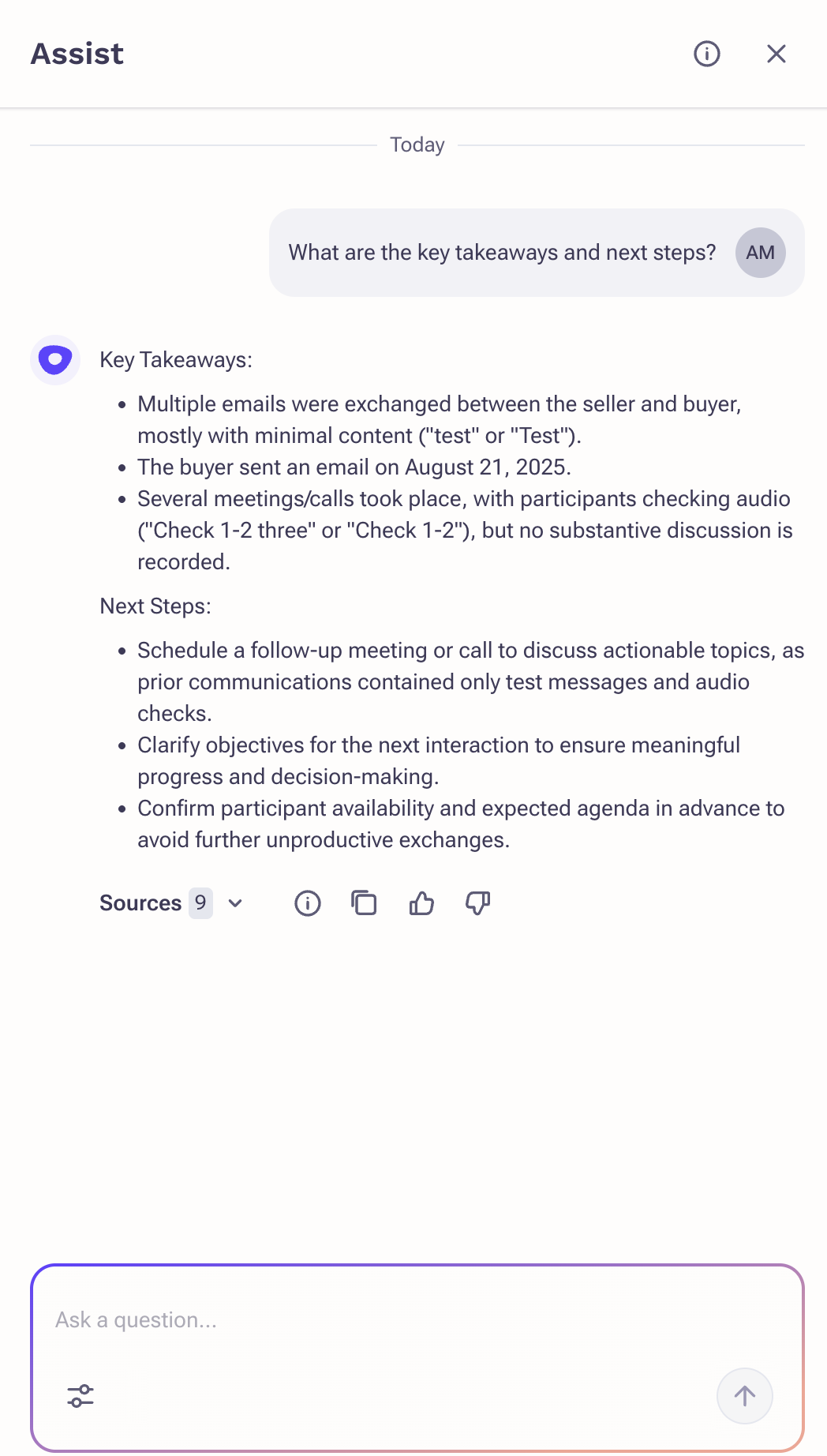
By selecting What are the key takeaways and next steps, a concise AI summary is generated that provides an overview of recent account activities.
Q&A Chat
The Q&A experience presents users with a curated list of relevant questions tailored to the account-based selling process. Additionally, users have the option to ask 'free-form' questions. This capability relies on advanced machine learning, and accuracy will continue to improve over time. Chat window assists users with Outreach defined pre-set questions which are most relevant to users engaging with account-related tasks. Users have two options for interacting with the chat window: they can either click on one of the questions displayed, or they can type directly into the input area. When a user clicks directly on a question, the question is automatically sent into the chat window. Once sent, the user has asked their question, and they can expect the answer to appear in the chat window within 3-5 seconds.
The following primary scenarios were taken into account for finalizing the preset questions:
- Identifying the account’s current state: Quickly identify risk factors or business challenges to determine the best next steps.
- Preparing for the next meeting: Review and ask questions to remind key follow-ups, action items, or questions asked from previous meetings or emails.
- 1:1 Rep/Manager Account review meeting: Spend 1:1 more efficiently by getting key insights on the account faster. Skim through the summary of recent activities and ask clarifying questions.
- Account hand-off: Newly assigned reps can ramp up on the account faster with quick summaries and the ability to ask questions.
Preset questions
- What specific challenges or pain points is the account experiencing today and have they tried to solve this problem before?
- What are the desired outcomes or business goals the account aims to achieve?
- What are the biggest objections or concerns raised so far?
- What are the major risks for the account?
- What are the risks for account renewal?
- What alternative solutions is the buyer considering?
- What’s the buying process and timeline for the account?
- What are the factors that influence the buyer’s decision process?
- What are the key takeaways and next steps agreed?
Deep links to Kaia meetings and emails
The system searches for the answer across past activities - currently the last 10 meetings and 80 emails. Multiple meetings and emails may be analyzed and referenced before generating a smart response. To provide users with further context, deep links are offered under Sources.

Clicking on a deep link to a Kaia meeting opens a new tab, directing users to the specific timestamps mentioned in the response. This allows managers to verify the answer but also provides additional context by allowing them to explore the discussion before and after the referenced point.
Deep links to email threads enable users to view the referenced emails associated with the topic of the question. This allows users to gain a deeper understanding of the context surrounding the answer.
Filtering
Period filters with extended coverage
Assist supports up to 80 calls and 500 emails. Choose from the following preset filter options or select a custom range.
- 7 days prior to last conversation
- 30 days prior to last conversation
- 90 days prior to last conversation
- 365 days prior last conversation
- Last 7 days
- Last 30 days
- Last 90 days
- Last 365 days
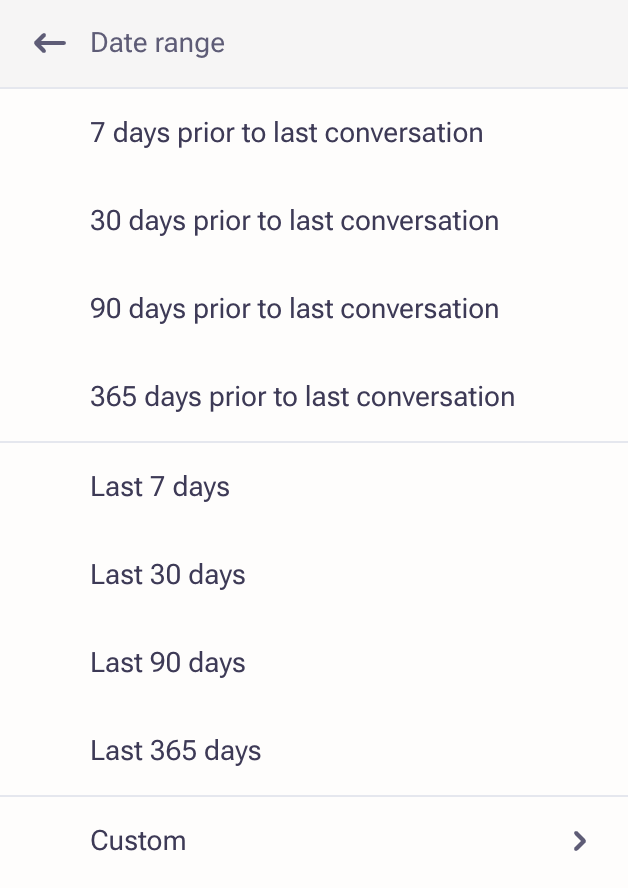
The default filter is All time (80 calls + 500 emails). Filters are sticky across all Assist screens (Home page, Account Assist, Side Panel and Slide outs of Account/Prospects). Email and call timestamps are shown in both the Assist view and the citations email popup.
Seller vs Buyer Context
Smart Account Assist can distinguish between seller and buyer in calls, meetings, and emails, which allows for the following:
- Responses pulled from what the customer (buyer) is saying, when the question is around the buyer’s perspective
- When users ask questions like “What factors influence the buyer’s decision?” or “What alternative is buyer considering?”, Assist automatically focuses on buyer-tagged content
- Even if the user doesn’t specify “buyer,” Assist will infer it from context for buyer/seller specific questions
Account Assist Availability
- Account Assist is available across multiple key surfaces: the Home page, Browser extensions, Record detail view (in the side panels of Accounts/Prospects), Slide outs on the list view of Accounts/Prospects
- Users will be able to access Assist directly from the side panels of Accounts and Prospects
Frequently Asked Questions
General FAQ
What AI technology does the Smart Account Assist feature use?
We are currently using Azure OpenAI services from Microsoft - to create embeddings based on account’s activity data that would help to generate responses to the questions using generative AI technology. With Azure OpenAI, customers get the security capabilities of Microsoft Azure while running the same models as OpenAI. Assist runs on GPT-4o.
The Assist button does not show up on my Account page?
Ensure the feature is enabled at both the organization and user profile level.
What data does Smart Account Assist use to generate the responses?
Smart Account Assist uses up to 80 last meetings/calls and 500 emails to generate the response. Customers without a Kaia meeting license will only have access to email data (up to 80 emails). No meetings — voice or video — will be used for Account assist generation.
Is Smart Account Assist available only in English?
Smart Account Assist uses Large Language Models (LLMs) which are designed and tested to understand and generate text in English. The LLM models support other languages and will be able to generate results in different languages, however, the accuracy and quality of other languages is not guaranteed in the initial scope.
How much data will Outreach backfill from the moment Smart Account Assist is enabled?
From the moment admin enabled Account Assist for the org, Outreach will backfill and generate embeddings for activity data (meetings, calls, emails) records starting from the enabled date. Then new activities will be processed daily.
How long will it take to backfill the data?
It depends from company to company and how much data they have. Therefore data backfill might take from hours to several days from the moment Admin enabled Smart Account Assist till the moment it is ready to be used.
Admins will see the ‘in progress’ or ‘finished’ state on the org settings page of GenAI features. Once data backfill is finished, eligible users will see the Assist button available to them and ready to be used.
Governance and Security FAQ
Is Smart Account Assist optional to turn on?
Smart Account Assist is optional to turn on. Only Admins will have control to turn it off/on on org level or user level (via governance profiles).
What data is shared and with whom (3rd party)?
Smart Account Assist uses Azure OpenAI by Microsoft. Microsoft has no access to Outreach and Outreach's Customer data. Customer data is also not incorporated or used to train Azure OpenAI models. Smart Account Assist calls Azure OpenAI Service for:
- Creating embeddings based on activity data
- Generate the response to the question based on embeddings
Outreach has opted out of:
- Content filtering
- Abuse monitoring
Microsoft has no access to Outreach’s data. Customer data is not shared with other customers, nor is it incorporated/used to train the Azure OpenAI models.
Where and how is the data stored?
Smart Account Assist uses the same storage mechanism (Amazon Web Services) that is used for storing Prospects, Accounts, Emails, and other customer data. The same security and privacy measures apply to Smart Account Assist data. Customer’s data is not stored in Microsoft Azure.
Can the data be deleted on customer request?
Yes. The data is stored in Amazon Web Services (AWS) and can be deleted upon request with the compliance service.
Was this article helpful?
That’s Great!
Thank you for your feedback
Sorry! We couldn't be helpful
Thank you for your feedback
Feedback sent
We appreciate your effort and will try to fix the article