Applies To
- MCP / Amplify
- Outreach Admins
Answer
The MCP server toggle is grayed out because this feature can only be enabled via the Amplify package.
To get information and access to Amplify, please reach out to your Outreach Account Owner (AE). If you don't know who your AE is, you can contact Support via the Support Portal.
Once you have the Amplify package, you can enable the MCP server toggle by following these steps:
- Log in to the Outreach platform.
- Navigate to Administration > Organization > Org info.
- Select the Gen AI tab.
- Scroll down to the MCP Server section.
- Enable the toggle to turn on the MCP Server.
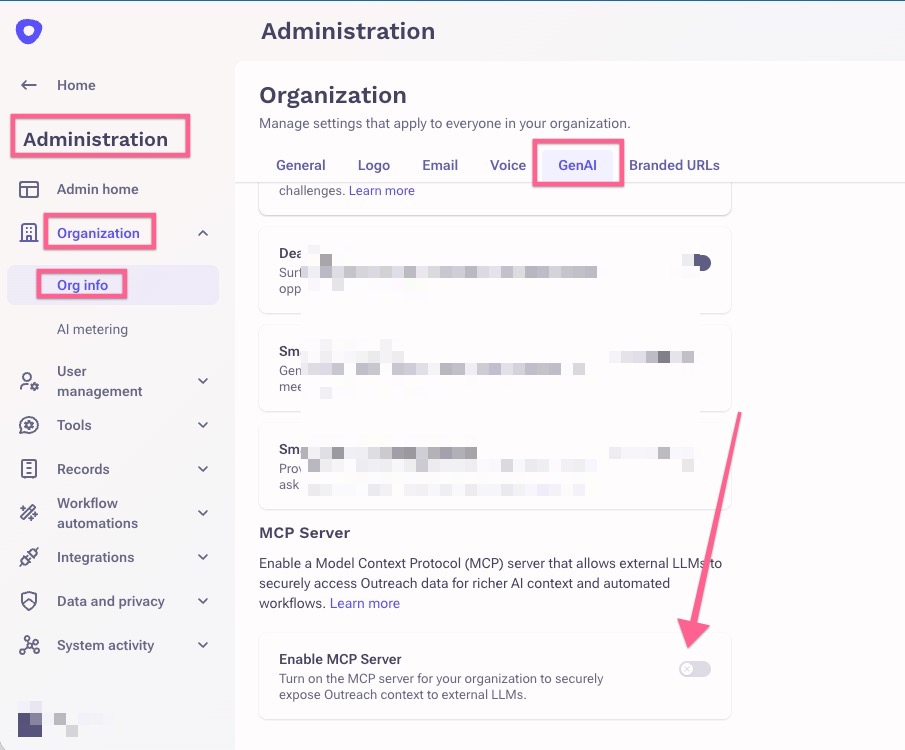
- Click Save.
Additional Information
To find out more about the MCP server, refer to the Outreach MCP Server article.
Was this article helpful?
That’s Great!
Thank you for your feedback
Sorry! We couldn't be helpful
Thank you for your feedback
Feedback sent
We appreciate your effort and will try to fix the article