Symptom
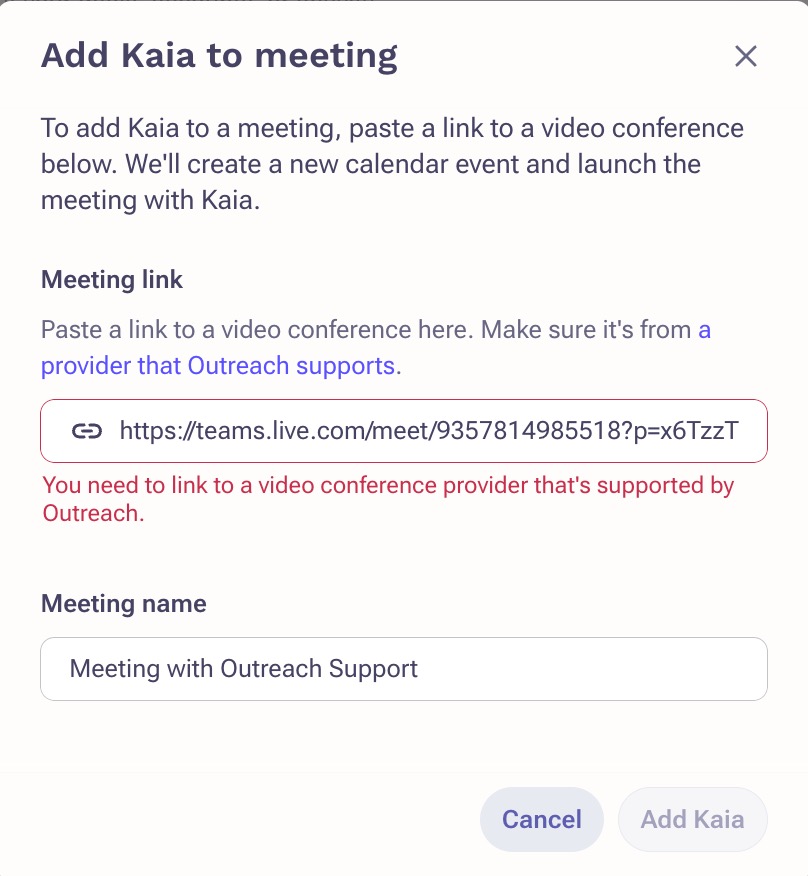
When trying to add Kaia to an ad-hoc Teams meeting, an error pops up, You need to link to a video conference provider that's supported by Outreach.
Applies To
Kaia
Microsoft Teams
Admins & Users
Before You Begin
If Kaia is also not auto-joining any meetings scheduled through Outreach, confirm with your org's Outreach admin that you have a Kaia license before continuing.
Resolution
To resolve the error, be sure you are logged into Teams using your org email address. This will give you a meeting link that begins with: https://teams.microsoft.com. A link beginning with https://teams.live.com means that you are logged into Teams with your personal account, which will not work with Kaia.
If you are logged in with your org email address, your meeting link begins with https://teams.microsoft.com, and you're still seeing the error, follow the below steps:
1. In your Teams meeting, click More (. . .)
2. Click Meeting info
3. Click the System Reference link, under the meeting info
4. This will open a new tab—copy the URL
5. Navigate to Outreach and paste the link into the Add Kaia to meeting window
Note that if you are using the Teams desktop app on a Windows machine, the System Reference link won't open. In this case, you must use the Teams website, or open the System Reference link from the meeting invite in the Teams calendar.
Cause
The Outreach <> Microsoft Teams integration requires users to be logged into their org email address (no personal Teams accounts). Additionally, users should create meetings in their Outlook calendar, rather than through teams directly.
Additional Information
Was this article helpful?
That’s Great!
Thank you for your feedback
Sorry! We couldn't be helpful
Thank you for your feedback
Feedback sent
We appreciate your effort and will try to fix the article