Purpose:
The purpose of this article is to provide direction to Outreach Users in adding Snippets to email content in Gmail.
Intended Audience:
- Outreach Users
Notes:
- Outreach Everywhere must be installed and enabled. For more information on installing Outreach Everywhere, refer to the How To Install the Outreach Everywhere Chrome Extension article.
How To Add Snippets in Gmail:
- Compose a new email or access an existing email.
- Click the Snippets icon in the email composition window.
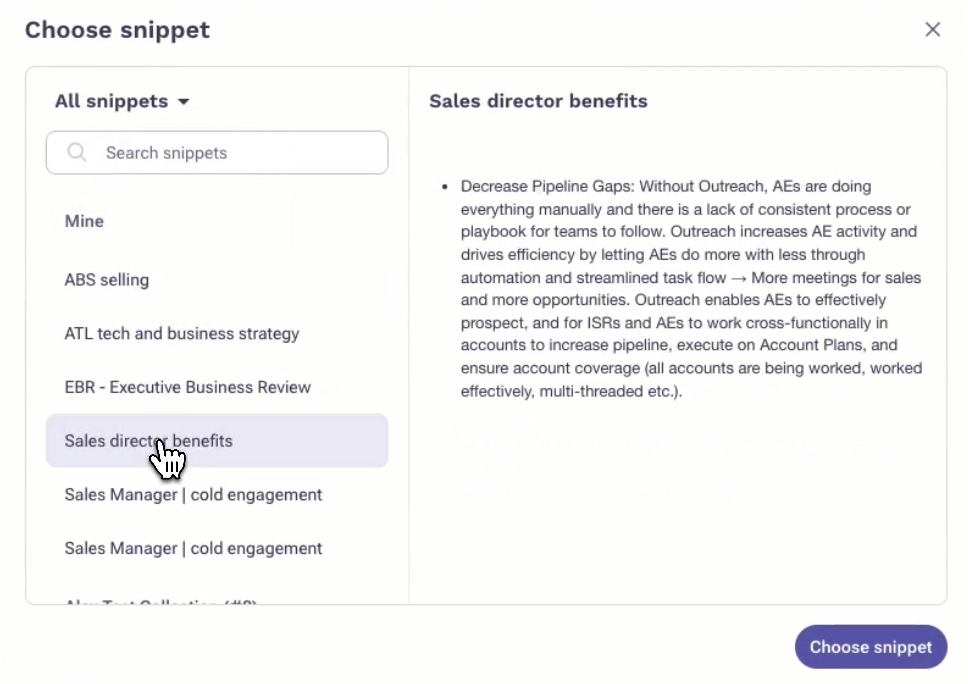
- Search and select the applicable Snippet.Note: To access Snippets that are part of a Collection, click the All Templates dropdown and select from the list of available Collections.
Additional Resources:
Outreach University - Templates and Snippets
Was this article helpful?
That’s Great!
Thank you for your feedback
Sorry! We couldn't be helpful
Thank you for your feedback
Feedback sent
We appreciate your effort and will try to fix the article