Objective
Schedule meetings with Prospects on behalf of another user within your Outreach org, assigning them as the meeting host.
Applies To
- Outreach Users
- Outreach application
- Outreach Everywhere Extension for Gmail
- Outlook Add-in
Before You Begin
- This procedure following the step of opening the meeting calendar can be completed the same way in any of the following:
- Outreach application
- Outreach Everywhere Extension for Gmail
- Outlook Add-in
- This process reflects direct bookings and does not include inserting availability through Gmail or Outlook.
- Only public/visible events are visible to individuals trying to book meetings on another user's behalf.
- The time format displayed is based on the user's system time format settings.
Procedure
- Access the Outreach platform.
- In the left nav, click Activity > Meetings. The calendar view will open.
- In the upper right of the screen, click the +Meeting button. In the resulting Schedule meeting panel, your name should appear as the Meeting host.
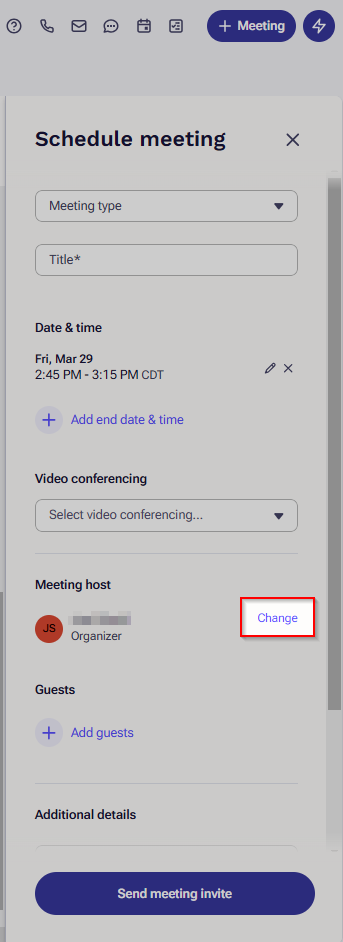
- Just to the right of your name in the Schedule meeting panel, click Change.
-
Search for and select the user on whose behalf you are scheduling the meeting.Note: The Calendar updates to display the selected organizer's schedule.
- Complete configuring the meeting details as applicable.
- Click Send meeting invite. The meeting invite is sent to the applicable parties.
Additional Information
To take other actions on behalf of users in your Outreach org:
- How To Send Email on Behalf of Another Outreach User
- How To Sequence Prospects on Behalf of Another Outreach User
For more on meetings in Outreach:
- How To Schedule a Meeting in Outreach
- How To Add Meetings in Gmail
- Insert Availability in Outlook
- How To Create a Meeting Type
Was this article helpful?
That’s Great!
Thank you for your feedback
Sorry! We couldn't be helpful
Thank you for your feedback
Feedback sent
We appreciate your effort and will try to fix the article