Objective
Learn about how you can use existing security practices to protect your business sensitive information while using Outreach MCP Server tools or connecting other MCP Servers to your Outreach instance.
Applies To
- Outreach Admins who want to set up Outreach via MCP for their organization
- Outreach Users who want to use Outreach via MCP in their daily workflow tools like Claude, ChatGPT, Microsoft Copilot, Google Gemini, and so on
Overview
Generally speaking, you can treat LLMs as another API endpoint, or client application, and secure the endpoint just as you would any other API endpoint or client application. MCP uses an HTTP endpoint, so you can use your web postures as a starting point. You can also follow general Identity and Access Management (IAM) best practices as they apply to OAuth 2.1. Some of the patterns are given below.
| Note: Every customer, their security and business policies, their IDP, and users are different, and there's no singuler deployment pattern on which Outreach can provide assertive guidance. Therefore, content of this document should not be treated as recommendations or prescriptive guidance. Please ensure you follow your own security and access best practices. |
Before You Begin
This document assumes you have general familiarity with MCP and how Outreach approaches headless patterns. If you want a refresher you can read our MCP Server and MCP Connectors documentation. All of our MCP documentation can be found in the MCP folder. If you are a developer, partner or a customer planning to please check our developer documentation.
Outreach as MCP Server
Enforcement Model
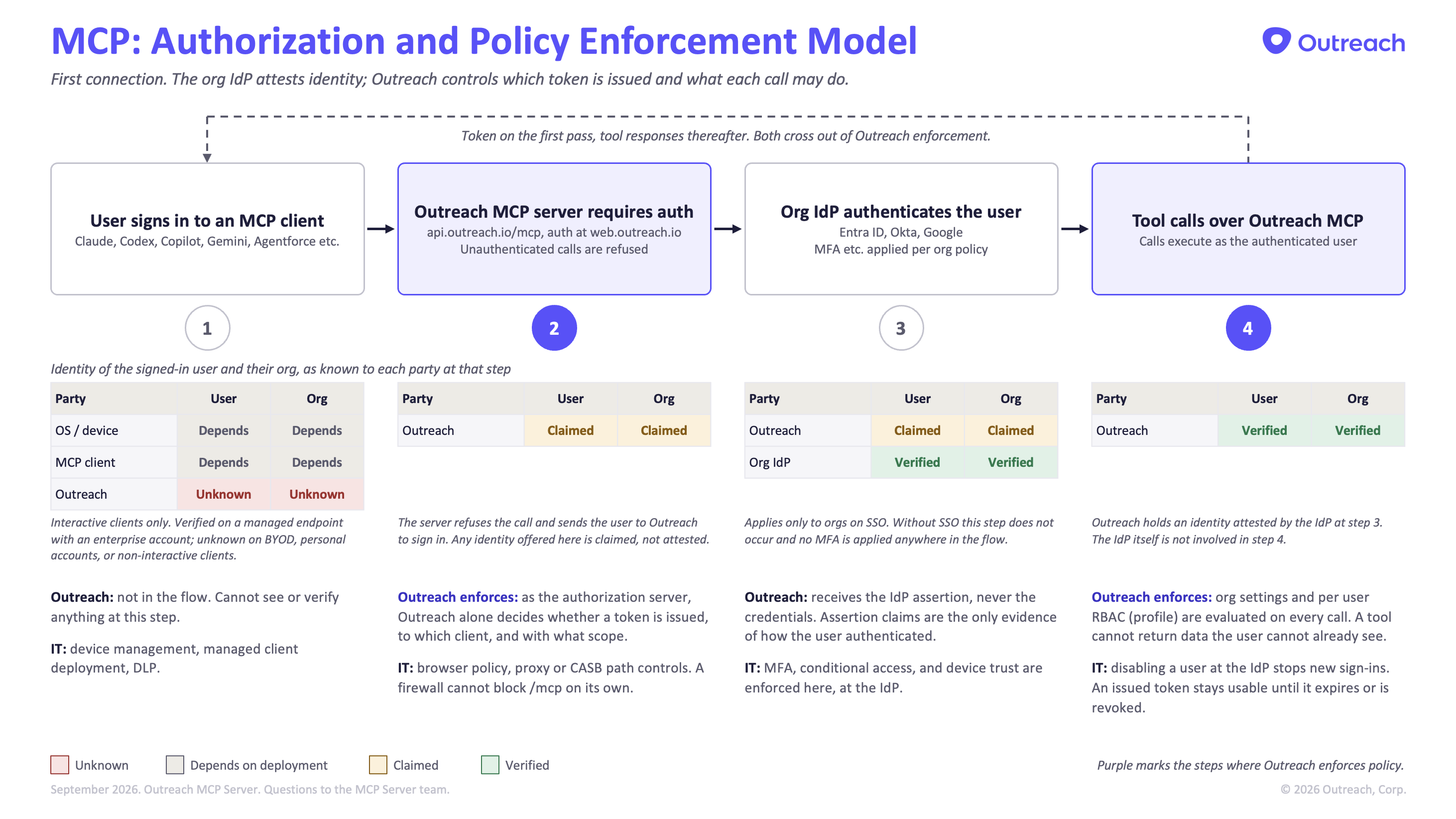
Representative
Pre-Auth Access Restrictions
If you want to enforce restrictions to access Outreach MCP Server before a user has authenticated to a client, Outreach has no control over that. Our recommendation instead is to follow your Identity Provider's (IDP's) best practices. If you want to enforce endpoint management, use MDM and MAM tools. You can also apply any vendor-specific policies.
Post-Auth Data Protections
Before sharing any data over MCP tools, Outreach enforces that the user must sign in, have an active user account, and have a valid license assigned. Outreach also enforces any Outreach (RBAC) Profile assigned to the user, so users can only access data allowed through their Profile permissions, the same as accessing Outreach through our web experience.
Session
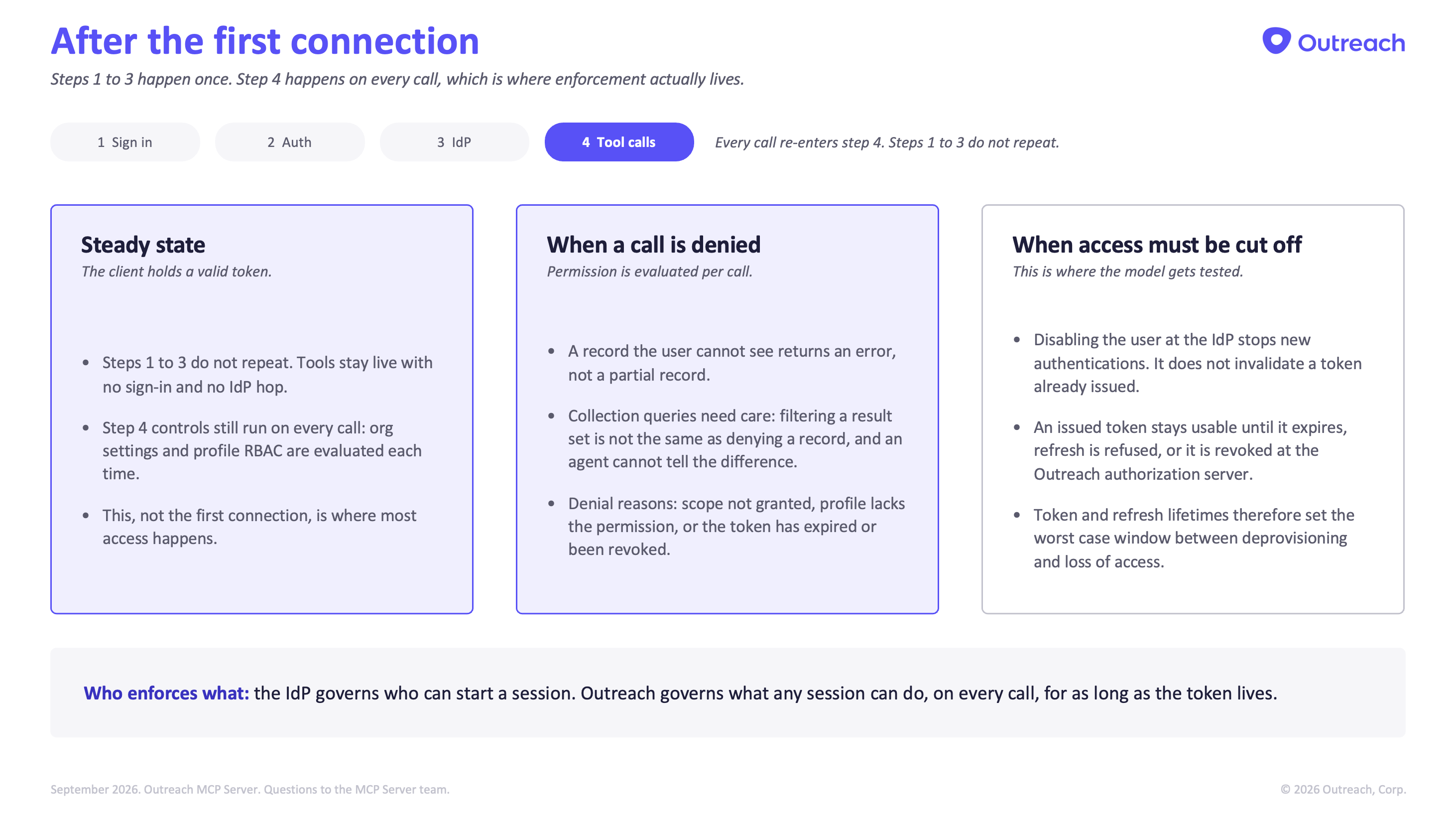
Representative
Here are some of the things you could consider:
Use your IDP tools – Most IDPs allow you to restrict access to a specific URL and control access to specific clients, users, or employee groups.
Use your MDM/MAM tools – If you want to manage the client access endpoints, enforce data or account security policies, or enforce proxy restrictions, MDM/MAM tools will help you lock it down.
Use AI vendor recommendations – Most popular AI platforms have their own security tools and guidance you could use. It might require specific licenses. Claude, for example, recommends Enterprise licenses, SSO restrictions, and tenant restrictions you could use to manage Claude.
Note: Outreach MCP Server cannot distinguish between different deployments or change posture. It's up to you to test and verify that Outreach MCP Server continues working, and that all its tools are usable, after setting up restrictions.
Outreach as MCP Client
Outreach also connects outward, calling third-party MCP servers on a user's behalf. The model mirrors the inbound one, with the control points at the other end. You can read all about Outreach as a MCP Connector here.
In a MCP Client Connector capacity, Outreach enforces a multi-part security model:
- All MCP Servers that Outreach connects to must be published to Outreach MCP Connector Marketplace. This ensure that all MCP Connector goes through Outreach's review process.
- Admins must approve which third-party servers their org may connect to. Nothing connects by default.
- Each connection is authorized by the individual user at the third party. Outreach holds a credential scoped to that user and uses it only for that user's requests.
- Outbound calls carry the acting user's identity, so Outreach RBAC still governs what can leave. An agent cannot send what the user cannot see. Since Outreach passes the user context, the MCP Servers are expected (though Outreach can't guarantee) to maintain per user security principals.
Inbound, Outreach controls what is released. Outbound, Outreach controls what is connected and what is sent. Same identity, same permissions, both directions.
LLM Vendor Security
All major LLM and Headless vendors also have their own enterprise grade security models. Outreach highly recommends you work with the LLM and Headless vendors to set up and enforce data and information security following their guidance and as required by your organizational policies. Below are some of the more popular ones
- MCP Spec Authorization Model (Protocol baseline for all AI vendors, including Outreach)
- Anthropic (Claude) Enterprise version and their engineering principles on containment
- OpenAI (Codex) Enterprise and setting up managed configuration
- Google (Gemini Enterprise) Governance
- Microsoft (Copilot and agents) Security for AI
- Salesforce (Agentforce) AI Trust Layer
- AWS (Bedrock AgentCore) Identity Model
Was this article helpful?
That’s Great!
Thank you for your feedback
Sorry! We couldn't be helpful
Thank you for your feedback
Feedback sent
We appreciate your effort and will try to fix the article